9!
!
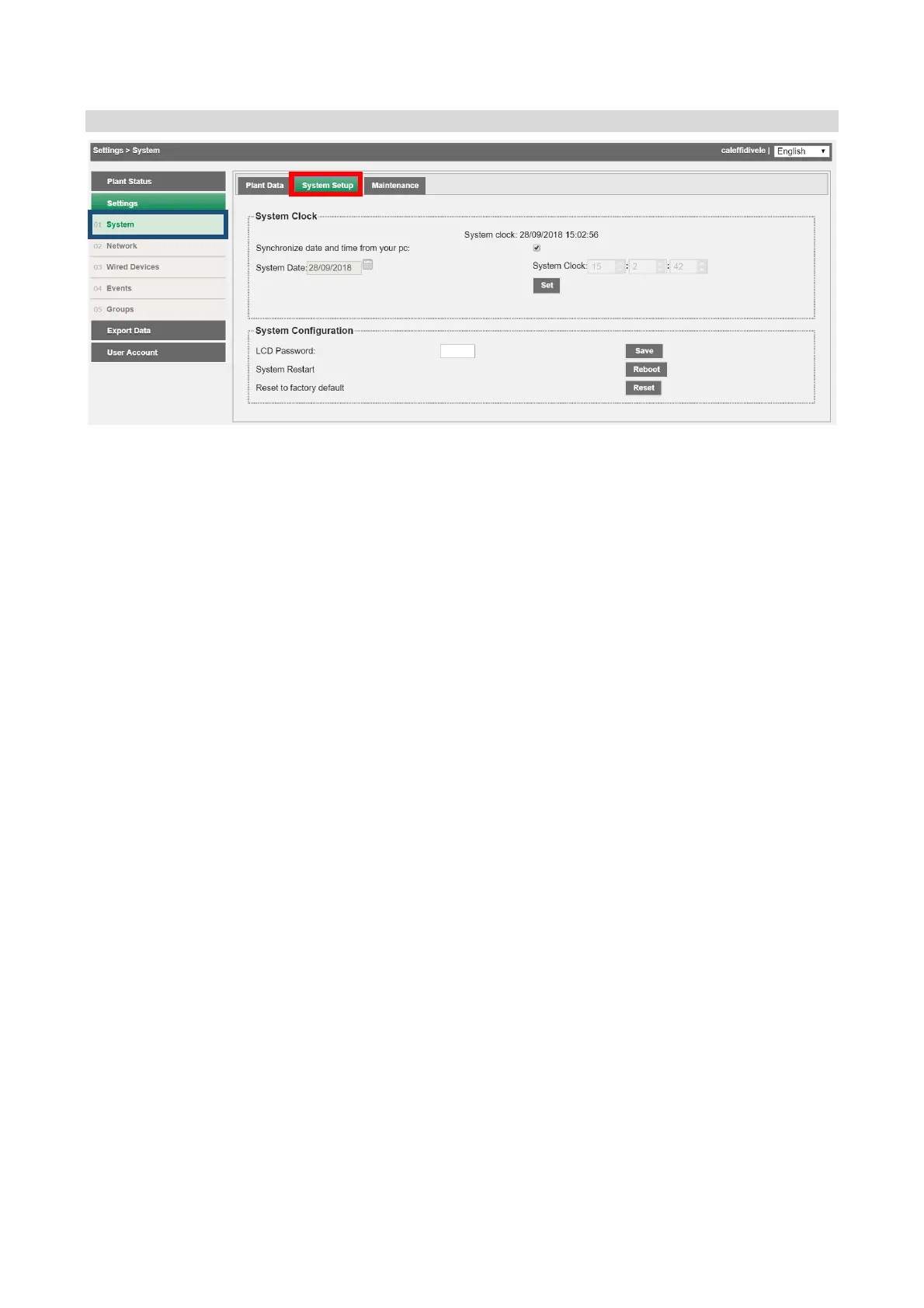
Settings!>!System!>!System!set-up!!
!
The!System!settings!page!has!two!sections:!
1. Date!and!Time:!cho o s e!betwe e n !manua l!setting!and!a u to matic!setting.!In!this!case!t he !
date!and!time!will!be!set!by!synchronisation!with!your!PC!!
!
2. System!configuration:!
• LCD!Password:!u s ed !to!change! the!password!to!access!the!commands!on!the! device!
display.!The!default!password!is!000000!
• Restart!system:!allows!the!device!to !b e !re sta rte d !
!
• Reset! to! factory! settings:! t o ! initialize! the! device! in! accordanc e ! with! the! factory!
settings!
!
Select!Reset!to!fa cto ry!settings!to!reset!D A TA !EASY!co nfigu ratio ns!in!the!System!and!
Network!sec tions.!T o!clear!all!the!data!saved!by!d evices!you!must!manually!delete!
all!the!previously!configured!devices.!
!
!
!
!
!
!
!
!
!
! !


 To Next Page