10!
!
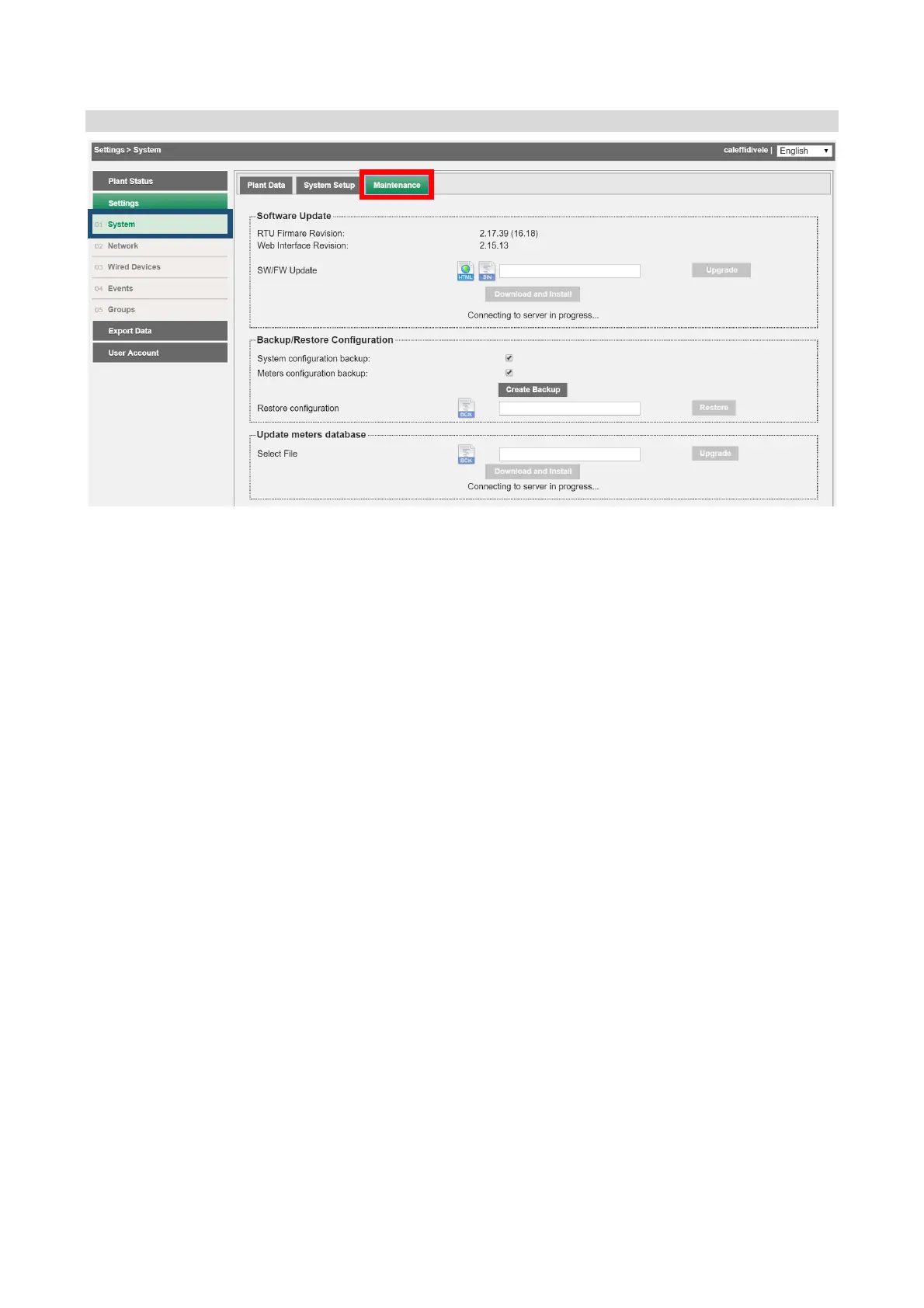
Settings!>!System!>!Service!
!
The!Service!screen!page!is!co mposed!of!
1. Software!Update!
• Firmware!Version:!shows !th e !firmware!version!in!us e! !
• Web!Interface!Version:!shows!the!web!interface!versio n !in!u s e! !
• SW/FW! upd ate:! allows! a ut o m a tic ! o n line ! o r! manual! updating ;! manual! updating! is!
only!possible!if!you!have!the!binary!file.!The!update!w ill!include!both!the!firmware!
and!the!web!interface!
The! system! transmits! information! in! relation! to! the! update! status,! specifying,! if! available,! the!
possibility!of!downloading! a!new!update!(the!system!must!be! connected!to!the!Internet!to!use!this!
service).!
AFTER!A!SYSTEM!UPDATE,!RELOAD!THE!WEB!PAGE.!
2. Backup/Restore!Configuration:!!
• System! co nfiguration! backup:! tick! if! you! w ish ! to! m ak e ! a! system! configuratio n !
backup.!!
• Meter!configuration!backup:! tic k!if!you!wish!to !make!a!backup !of!alread y !configured!
meters.!!
• Restore! configuration:! select! th is! item! if! yo u ! wish! to! r es to re ! the! configurat ion !
and/or! previously! configured! meters;! the! operation! can! be! perform ed! only! if! a!
previously!created!backup!file!is!availab le!
3. Update!meter!database:!update!the!database!of!the!meters!automatically!recognised!
by!DATA!EASY!
!
!
The!system!must!be!connected!to!the!Internet!to!use!this!service!
! !


 To Next Page