13!
!
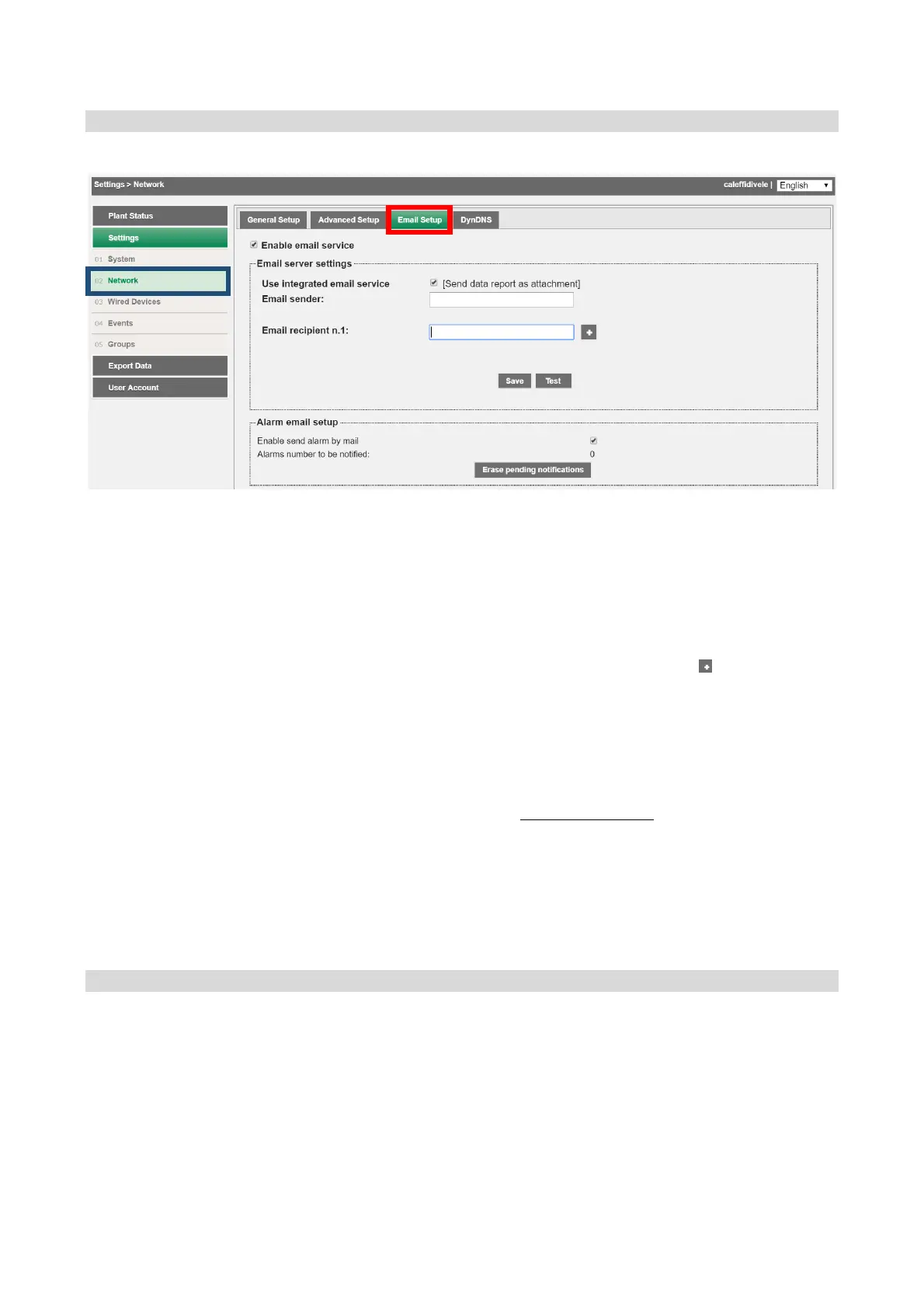
Settings!>!Network!>!Email!
Section!dedicated!to!set-up!of!the!parameters!required!to!send!emails.!
!
The!page!is!divided!into!
1. Mail!server!settings!
• SMTP!Hostnam e:!en te r!th e !a dd re s s!o f!th e !S MTP!server!you!wish!to!use!
• SMTP!port:!set!th e !SMTP!server!com munication!port.!!
• SMTP!Username :!en te r!th e !u se rn ame!for!SMTP!se rve r!a c ce ss !
• SMTP!password:!e nt er !th e!u s er na me!for!SMTP!serv e r!ac c es s !
• Email!Sender:!enter!an!e mail!address!to!define !th e !se n d er !
• Email!recipient!n.1:! e n te r! recipient! e mail!add re ss e s.! Press! ! to!add! a! re cipie nt.!
Do!not!enter!more!than!4!recipients.!!
Press!Save!to!save!the!configuration.!Pres s!Test!to!ch ec k!co rrec t!op eratio n!w ith!th e!en tere d!p arameters!
2. Mail!communication!management!
ü Enable! alarms! notification! by! email:! enables! notifica tio n ! by! email! of! the! alarms!
present!on!the!plant,!as!acquired!by!the! DATA!EASY!device.!The!system!will!also!
manage!automatic!signalling!of!
Communication% Error
!alarms! if!one!or! m ore!of!the!
field! devices! fails! to! a nsw e r ! the! interro gatio n! correctly.! Re co very ! from! the ! error!
will!be!confirmed!by!sending!an!‘alarm!ended’!email.!All!notifications!can!always!
be!consulted!in!the!section!System!Status!→!Events!Log.!
• Number! of! alarms! awaiting! notification:! shows! the! number! of! alarms! awaiting!
notification.! Press! the! pending! notifications! Delete! button! to! delete! alarms! that!
have! yet! to! be! notified! and! check! the! network! and! email! management!
configuration!settings!
Settings!>!Network!>!DynDNS!
Do!not!edit!the!parameters!entered!in!this!section!
!
!
!
!
!


 To Next Page