16!
!
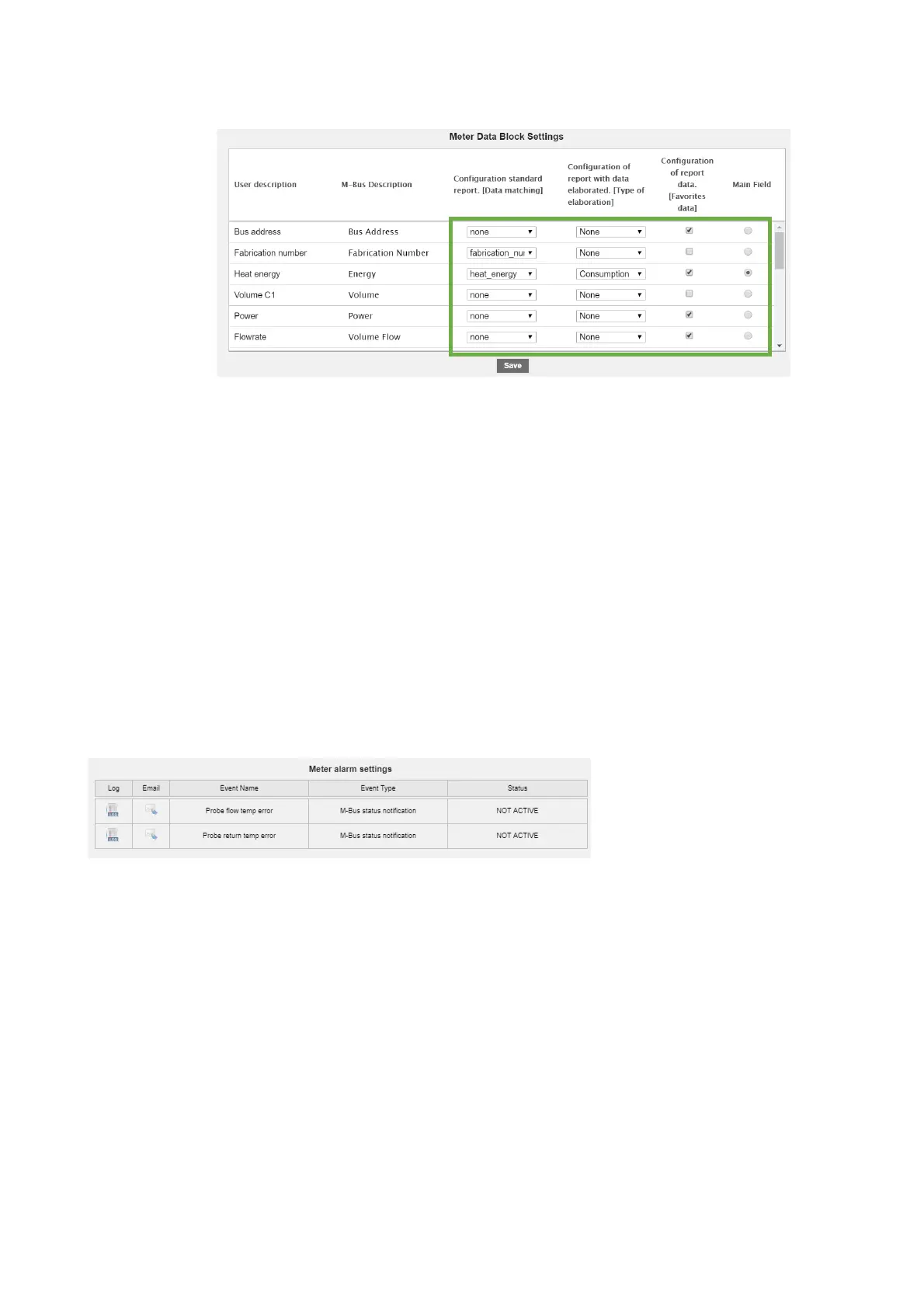
3. Meter!data!setup:!the!fields!highlighted!in!green!are!editable!
!!
• User! description:! value! originating! from! the! device! in! ac co r da n ce ! with! the! protocol!
standard,!editable!!
• M-Bus! description:! value! originating! from! the! device! in! accordance! with! the! protocol!
standard,!uneditable!
• Summary!data:!sele c t!th e !ca lcu lat ion !ty p e !fo r!th e !e nd !o f!d a y!s u m mary!data.!!
• Once!of!the!following!may!be!selected:!
o Disable:!no !da ta !d isp lay ed !!
o Consumption:!gen e ra te s!value!as!end!of!day!maximum!and!the!corresponding!
delta!
o Minimum:!genera te s!th e !va lu e!a s!t he !d a y!minimum!
o Maximum:!gener ate s !th e!v a lue !a s!th e !d ay !maximum!
o Average:!generates!the!value !a s!th e !d ay !av e ra ge!
• Display!value:!tick!the !d at a!to !b e !d isp lay e d!in !th e !Devices!section!
• Main!value:!main!value!to !be !d isp lay e d !in!th e !Devices!section!
• Save:!to!sav e !an y !ch a ng e s!
!
4. Meter!alarm!settings:!each!meter!has!a!series!of!alarms!that!can!be!set!individually.!All!the!alarms!
managed!will!be!shown!as!in!the!table!below,!and!the!management!options!can!be!customized!for!each!
alarm.!By!default,!all!check!boxes!will!be!disabled!from!each!alarm.!Once!the!alarm!has!been!selected!
!
!
!
!
!
!
!
!
!
!
!


 To Next Page