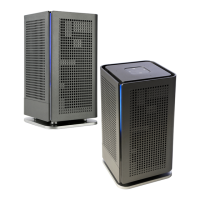
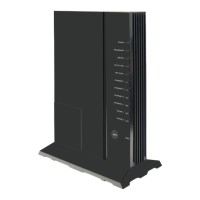
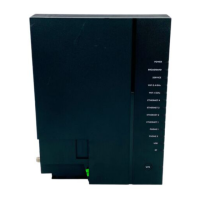
The Calix GigaSpire BLAST u4g (GS2128G) is a next-generation smart home system that integrates GPON ONT and residential gateway functionalities into a single unit, providing a comprehensive solution for broadband connectivity and an enhanced Wi-Fi experience. This intelligent, high-performance system supports GPON WAN for internet access and leverages the latest 802.11ax (Wi-Fi 6) technology to deliver superior wireless performance.
Function Description
The BLAST u4g serves as a central hub for home networking, offering switching and routing capabilities that support multi-Gigabit throughput for IPTV video and data services. It enables residential subscribers to access broadband data, Internet Protocol (IP) video, and voice (POTS) services. The device is designed to provide optimal whole-home Wi-Fi coverage through simultaneous dual-band 2.4 GHz and 5 GHz operation, coupled with dynamic beamforming. Its integration of a GPON ONT provides carrier-class WAN connectivity, while on the LAN side, it offers Wi-Fi and two Gigabit Ethernet interfaces for connecting customer multi-media devices.
The system is engineered to deliver longer range, higher efficiency, and less interference compared to earlier generations of Wi-Fi technology, making it ideal for delivering HD and UHD (ultra-HD) video and data in a mobile broadband environment. The Calix CommandIQ® app and a phone or laptop can be used by field technicians to install and apply subscriber profiles, or by service providers to configure, activate, and upgrade the BLAST u4g remotely using in-band management or TR-069.
Key Attributes and Usage Features
Home Gateway:
- Layer 2 bridge and Layer 3 routing for High Speed Internet (HSI) data and IPTV video services.
- DHCP server options.
- DHCP (IPoE) and PPPoE network connections.
- Network Address Translation (NAT), public to private IP addressing.
- Configurable IP address schemes, subnets, static-IP addresses.
- DNS server.
- Bridge port assignment and data traffic mappings.
- Port forwarding.
- Firewall and security.
- Application and website filtering.
- Selectable forwarding and blocking policies.
- DMZ hosting.
- Parental controls, time of day usage.
- Denial of service (DoS) protection.
- MAC filtering.
- Time/Zone support.
- Universal Plug-and-Play (UPnP).
Wi-Fi:
- 2.4 GHz and 5 GHz, simultaneous dual-band.
- 2.4 GHz and 5 GHz 802.11ax (Wi-Fi 6) certified, 802.11a/n/ac compatible.
- 4x4 streams (2x2 @ 2.4 GHz and 2x2 @ 5 GHz).
- 2.4 GHz 802.11ax (Wi-Fi 6) certified, 802.11b/g/ac compatible.
- WPA/WPA2/WPA3; WEP 64/128 bit encryption.
- PuF (Physical Unclonable Functions).
- WPS push-button.
- 2x2 DL/UL MU-MIMO with beamforming.
- 1024 QAM; OFDMA; BSS Coloring.
- DCM (Dual Carrier Modulation).
- TWT (Target Wake Time) for IoT clients.
GPON WAN Interface:
- Optical SC/APC connector.
Gigabit Ethernet (GE) LAN Interfaces:
- Two (2) ports of Multi-rate 10/100/1000 BASE-T Ethernet, auto-negotiating for residential IPTV and data services.
Single Voice Line:
- Carrier grade SIP, H.248 (aka Megaco).
USB Port:
- USB 2.0 - Type A host interface.
Supports multiple data service profiles.
Traffic Management and Quality of Service (QoS):
- 802.1Q VLANs.
- 802.1p service prioritization.
- Q-in-Q tagging.
- Multiple VLANs.
- DiffServ.
- Pre-defined QoS on service type.
- LAG of GE ports.
- MAP-T.
IPTV, IGMPv2 (future support of IGMPv3):
- IGMP Snooping and Proxy.
- IGMP Fast Leaves.
Gateway Management:
- Calix Support Cloud.
- TR-069.
- Local Home Gateway GUI, access provisionable.
- Remote WAN side GUI access.
- Default username/password.
Powering:
- AC to 12 VDC power adapter.
- Input voltage: 100 - 240 VAC (nominal).
- Output voltage: 10 VDC (min.), 15 VDC (max), 12 VDC (nominal).
- External Power Adapter: 12 VDC, 2.5 A.
Maintenance Features
The BLAST u4g includes several reset behaviors to facilitate troubleshooting and maintenance:
Basic Reset (Reboot):
- Function: Hardware: Press Reset button once for 1 second. Software: EWI > Utilities > Reboot.
- Expected Behavior: Router or satellite reboots. RG configuration and subscriber's custom settings persist.
- Notes: Pressing the Reset button performs a standard power cycle, all configuration information persists. Device goes off-line for 2-3 minutes while it completes the reboot process.
Configuration Reset:
- Function: Hardware: Press and hold Reset button for 15+ seconds. Software: EWI > Utilities > Restore Defaults.
- Expected Behavior: Router or satellite reboots. RG configuration and subscriber's custom settings persist. Service provider applied management settings persist.
- Notes: Subscriber (Admin) user has access to the EWI to invoke a configuration reset. Device goes off-line for 2-3 minutes while reboot process completes. Press and hold Reset button until LEDs flash (after about 10 seconds). Device goes off-line while it completes the reboot process. Residential Gateway (RG) configuration settings include all subscriber-configurable information such as login credentials for Admin user, SSIDs, LAN IP scope, etc., all of which revert to defaults.
Factory Reset:
- Function: Hardware: no option. Software: (for support user only). EWI > Support > Tools > Smart Activate > Factory Reset.
- Expected Behavior: Router reboots. RG configuration settings reset to factory defaults. Service provider applied management settings reset to factory defaults.
- Notes: Function available only to operators via EWI Support user (not available to subscriber/Admin user). Smart Activate management settings include all information visible on the EWI Support tab, such as login credentials for Support user, TR-69 ACS URL and login credentials, SPID, etc., all of which reset to defaults.
Installation and Site Preparation:
The device can be placed flat on a tabletop or wall mounted. Proper airflow around the unit is crucial, and it should not be installed in cabinetry or other building material around the outside of the unit. The unit is designed for surface mounting only. The manual provides detailed tabletop and wall mounting dimensions, including a wall mount drilling template.
Unpacking the GigaSpire u4g:
Each device is shipped with:
- (1) GigaSpire BLAST u4g
- (1) Power Adapter interface cord (wall wart)
- (1) Safety and Regulatory Statements Guide
- (2) Product Identification Labels with Login Credentials
- (1) Wall Mount Drilling Template
Important Safety Instructions:
- Do not use this product near water or in a wet basement, or near a swimming pool.
- Use only the power cord indicated in this manual.
- For external power supplies, the external power supply used in this device is to be Class II or a Limited Power Source (LPS) power supply.
- Fiber optic radiation can cause severe eye damage or blindness. Do not look into the open end of an optical fiber.
Environmental Specifications:
- Operating temperature: Indoor ambient temperature, 0° to 40°C (32° to 104°F).
- Operating and storage relative humidity: 10 to 90 % and 5 to 95% non-condensing respectively.
Physical Dimensions:
- Width: 8.3 inches (210 mm)
- Height: 3.3 inches (83 mm)
- Depth: 7.5 inches (191 mm)
- Weight: 4.4 pounds (2 kg)

 Need help?
 General

 To Next Page