
 Need help?
Do you have a question about the Cambridge Audio AXR100D and is the answer not in the manual?
Lists all items included in the AXR100D box, such as the receiver, remote, batteries, and antennas.
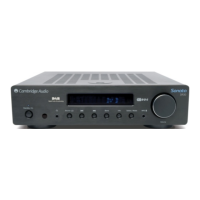
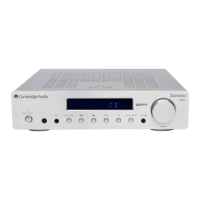
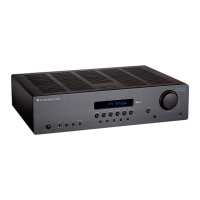
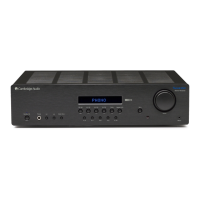
Describes the primary buttons on the front panel: Power, Headphones, Skip/Scan, and Mode/Store.
Covers input source buttons, display, speaker toggling, menu, volume, and aux input.
Details digital inputs (TOSLINK, S/P DIF) and analogue inputs (Audio, Phono).
Covers REC OUT, SUB OUT, and DAB/FM antenna connections on the rear panel.
Details the Bluetooth antenna connection and the two sets of loudspeaker terminals.
Explains heat tunnel ventilation, voltage selection, and AC power connection.
Describes power, mute, source selection, and CD player control buttons.
Explains speaker toggling, stereo/mono, mode, volume, skip/scan, and menu access.
Instructions for connecting speakers using bare wire or banana plugs.
Shows how to connect line-level sources and turntables to the unit.
Explains connecting an active subwoofer and using Speaker B terminals.
Details how to connect loudspeakers using the bi-wire configuration.
Instructions for positioning the temporary aerial and replacing it with an outdoor one.
How to choose sources and pair Bluetooth devices, with troubleshooting tips.
Guide on adjusting volume and tone settings (Bass, Treble, Balance).
Instructions for tuning DAB/FM stations and saving them as presets.
Explains DAB mode, auto scanning, and FM tuning in Auto mode.
Accessing device information and adjusting Bass, Treble, and Balance.
Configuring Auto Power Down and performing a factory reset.
Step-by-step guide for upgrading the unit's firmware via USB.
Solutions for no power, no sound, distorted sound, hum, and interference.
Troubleshooting remote control problems and over temperature protection.
Guidance for issues storing radio presets and limited DAB station scanning.
Details power output, THD, frequency response, and signal-to-noise ratios.
Specifies input impedances, power consumption, and subwoofer output.
Information on digital input formats, dimensions, and weight.
Details DAB/FM bands, aerial inputs, and tuner distortion levels.
Explains that the AXR100D uses class AB amplification.
Warns against using 4 or 6 Ohm speakers due to potential damage.
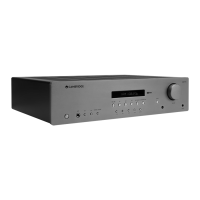
The AXR100D is a stereo receiver designed to deliver high-quality audio from various sources, including digital and analogue inputs, a built-in tuner, and Bluetooth connectivity. It serves as the central hub for your home audio system, allowing you to connect loudspeakers, a subwoofer, headphones, and other audio devices.
The AXR100D acts as an amplifier and a tuner, providing both power amplification for loudspeakers and the ability to receive radio broadcasts. It features multiple input options to accommodate a wide range of audio components. Digital inputs (TOSLINK and S/P DIF co-axial) allow for connection to modern digital sources, while several analogue 'line level' inputs are available for devices such as CD players, BD/DVD players, and other audio equipment. A dedicated Phono input with a built-in MM phono stage allows for direct connection of turntables, eliminating the need for an external phono pre-amp for most moving magnet cartridges.
For radio enthusiasts, the AXR100D includes a built-in DAB/DAB+ and FM tuner. This allows access to a wide array of digital and analogue radio stations, with the capability to store up to 40 presets for each band (DAB and FM) for quick access. Bluetooth connectivity (5.0 A2DP/AVRCP supporting SBC) is also integrated, enabling wireless streaming of audio from compatible devices like smartphones, tablets, and laptops.
The receiver offers flexible speaker output options with two sets of loudspeaker terminals (A and B), allowing for single-room or multi-room setups. The Speaker A/B button on both the front panel and remote control enables toggling between speaker A, speaker B, both A and B, or turning both off. A dedicated Sub-Out connection is provided for an active subwoofer, with a 2nd order low pass filter at 200Hz to optimize bass reproduction. A Rec Out output offers a constant high-level signal for connecting to recording devices. For private listening, a front-panel headphones socket is available, which automatically mutes the loudspeaker outputs when in use.
Operating the AXR100D is designed to be intuitive, with controls available on both the front panel and a supplied remote control. The front panel features a clear display that shows information such as the selected input source, volume level, and tuner details (radio frequency or RDS station name). A large volume control knob allows for precise adjustment of sound levels.
Input selection is straightforward, with dedicated buttons for each source (DAB/FM, D1, D2, D3, A1, A2, A3/Aux, Phono) on both the front panel and remote. The AUX INPUT SOCKET on the front panel provides a convenient 3.5mm stereo-jack connection for portable audio devices, automatically selecting this input when a device is plugged in.
The tuner offers multiple modes for station selection: Preset, Auto, and Manual. In Preset mode, users can cycle through stored stations using the skip/scan buttons. Auto mode automatically searches for the next strong signal, while Manual mode allows for fine-tuning of frequencies. Storing radio presets is a simple process, involving holding the 'Mode/Store' button, selecting a preset location, and confirming the selection.
Tone settings, including Bass, Treble, and Balance, can be adjusted via the menu system, using the volume control knob to modify levels. The unit also includes an Auto Power Down (APD) feature, which can be enabled or disabled, automatically switching the unit to standby after 20 minutes of inactivity to conserve power.
Bluetooth pairing is initiated by pressing the Bluetooth/Phono button, and the display will show "PAIRING" to indicate readiness for connection. The AXR100D can store up to 8 paired Bluetooth devices for convenience.
The AXR100D is built for reliable performance, with several features and recommendations to ensure longevity and optimal sound quality. For loudspeaker connections, the manual recommends using high-quality loudspeaker cable and suggests using banana plugs for secure connections, noting that dust caps on the speaker terminals may need to be removed for this. Proper cable management, ensuring no stray strands short the speaker outputs, is emphasized.
The unit incorporates an over-temperature protection system. If the amplifier overheats due to prolonged high-volume use or inadequate ventilation, it will shut down. Users are advised to allow the unit to cool down for 10 minutes and ensure it is placed in an open, well-ventilated area to prevent recurrence. Reducing the volume level is also recommended if the unit is being overdriven.
For radio reception, the AXR100D is supplied with a temporary aerial, but for permanent and optimal use, outdoor DAB/FM aerials are highly recommended. The F-type screw connection allows for easy replacement of the supplied aerial with an external one.
Firmware updates are supported via a USB drive inserted into the service port on the rear of the unit. The manual provides clear instructions for downloading the firmware, copying it to a USB drive, and initiating the upgrade process through the menu. It strongly advises against disconnecting power or the USB dongle during an upgrade to prevent permanent damage. A factory reset option is available through the menu, which restores the unit to its default settings and clears all stored presets, useful for troubleshooting or after a firmware update.
Troubleshooting tips are provided for common issues such as no power, no sound, distorted sound, hum, unwanted background noise, and remote control malfunction, guiding users through basic checks like power connections, input selection, speaker wiring, aerial placement, and battery status.
 General
| Frequency Response | 5Hz - 50kHz |
|---|---|
| Digital Inputs | 1 x optical, 1 x coaxial, 1 x USB |
| Outputs | 1 x pre-out, 1 x 6.35mm headphone, 1 x subwoofer |
| Bluetooth | Yes (aptX HD) |
| Dimensions | 430 x 151 x 340mm (W x H x D) |
| Weight | 10.5kg |
| DAB/DAB+ Band | Band III (174-240 MHz) |
| FM Band | 87.5-108 MHz |
| Standby Power Consumption | <0.5W |
| Input Impedance (MM) | 47k Ohms |
| DAC Resolution | 24-bit/192kHz |
| Power Output | 100W per channel (8 ohms) |
| Total Harmonic Distortion | <0.01% |
| Inputs | 1 x MM phono, 1 x 3.5mm aux |
| Tuner | DAB/DAB+ |
| Input Impedance | 47k Ohms |
| Bluetooth Version | 4.2 |
| Analogue Inputs | 3 x RCA, 1 x MM Phono, 1 x 3.5mm Aux |
| USB Input | Yes (for firmware updates) |
| Analog Inputs | 1 x 3.5mm aux |



 To Next Page