Page 20 - Manual FA01799 -EN - 04/2022 - © Came S.p.A. - The contents of this manual may be changed, at any time, and without notice. - Translation of the original instructions
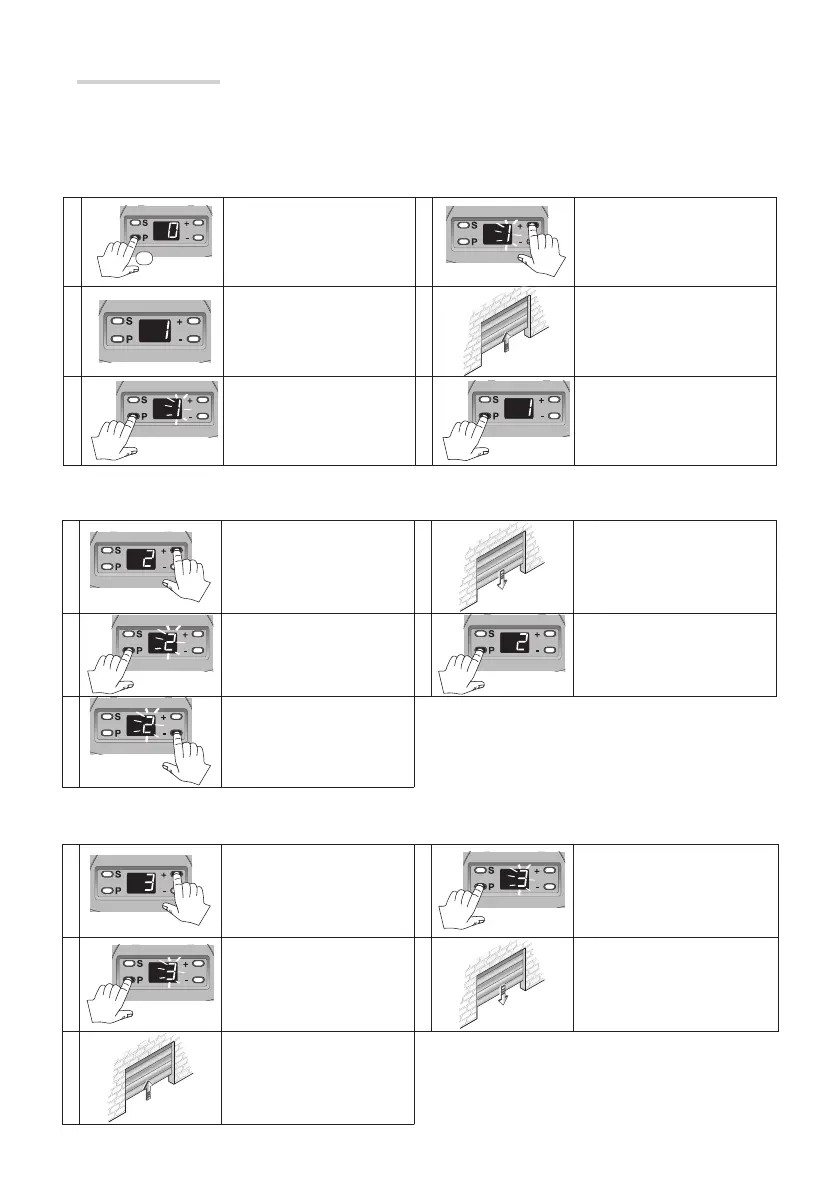
Establishing the closing limit-switch points
1 Press +, 2 appears. 4
Let the door reach the closing
position you want.
2 Press P, 2 flashes. 5 Press P to save the operation.
3 Press -.
Checking the travel self-learning
1 Press +, 3 appears. 4 Press P.
2 Press P, 3 flashes. 5
The door reaches the closing
limit switch.
3
The door reaches the
opening limit switch.
With the operator idle
1
RÒ
Press P for about five
seconds.
4 Press +.
2
The operator emits a sound
signal and 1 appears.
5
Let the door reach the desired
opening position.
3
Press P again,
1 flashes
6 Press P to save the procedure.
Obligatory functions
Establishing the opening limit-switch points
⚠ Respect the order of settings of the limit switches shown in this manual.
Page 20 - Manual FA01799 -EN - 04/2022 - © Came S.p.A. - The contents of this manual may be changed, at any time, and without notice. - Original instructions



 To Next Page
 Loading...