Albert uses on-screen messages and
sound alerts when the battery level
reaches 20%, 10% and 3%.
When the battery level reaches 3%, you
cannot continue with a transaction until
you start charging Albert, with either the
charging dock or cable.
Albert comes with a partly charged battery.
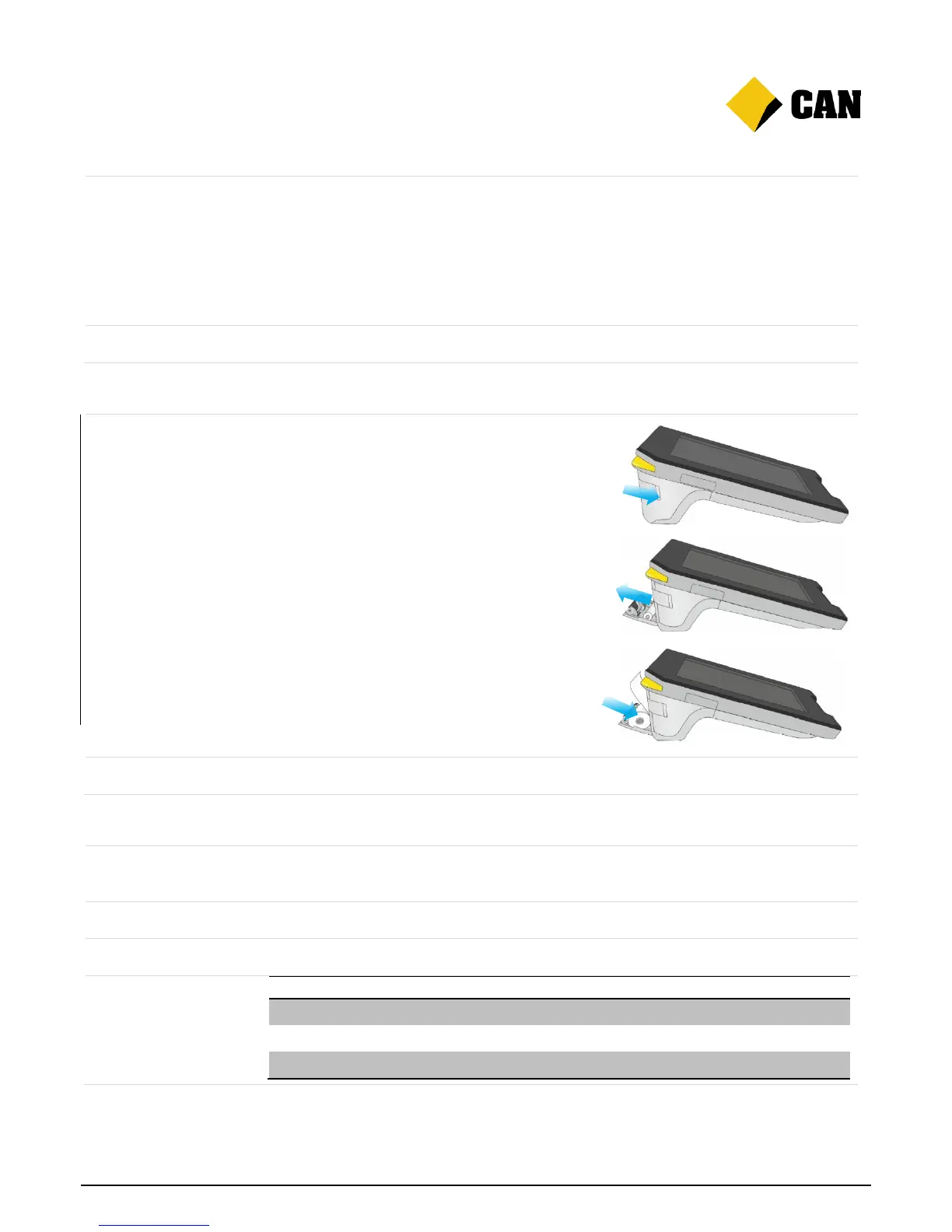
Changing the receipt roll
1. Open the printer door by sliding down the
button on the left. The door will pop down.
2. Remove the empty roll and any leftover paper.
3. Prepare the new roll by loosening the end of
the strip.
4. Drop the new roll into the compartment. Make
sure the end of the strip of paper feeds over
the roll and above the door.
5. Close the door by pressing it towards Albert.
When closed properly it will click into place.
Albert will be installed with a full roll of paper.
Recognising Albert’s alerts
The LED Merchant Feedback light changes colour and flashes to indicate warnings,
errors, processing and successes.
Albert has multiple sounds for warnings, errors and successes.
Albert uses on-screen messaging to let you know what you need to do next.


 To Next Page