EasyManua.ls Logo

CAN Albert - Albert Interface Navigation

CAN Albert
19 pages
Print Icon
To Next Page IconTo Next Page
To Previous Page IconTo Previous Page
Loading...
Albert User Guide
8
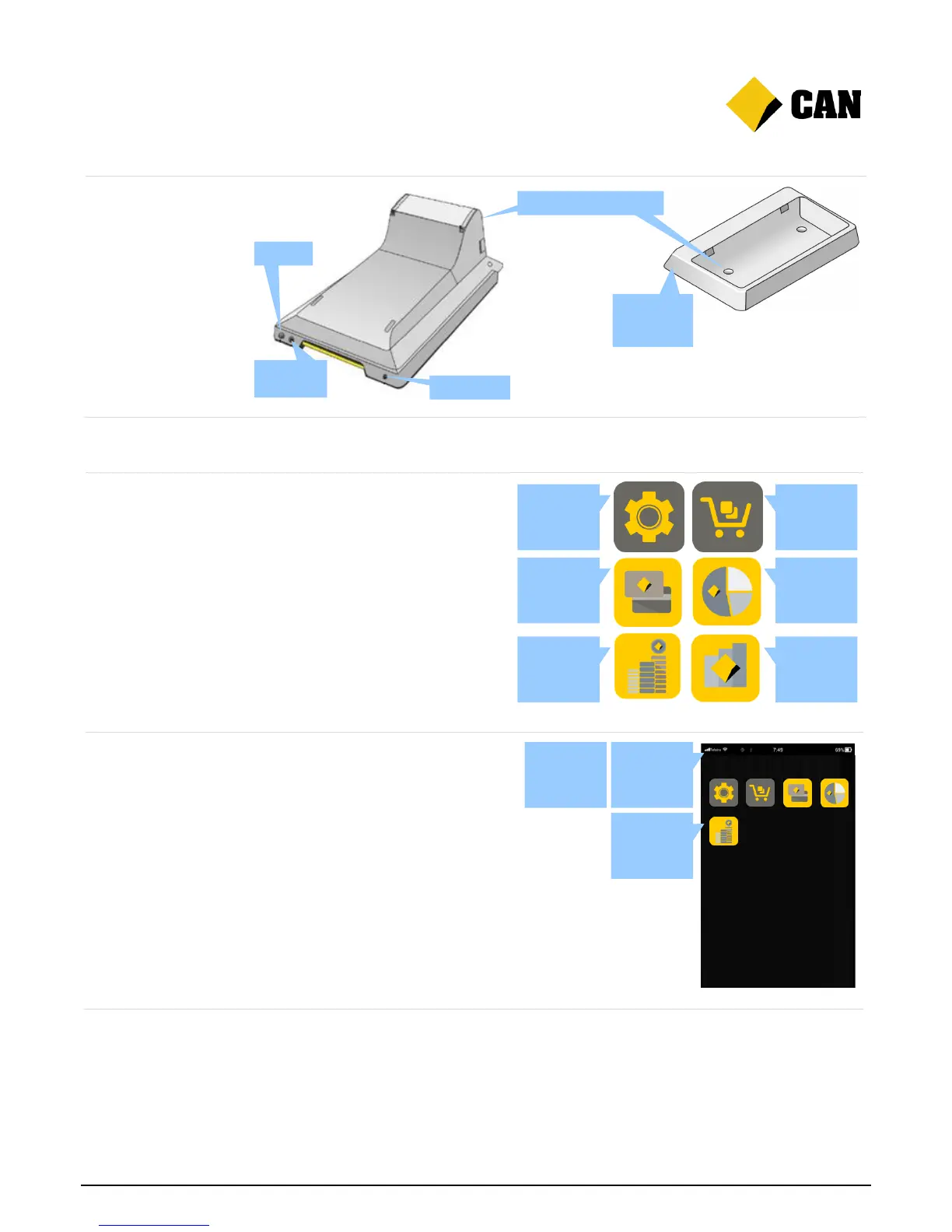
Bottom view and
charging dock
Finding your way around
Home screen
Home screen: The home
screen allows for three pages
of different app icons. Swipe
left or right to move between
pages.
App icons: Albert comes with
several pre-installed apps. To
open an app, just tap the icon.
Information bar
Connection provider: The top
left of the screen shows the
type and strength of the current
connection.
Time: The top right shows the
time, which updates
automatically.
Battery: The top right shows
how much battery is left.
Charging: The charge icon
appears when Albert is
charging.

Camera
Headphone
jack
Microphone
Charge connection points
Connection
point of cable
and dock
Settings app
Payment app
Cash
Counter app
App bank
app
Split Bill app
Daily IQ app
Home screen
Information
bar
App icons

Other manuals for CAN Albert

Related product manuals