63
Using the Full Range
of Features
E
Effects
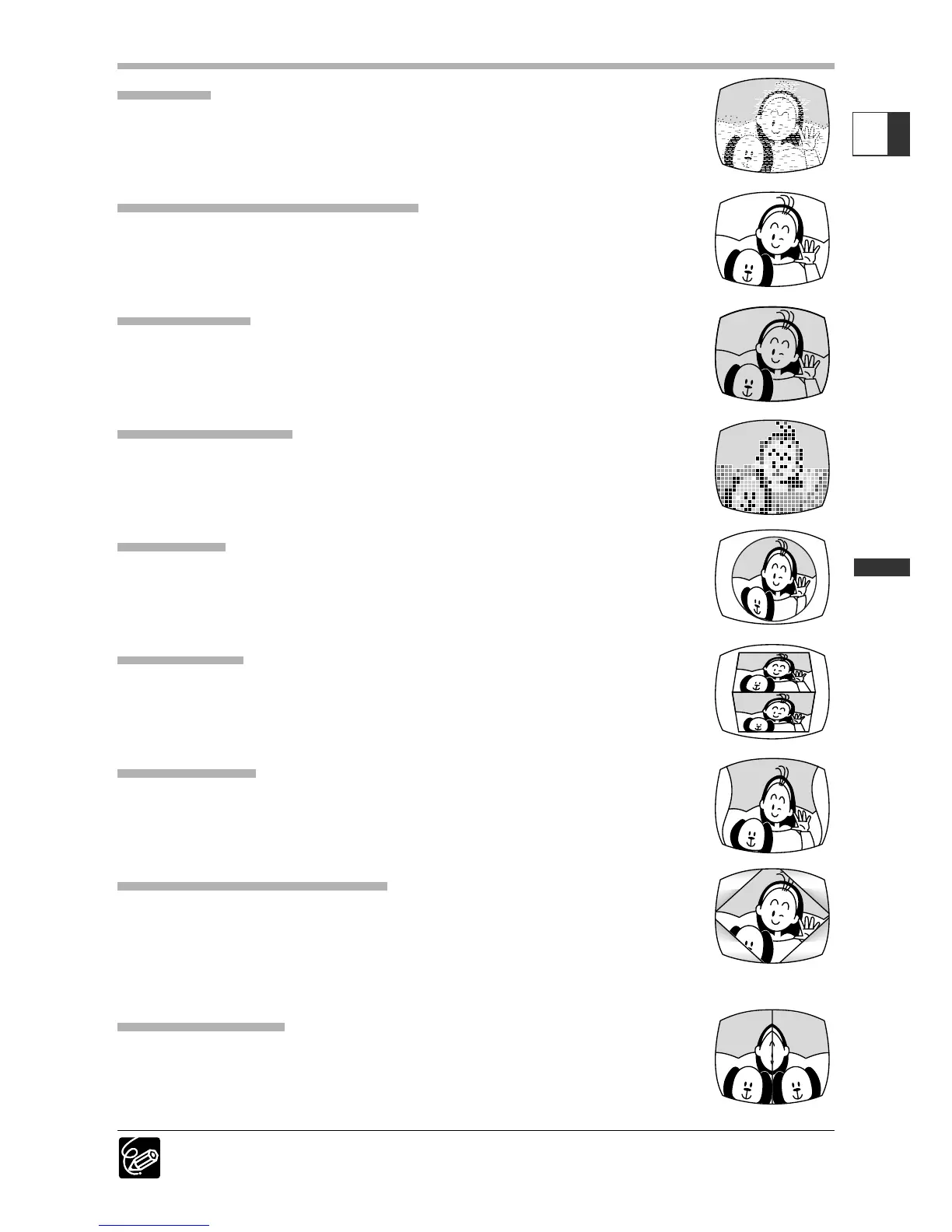
Art (ART)
The image becomes like a paint (solarization).
Black and White (BLK & WHT)
The image becomes black and white.
Sepia (SEPIA)
The image becomes monochrome with a brownish tint.
Mosaic (MOSAIC)
The image is blurred through enlarging the size of some pixels.
Ball (BALL)
The image becomes like a ball.
Cube (CUBE)
The image becomes a cube and rotates.
Wave (WAVE)
Both ends of the image sway in waves.
Color Masking (COLOR M.)
The image becomes a rhombus surrounded by a masking frame that
changes the colors.
Mirror (MIRROR)
Creates a symmetrical image as if there would be a mirror in the
center of the screen.
Only Black and White can be used in CARD CAMERA mode.


 To Next Page