EasyManua.ls Logo

Canon EOS 33 - Portrait Mode

Canon EOS 33
108 pages
Print Icon
To Next Page IconTo Next Page
To Previous Page IconTo Previous Page
Loading...
Portrait
Mode
The
rrage
was
removed
due
to
copynght
restnctions
This
mode
blurs
the
background
to
make
the
human
subject
stand
out.
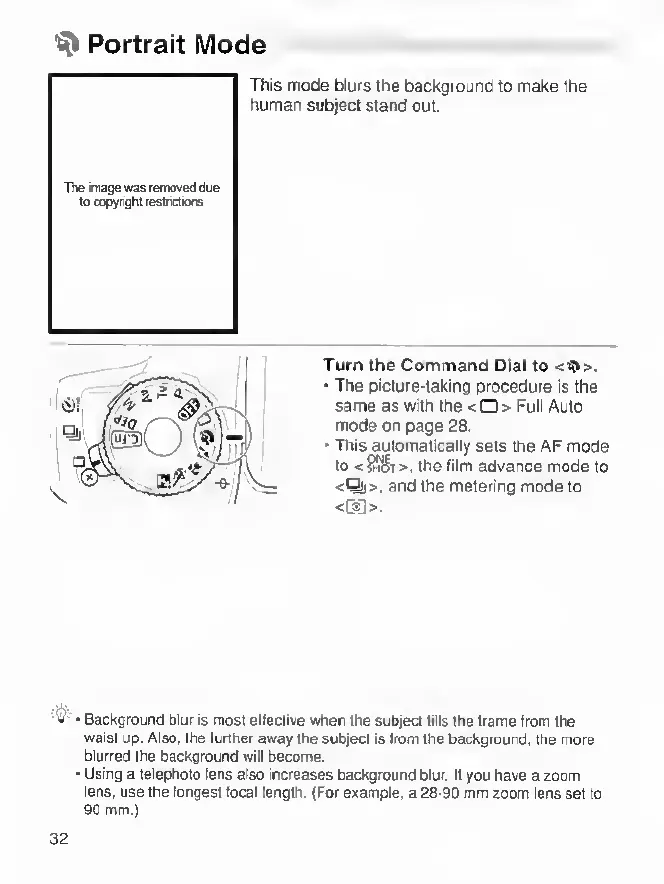
Turn
the
Command
Dial
to
<9>.
•
The
picture-taking
procedure
is
the
same
as
with
the
<0>
Full
Auto
mode
on
page
28.
•
This
automatically
sets
the
AF
mode
to
<i58T>.
the
film
advance
mode
to
<^>,
and
the
metering
mode
to
<oa>.
Background
Dlur
is
most
effective
when
the
subject
fills
the
frame
from
the
waist
up.
Also,
the
further
away
the
subject
is
from
the
background,
the
rnore
blurred
the
background
will
become.
Using
a
telephoto
tens
also
increases
background
blur.
If
you
have
a
zoom
lens,
use
the
longest
local
lerrgth.
(For
example,
a
28-90
mm
zoom
lens
set
to
90
mm.)
32