EasyManua.ls Logo

Canon EOS 33 - Landscape Mode

Canon EOS 33
108 pages
Print Icon
To Next Page IconTo Next Page
To Previous Page IconTo Previous Page
Loading...
Landscape
Mode
The
image
was
removed
due
to
copyright
restricbons
This
is
for
sweeping
scenery,
night
scenes,
etc.
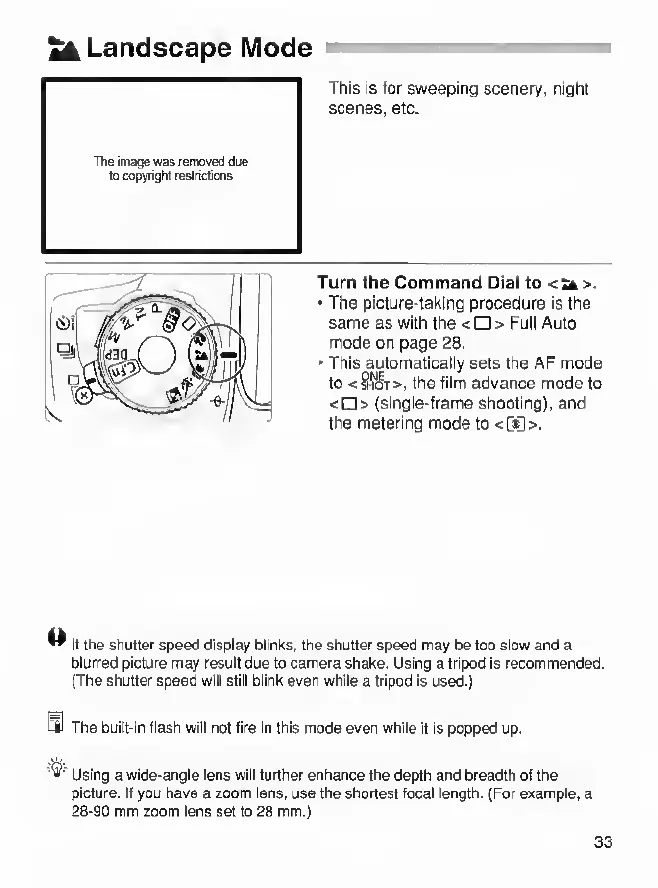
Turn
the
Command
Dial
to
<^>.
The
picture-taiting
procedure
is
the
same
as
with
the
<0>
Full
Auto
mode
on
page
28.
This
automatically
sets
the
AF
mode
to
<SSSt>,
the
film
advance
mode
to
<D>
(single-frame
shooting),
and
the
metering
mode
to
<G6>.
^
If
the
shutter
speed
display
blinks,
the
shutter
speed
may
be
too
slow
and
a
blurred
picture
rnay
result
due
to
camera
shake.
Using
a
tripod
Is
recommended.
(The
shutter
speed
will
still
blink
even
while
a
tripod
is
used.)
4J
The
built-in
fiash
will
not
fire
In
this
mode
even
while
it
is
popped
up.
Using
a
wide-angle
lens
wiil
further
enhance
the
depth
and
breadth
of
the
picture.
If
you
have
a
zoom
lens,
use
the
shortest
focal
length.
(For
example,
a
28-90
mm
zoom
lens
set
to
28
mm.)
33

Other manuals for Canon EOS 33

Related product manuals