EasyManua.ls Logo

Canon EOS 33 - Selecting a Focusing Point

Canon EOS 33
108 pages
Print Icon
To Next Page IconTo Next Page
To Previous Page IconTo Previous Page
Loading...
EB
Selecting
a
Focusing
Point
The
focusing
point
achieves
focus
over
the
part
it
covers.
You
can
select
the
focusing
point
in
one
of
two
ways:
Automatic
selection
or
manual
selection.
In
Creative
Zone
modes,
you
can
switch
between
automatic
and
manual
focusing
point
selection.
Automatic
Focusing
Point
Seiection
The
camera
selects
one
of
the
seven
focusing
points
automatically.
Manuai
Focusing
Point
Seiection
Select
one
of
the
seven
focusing
points
manually.
Focusing
Point
Selection
Method
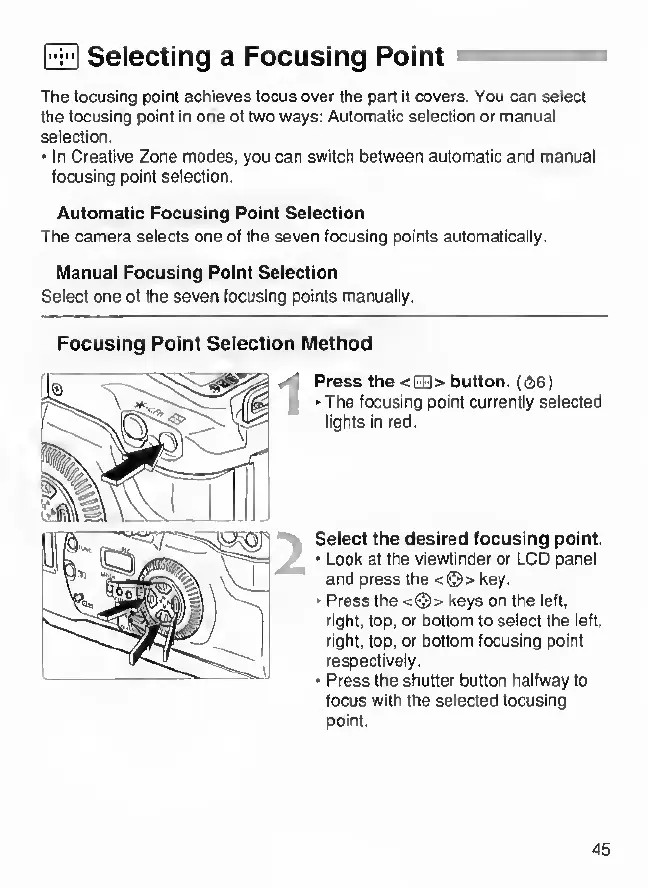
Press
the
<EB>
button.
((2i6)
The
focusing
point
currently
selected
lights
in
red.
Seiect
the
desired
focusing
point.
Look
at
the
viewfinder
or
LCD
panel
and
press
the
<©>
key.
>
Press
the
<©>
keys
on
the
left,
right,
top,
or
bottom
to
select
the
left,
right,
top,
or
bottom
focusing
point
respectively.
Press
the
shutter
button
halfway
to
focus
with
the
selected
focusing
point.
45

Other manuals for Canon EOS 33

Related product manuals