EasyManua.ls Logo

Canon EOS 33 - Page 46

Canon EOS 33
108 pages
Print Icon
To Next Page IconTo Next Page
To Previous Page IconTo Previous Page
Loading...
EB
Selecting
a
Focusing
Point
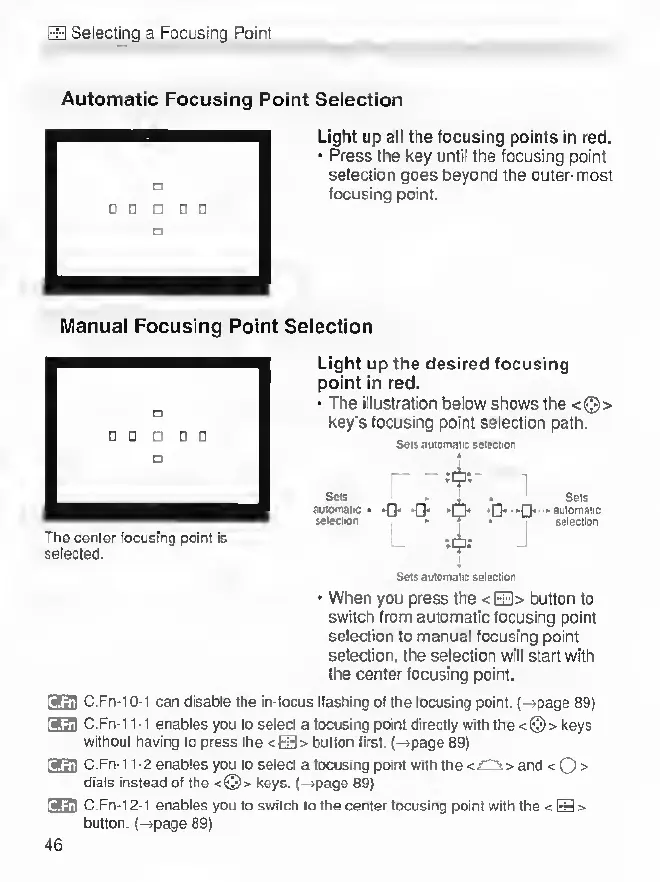
Automatic
Focusing
Point
Selection
Light
up
ail
the
focusing
points
in
red.
Press
the
key
until
the
focusing
point
selection
goes
beyond
the
outer-most
focusing
point.
Manual
Focusing
Point
Selection
The
center
focusing
point
is
selected.
Light
up
the
desired
focusing
point
in
red.
The
illustration
below
shows
the
<©>
key's
focusing
point
selection
path.
S«n
auratnaiic
Miecnon
rtji:
SMs
.
.
.
Sbis
smomaiic
«
*0>
-Th
-Q-
-n-
-Suiomaiic
s*l»clon
-
nr
,
sSeenon
Mji:
S«u
dutomaiic
Ml«ctton
When
you
press
the
<EE1>
button
to
switch
from
automatic
focusing
point
selection
to
manual
focusing
point
selection,
the
selection
will
start
with
the
center
focusing
point.
srati
c
.Fn-10-1
can
disable
the
in-focus
Hashing
of
the
focusing
point.
(~»page
89)
fann
C.Fn-11-1
enables
you
to
select
a
focusing
pant
directly
with
the
<©>
keys
without
having
to
press
the
<EE]>
button
Nrsl.
(-*page89)
fJ3!1
C.Fn-1
1-2
enables
you
to
select
a
focusing
point
with
the
<rOi>
and
<
O
>
dials
instead
of
the
<©>
keys.
(-*page
89)
[3f3fl
C
.Fn-12-1
enables
you
to
switch
to
the
center
focusing
point
with
the
<liiE>
button.
(-»page
89)
46

Other manuals for Canon EOS 33

Related product manuals