EasyManua.ls Logo

Canon EOS 33 - Auto Exposure Bracketing (AEB); Automatic Exposure Adjustments

Canon EOS 33
108 pages
Print Icon
To Next Page IconTo Next Page
To Previous Page IconTo Previous Page
Loading...
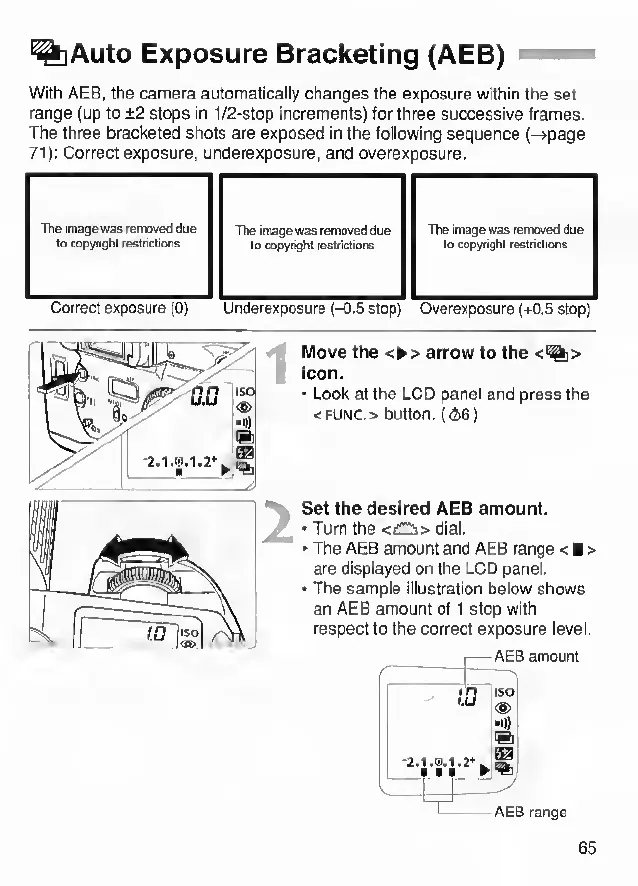
%Auto
Exposure
Bracketing
(AEB)
With
AEB,
the
camera
automatically
changes
the
exposure
within
the
set
range
(up
to
±2
stops
in
1/2-stop
inorements)
for
three
successive
frames.
The
three
bracketed
shots
are
exposed
in
the
following
sequence
(->page
71):
Correct
exposure,
underexposure,
and
overexposure.
The
image
was
removed
due
to
copyright
restrictions
The
image
was
removed
due
to
copyri^l
restrictions
The
image
was
removed
due
to
copyright
restrictors
Correct
exposure
(0)
Underexposure
(-0.5
stop)
Overexposure
(+0.5
stop)
Move
the
<^>
arrow
to
the
<%>
icon.
Look
at
the
LCD
panel
and
press
the
<FUNC.>
button.
((i6)
Set
the
desired
AEB
amount.
Turn
the
<£2i>
dial.
The
AEB
amount
and
AEB
range
<
>
are
displayed
on
the
LCD
panel.
The
sample
illustration
below
shows
an
AEB
amount
of
1
stop
with
respect
to
the
correct
exposure
level.
65

Other manuals for Canon EOS 33

Related product manuals