EasyManua.ls Logo

Canon EOS 33 - Exposure Compensation; Adjusting Exposure Levels

Canon EOS 33
108 pages
Print Icon
To Next Page IconTo Next Page
To Previous Page IconTo Previous Page
Loading...
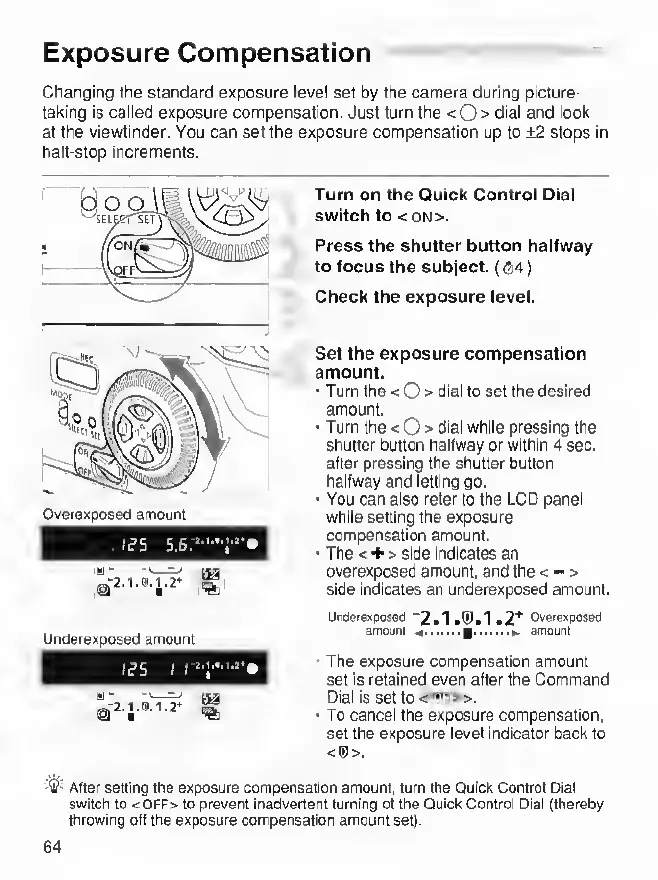
Exposure
Compensation
Changing
the
standard
exposure
level
set
by
the
camera
during
picture¬
taking
is
caiied
exposure
compensation.
Just
turn
the
<0>
dial
and
look
at
the
viewfinder.
You
can
set
the
exposure
compensation
up
to
+2
stops
in
halt-stop
increments.
Turn
on
the
Quick
Control
Dial
switch
to
<0N>.
Press
the
shutter
button
halfway
to
focus
the
subject.
((34)
Check
the
exposure
level.
Set
the
exposure
compensation
amount.
•
Turn
the
<0>
dial
to
set
the
desired
amount.
•
Turn
the
<0>
dial
while
pressing
the
shutter
button
halfway
or
within
4
sec.
after
pressing
the
shutter
button
halfway
and
letting
go.
•
You
can
also
refer
to
the
LCD
panel
while
setting
the
exposure
compensation
amount.
•
The
<
+
>
side
indicates
an
overexposed
amount,
and
the
<
-
>
side
indicates
an
underexposed
amount.
UnBeie»pose(J
"2«1
ifPil
•2'*’
Ov9re»posBd
amount
^.g.^
amount
•
The
exposure
compensation
amount
set
is
retained
even
after
the
Command
Dial
is
set
to
•
To
cancel
the
exposure
compensation,
set
the
exposure
level
indicator
back
to
<(!)>.
-11?-
After
setting
the
exposure
compensation
amount,
turn
the
Quick
Control
Dial
switch
to
<:OFF>
to
prevent
inadvertent
turning
ot
the
Quick
Control
Dial
(thereby
throwing
oil
the
exposure
compensation
amount
set).
64