EasyManua.ls Logo

Canon EOS 33 - ISO Setting the ISO Film Speed; Manually Setting Film Sensitivity

Canon EOS 33
108 pages
Print Icon
To Next Page IconTo Next Page
To Previous Page IconTo Previous Page
Loading...
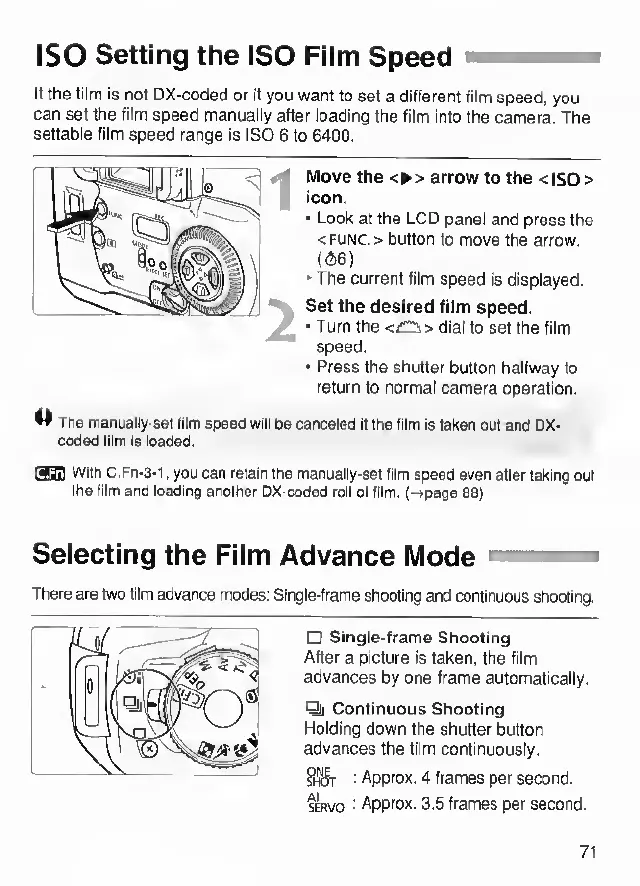
ISO
Setting
the
ISO
Film
Speed
II
the
film
is
not
DX-coded
or
if
you
want
to
set
a
different
film
speed,
you
can
set
the
film
speed
manually
after
loading
the
film
Into
the
camera.
The
settable
film
speed
range
is
ISO
6
to
6400.
Move
the
<
>
arrow
to
the
<
ISO
>
icon.
Look
at
the
LCD
panel
and
press
the
<FUNC.>
button
to
move
the
arrow.
(
66
)
'
The
current
film
speed
is
displayed.
Set
the
desired
film
speed.
Turn
the
<£::i>
dial
to
set
the
film
speed.
Press
the
shutter
button
halfway
to
return
to
normal
camera
operation.
M
The
manually-set
film
speed
will
be
canceled
if
the
film
is
taken
out
and
DX-
coded
film
Is
loaded.
wm
With
C,Fn-3-l,
you
can
retain
the
manually-set
film
speed
even
after
taking
out
the
film
and
loading
another
DX-coded
roll
of
film,
[-rpage
88)
Selecting
the
Film
Advance
Mode
hmh
There
are
two
film
advance
modes;
Single-frame
shooting
and
continuous
shooting.
Single-frame
Shooting
After
a
picture
is
taken,
the
film
advances
by
one
frame
automatically.
Qi
Continuous
Shooting
Holding
down
the
shutter
button
advances
the
film
continuously.
B+lf'
i
Approx.
4
frames
per
second.
SERVO
-
Approx.
3.5
frames
per
second.
71

Other manuals for Canon EOS 33

Related product manuals