3 Setting the FlashN
202
For details on the external Speedlite’s Custom Functions, refer to the
Speedlite’s instruction manual.
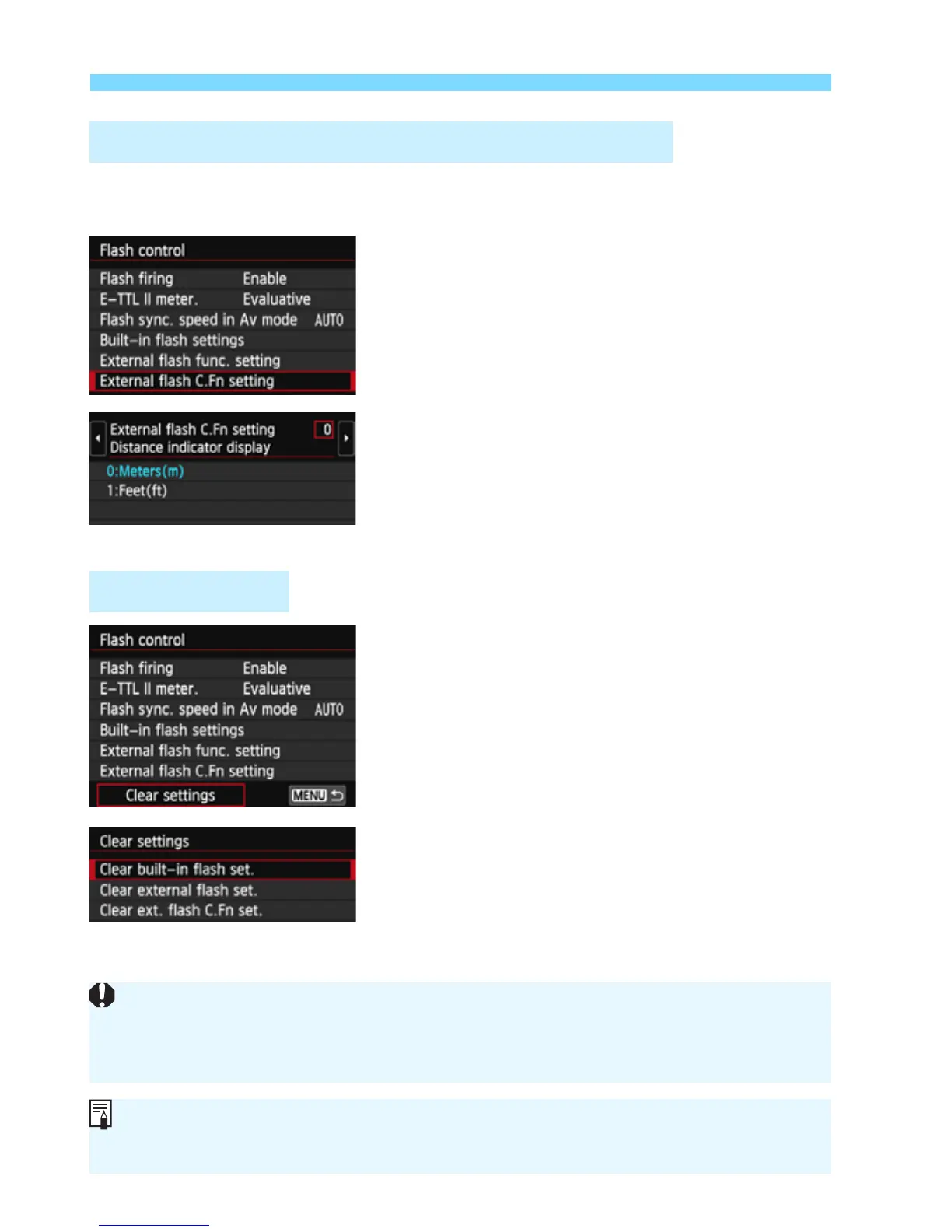
1
Select [External flash C.Fn
setting].
Select [External flash C.Fn setting],
then press <0>.
2
Set the desired function.
Press the <U> key to select the
number, then press <0>.
Select the setting, then press <0>.
1
Select [Clear settings].
Select [Clear settings], then press
<0>.
2
Select the settings to be cleared.
Select [Clear built-in flash set.],
[Clear external flash set.], or [Clear
ext. flash C.Fn set.], then press
<0>.
When you select [OK], the respective
flash settings or all the Custom
Function settings will be cleared.
External Speedlite Custom Function Settings
Clear Settings
With an EX-series Speedlite, if the [Flash metering mode] Custom
Function is set to [TTL] (autoflash), the Speedlite will always fire at full
output.
The Speedlite’s Personal Functions (P.Fn) cannot be set or canceled with
the camera’s [Flash control] screen. Set it with the Speedlite.



 To Next Page