15
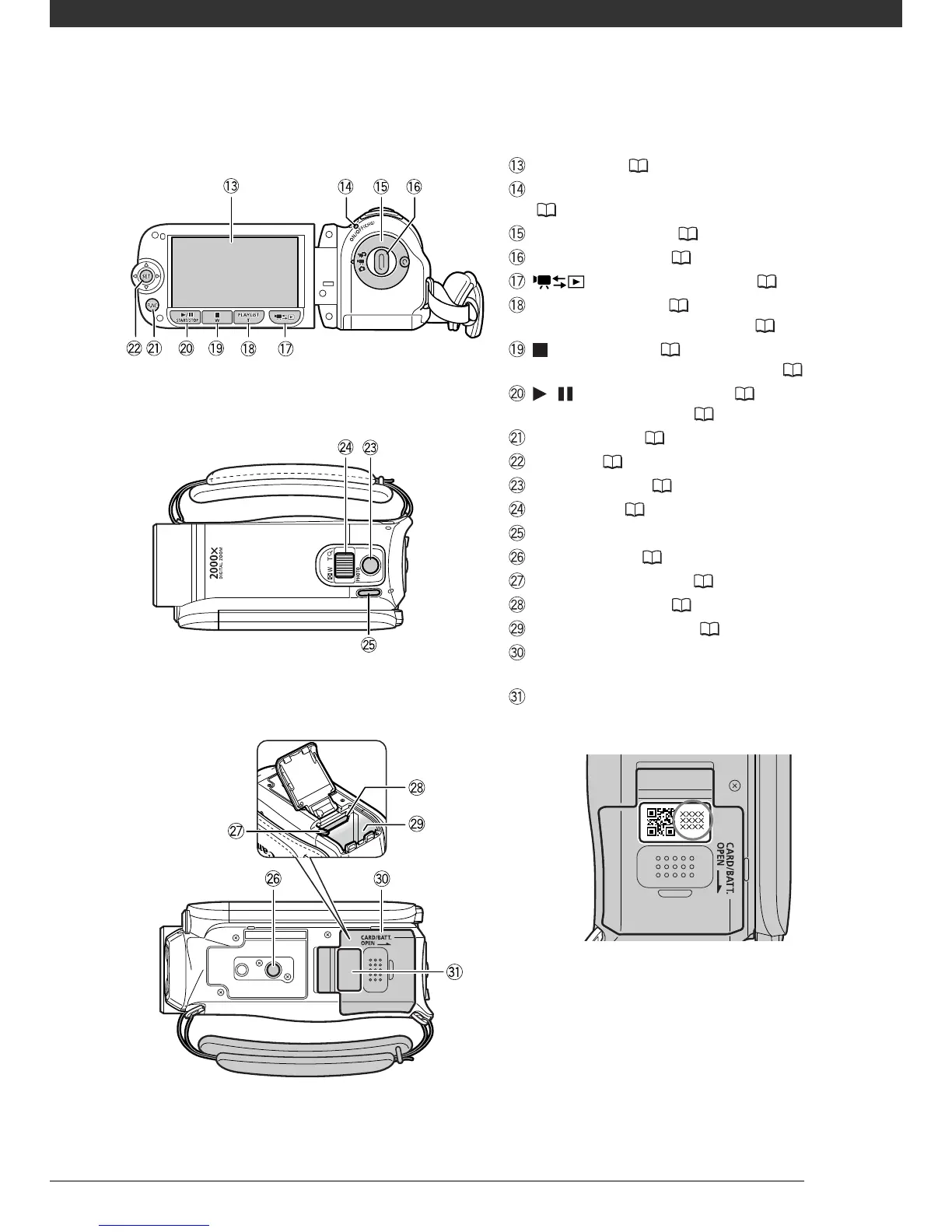
Back view
Bottom view
Top view
LCD screen ( 22)
ON/OFF(CHG) (power/charge) indicator
( 20)
Camera mode dial ( 24)
Start/Stop button ( 32)
(camera/play) button ( 25)
PLAYLIST button ( 53)/
Zoom in T (telephoto) button ( 33)
(stop) button ( 36)/
Zoom out W (wide-angle) button ( 33)
/ (play/pause) button ( 36)/
START/STOP button ( 32)
FUNC. button ( 26, 79)
Joystick ( 25)
PHOTO button ( 57)
Zoom lever ( 33)
POWER button
Tripod socket ( 99)
Battery release latch ( 20)
Memory card slot ( 30)
Battery compartment ( 19)
Battery compartment cover/
Memory card slot cover
Serial number
The serial number label is located on the top
surface of the battery compartment cover.



 To Next Page