Preparations
30
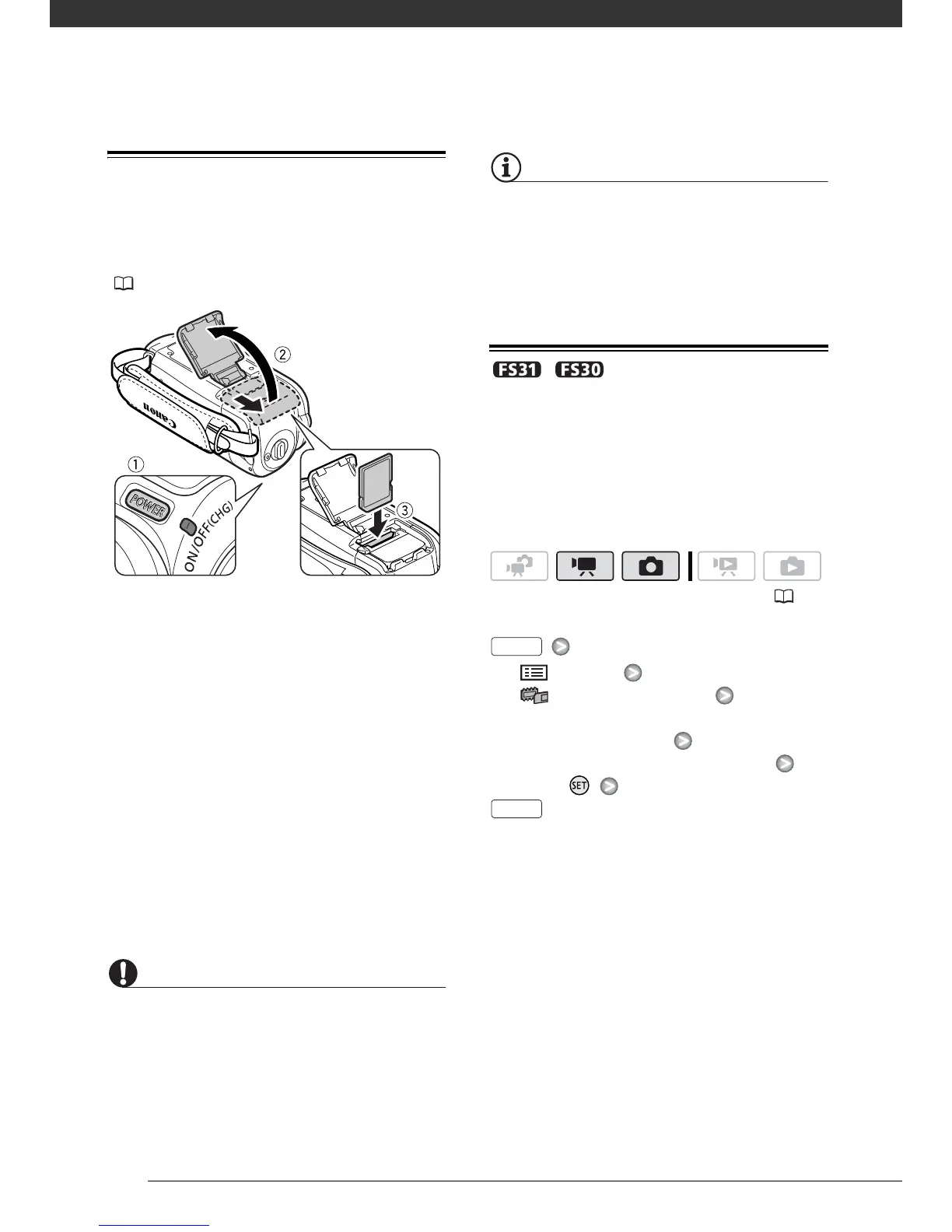
Inserting and Removing a Memory Card
Make sure to initialize all memory cards
before using them with this camcorder
( 31).
1 Turn off the camcorder.
Make sure that the ON/OFF(CHG)
(power/charge) indicator is off.
2 Slide the memory card slot cover
away from the lens and open it.
3 Insert the memory card straight,
with the label facing away from the
lens, all the way into the memory
card slot until it clicks.
4 Close the cover and slide it toward
the lens until you hear a click.
Do not force the cover closed if the
memory card is not correctly
inserted.
IMPORTANT
Memory cards have front and back sides
that are not interchangeable. Inserting a
memory card facing the wrong direction
can cause a malfunction of the camcorder.
NOTES
To remove the memory card: Push the
memory card once to release it. When the
memory card springs out, pull it all the
way out.
/ Selecting the Memory for
the Recordings
You can select to record your movies
and photos in the built-in memory or on
the memory card. The built-in memory
is the default media for recording both.
[ MENU]
[ MEMORY OPER.]
[MEDIA:MOVIES] or
[MEDIA:PHOTOS]
The memory you want to use*
Press
* For each media, you can check the total,
used, and approximate available space.
The approximate available space will
depend on the recording mode (for movies)
or size/quality (for photos) currently in use.
( 24)
FUNC.
FUNC.



 To Next Page