78
E
Editing
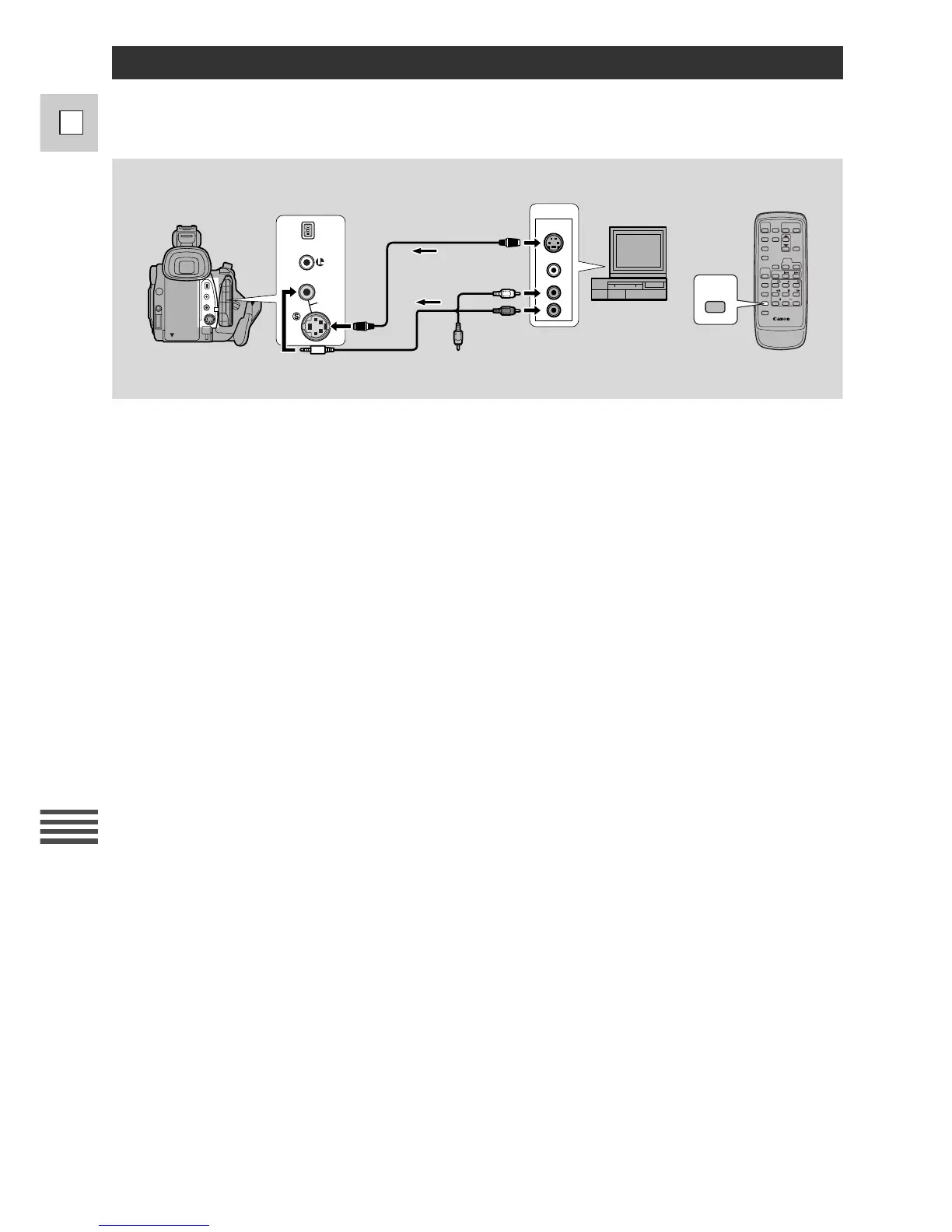
You can insert new scenes from your VCR or other camcorder onto your pre-recorded tape using the
GL1’s analog line-in or DV in terminals. Original video and audio will be replaced with the new video
and audio.
Recording Over Existing Scenes (A/V Insert Editing)
The tape in the camera:
When using the GL1’s A/V insert function, only record to tapes recorded in SP mode with continuously
recorded time codes.
If there are non-recorded portions or portions recorded in LP mode on the tape, recording may be
interrupted or you may not be able to insert A/V correctly.
The playback tape:
Use only tapes without non-recorded portions.
If there are non-recorded portions or changes in the recording mode, you may not be able to insert A/V
correctly.
You cannot insert A/V in the following cases:
• The playback tape has been poorly recorded.
• During special playback: fast forward playback, rewind playback or slow playback etc.
TV:
You cannot insert A/V from a TV program with anomalous synchronized signals, such as when the
program itself received poor signals.


 To Next Page