4
4
4-29
4-29
Parts Replacement and Cleaning Procedure > Clutch Solenoid Motor Fan PCB (DADF) > Removing the Sensor(SR1,SR2,SR3)
Parts Replacement and Cleaning Procedure > Clutch Solenoid Motor Fan PCB (DADF) > Removing the Sensor(SR1,SR2,SR3)
Removing the Sensor(SR1,SR2,SR3)
1) Remove the feed unit."Removing the Feed Unit"(page 4-20).
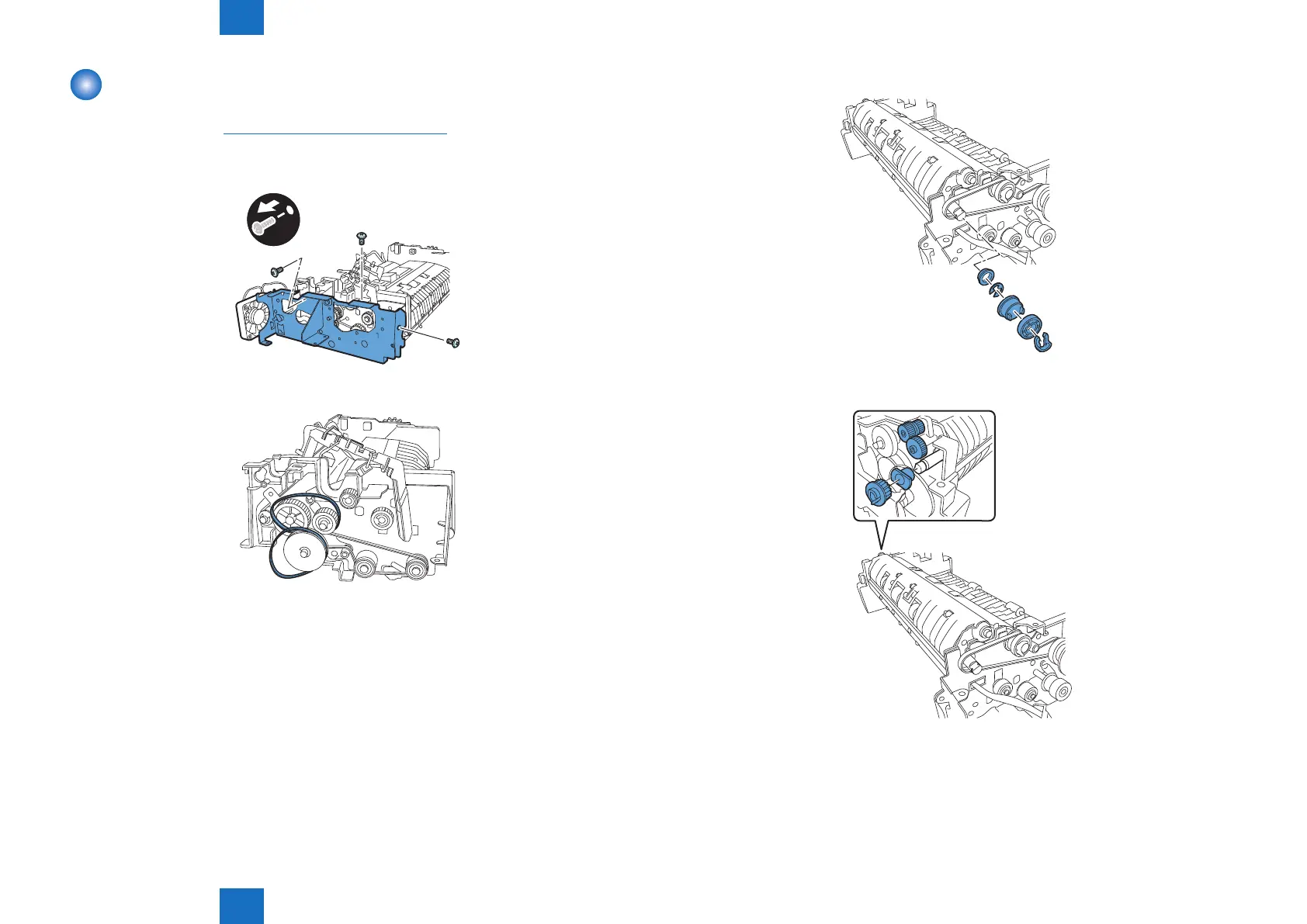
2) Remove the metal plate
- Screw 3 pcs.
x3
3) Remove the two timing belts.
F-4-64
F-4-65
4) Remove the resin ring, pulley, gear, E-ring, and bearing.
5) Remove the gear, gear, gear, and bearing.
F-4-66
F-4-67









 To Next Page