2-18
2
Installing the Canon Advanced Printing Technology
■ Windows 2000/XP Add Printer Wizard
Windows 2000/XP Add Printer WizardWindows 2000/XP Add Printer Wizard
Windows 2000/XP Add Printer Wizard
To install the CAPT on a local computer using Windows 2000/XP, you can use the Add
Printer Wizard.
Following is the installation procedure for “Using Parallel Port” under Windows 2000.
1 Log on as member of Administrators. The full control access right for the printer is necessary
for the installation of the CAPT.
2 From the Start menu, select Settings, then Printers (in Windows XP, select Printers and
Faxes from Start menu). The Printers (in Windows XP, Printers and Faxes) folder appears.
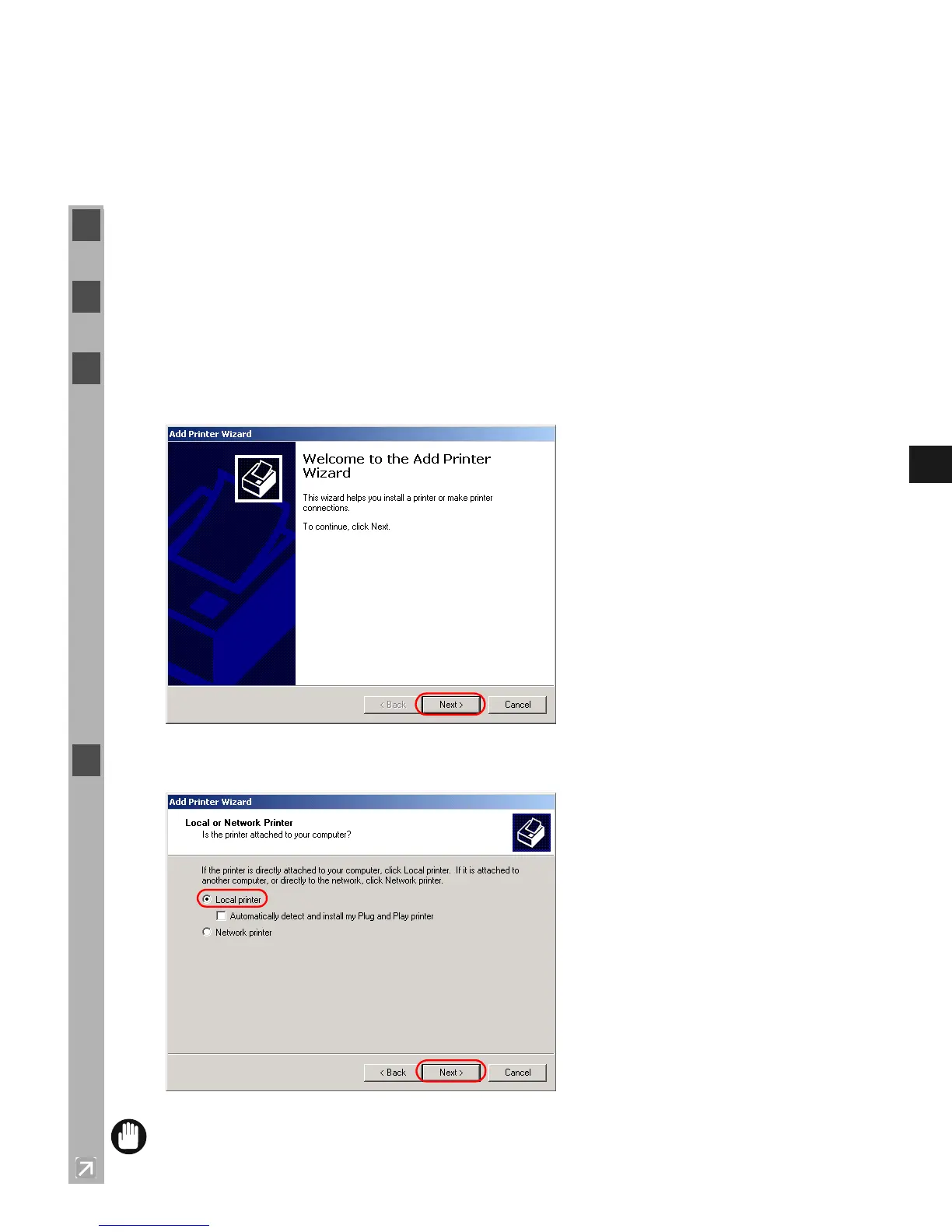
3 Double-click the Add Printer icon (in Windows XP, click Add a printer in Printer Tasks).
The Add Printer Wizard dialog box appears. Click Next >.
4 Select Local printer, then click Next >.
IMPORTANT
• To check on “Automatically detect and install my Plug and Play printer” is not
recommended.














 To Next Page