Copy Set Numbering Options
6-37
6
System Manager Settings
Copy Set Numbering Options
You can specify the detailed settings of the Copy Set Numbering mode for both the Copying and
Mail Box functions. For instructions on using the Copy Set Numbering mode, see Chapter 4,
"Special Copying and Mail Box Features," in the Copying and Mail Box Guide.
1
Press ➞ [System Settings] ➞ [Copy Set Numbering Option
Settings].
2
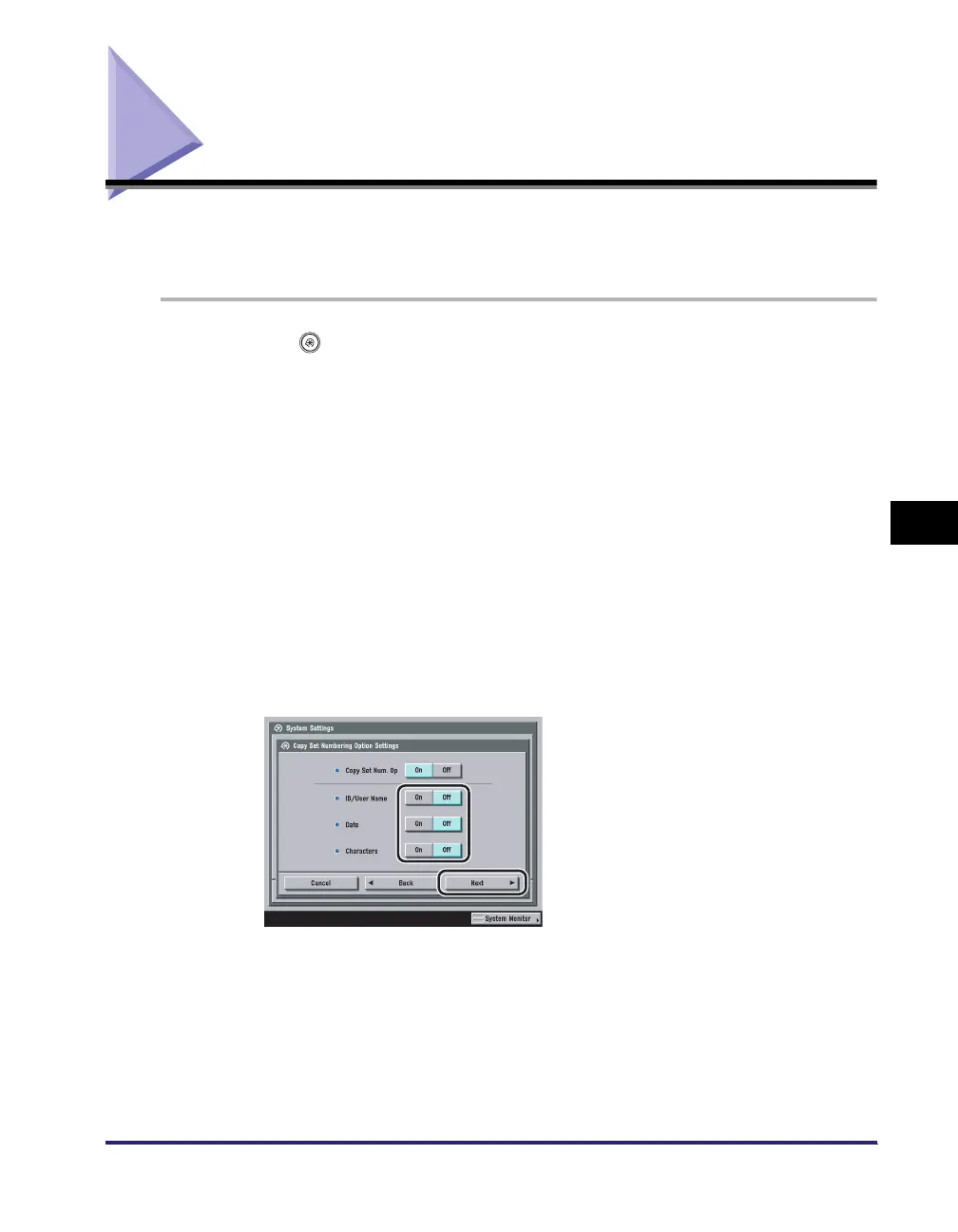
Select [On] or [Off] for <Copy Set Num. Op>.
Details of each item are shown below.
● If you select [On]:
❑ Select [On] or [Off] for each of the items ➞ press [Next].
[On]: [Full Surface] and [Numbers in 5 Locations] are greyed out, and cannot be selected
on the Orientation and Position Settings screen when you set the Copy Set
Numbering mode. The font sizes of the copy set numbers are as follows: [Small]:
10.5 point, [Medium]: 12 point, [Large]: 14 point
[Off]: [Full Surface] and [Numbers in 5 Locations] can be selected on the Orientation and
Position Settings screen when you set the Copy Set Numbering mode. The font
sizes of the copy set numbers are as follows: [Small]: 12 point, [Medium]: 24 point,
[Large]: 36 point




 To Next Page