Canon imagePRESS C800/C700 Service Guide
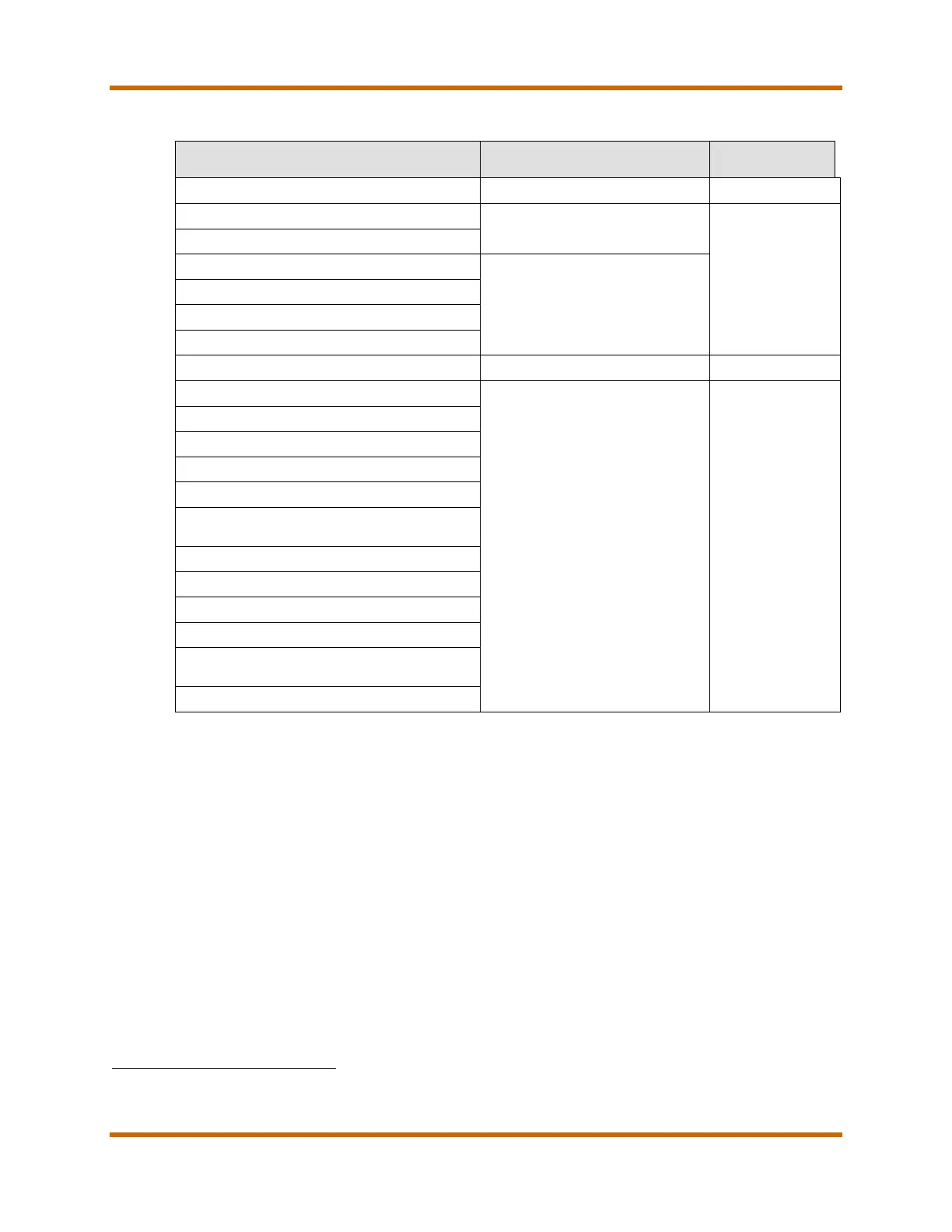
Table 20 – Power and Plug Requirements for Main Unit and Accessories
Description Power Supply
Single-phase 208V / 20A outlet
Duplex Color Image Reader-H1
From the Main Unit
N/A
Stack Bypass-B1
From the Finisher-AM1 or
Saddle Finisher-AM2
Puncher Unit-BT1
Paper Folding Unit-F1
POD Deck Lite-B1
120V / 15A outlet NEMA 5-15
Multi-Drawer Paper Deck-B1
Document Insertion Unit-M1
Professional Puncher-B1 &
Professional Puncher integration Unit-C1
41
Two-Knife Booklet Trimmer-A1
imagePRESS Server F200
42
imagePRESS Server G100
Square Fold Booklet Maker with Two-Knife
Trimmer
Square Fold Booklet Maker
41 The Professional Puncher Integration Unit-C1 is powered from the Professional Puncher-B1
42 If the optional Integrated Interface & Stand-A1 is used, an additional 120V / 15A NEMA 5-15 receptacle is required for the
monitor.
Canon imagePRESS C800/C700 Service Guide October 2014
Revision 2 Page 40





 To Next Page