6
1
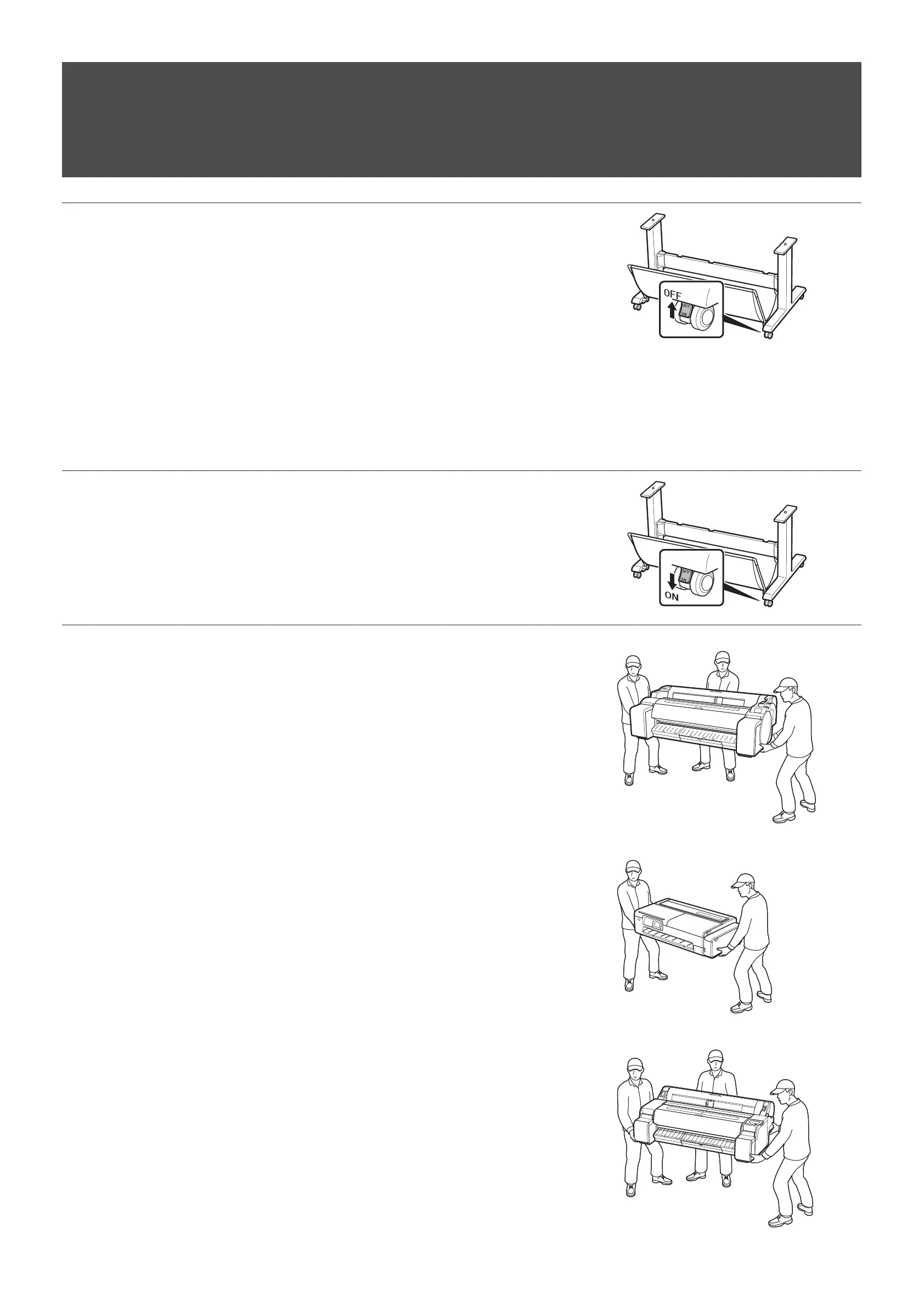
プリンター本体を設置しやすい場所までスタンドを移動します。スタンドを移動する際は、4 つのキャスターのロック
をすべてオフにします。
Move the stand to a location that will make it easy to install the printer. When moving the stand, switch the locks
on all 4 casters to off.
Déplacez le socle dans un endroit facilitant l'installation de l'imprimante. Lorsque vous déplacez le socle,
désactivez les verrous des 4roulettes.
Mueva el soporte hasta una ubicación donde resulte fácil instalar la impresora. Cuando mueva el soporte, quite el
bloqueo de las 4 ruedas.
Mova o suporte para um local onde seja fácil instalar a impressora.Ao mover o suporte, desative as travas de todas
as 4 rodinhas.
Transportieren Sie das Gestell an einen Standort, an dem Sie den Drucker leicht installieren können. Wenn Sie das
Gestell transportieren, deaktivieren Sie die Sperren an allen 4 Rollen.
Spostare il supporto in un punto in cui sarà semplice installare la stampante. Quando si sposta il supporto,
posizionare su OFF i blocchi su tutte e 4 le rotelle.
Verplaats de standaard naar een locatie waar u de printer gemakkelijk kunt installeren. Ontgrendel alle 4 wielen
wanneer u de standaard verplaatst.
Przesuń podstawkę w takie miejsce, w którym instalacja drukarki będzie łatwa. Na czas przesuwania podstawki
dezaktywuj blokady wszystkich 4 kółek.
2
移動後、4 つのキャスターのロックをすべてオンに戻します。
After moving the stand, return all 4 of the caster locks to on.
Après avoir déplacé le socle, remettez en place les 4verrous des roulettes.
Después de mover el soporte, vuelva a bloquear las 4 ruedas.
Após mover o suporte, reative novamente as 4 travas das rodinhas.
Nachdem Sie das Gestell transportiert haben, aktivieren Sie die Sperren an allen 4 Rollen wieder.
Dopo aver spostato il supporto, riportare su ON i blocchi delle 4 rotelle.
Vergrendel alle 4 wielen weer wanneer u de standaard hebt verplaatst.
Po przesunięciu podstawki ponownie aktywuj blokady wszystkich 4 kółek.
3
プリンターを下記の人数で持ち上げ、スタンドまで移動します。
• GP-300/GP-200:3 人以上
• TC-20M/TC-20:2 人
• TM-340:3 人以上
• TM-240/TA-20:2 人以上
Have the following number of people lift the printer and move it to the stand.
• GP-300/GP-200: 3 people or more
• TC-20M/TC-20: 2 people
• TM-340: 3 people or more
• TM-240/TA-20: 2 people or more
Ayez recours au nombre suivant de personnes pour soulever l'imprimante et la mettre sur le socle.
• GP-300/GP-200: 3 personnes ou plus
• TC-20M/TC-20: 2 personnes
• TM-340: 3 personnes ou plus
• TM-240/TA-20: 2 personnes ou plus
Levante la impresora entre el siguiente número de personas y muévala hasta el soporte.
• GP-300/GP-200: 3 personas o más
• TC-20M/TC-20: 2 personas
• TM-340: 3 personas o más
• TM-240/TA-20: 2 personas o más
A quantidade de pessoas a seguir é necessária para levantar a impressora e movê-la ao suporte.
• GP-300/GP-200:3 pessoas ou mais
• TC-20M/TC-20:2 pessoas
• TM-340:3 pessoas ou mais
• TM-240/TA-20:2 pessoas ou mais
Heben Sie den Drucker mit der folgenden Anzahl an Personen an, und transportieren Sie ihn zum Gestell.
• GP-300/GP-200: 3 Personen oder mehr
• TC-20M/TC-20: 2 Personen
• TM-340: 3 Personen oder mehr
• TM-240/TA-20: 2 Personen oder mehr
Per sollevare e portare la stampante sul supporto occorre il seguente numero di persone.
• GP-300/GP-200: 3 persone o più
• TC-20M/TC-20: 2 persone
• TM-340: 3 persone o più
• TM-240/TA-20: 2 persone o più
Laat de printer door het volgende aantal mensen tillen en verplaatsen naar de standaard.
• GP-300/GP-200: 3 mensen of meer
• TC-20M/TC-20: 2 mensen
• TM-340: 3 mensen of meer
• TM-240/TA-20: 2 mensen of meer
Niech wskazana poniżej liczba osób podniesie drukarkę i przeniesie ją na podstawkę.
• Model GP-300/GP-200: 3 osoby lub więcej
• Model TC-20M/TC-20: 2 osoby
• Model TM-340: 3 osoby lub więcej
• Model TM-240/TA-20: 2 osoby lub więcej
<GP-300/GP-200/TA-20>
<TC-20M/TC-20>
<TM-340/TM-240>
プリンターを設置する
Instalación de la impresora Installazione della stampante
Installing the Printer Instalação da impressora De printer installeren
Installation de l'imprimante Installation des Druckers Instalacja drukarki












 To Next Page