12
6. TROUBLESHOOTING FLOWCHART
6-1. Printer Main Unit Troubleshooting Flowchart (how to confirm printer operation at refurbishment)
<Note for normal printer refurbishment>
At end of refurbishment, set the printer to the default shipment conditions (with the paper lifting plate
in the raised position, and the carriage locked in the print head replacement position), following the
steps below.
1. Install the print head, and while pressing and holding the Power button, connect the AC plug.
After the LED lights in green, with the Power button still pressed, press the Resume/Cancel
button 2 times, and release both the Power and Resume/Cancel buttons. (Each time the
Resume/Cancel button is pressed, the LED lights alternately in orange and green, starting with
orange.)
2. Press the Resume/Cancel button 4 times, and then press the Paper Feed switch 2 times. The
shipment inspection pattern is printed, and the EEPROM is initialized.
3. After removing the print head, press the Paper Feed switch 2 times to turn off the printer. (The
paper lifting plate is raised, and the carriage moves to the print head replacement position.)
DO NOT print after this point.
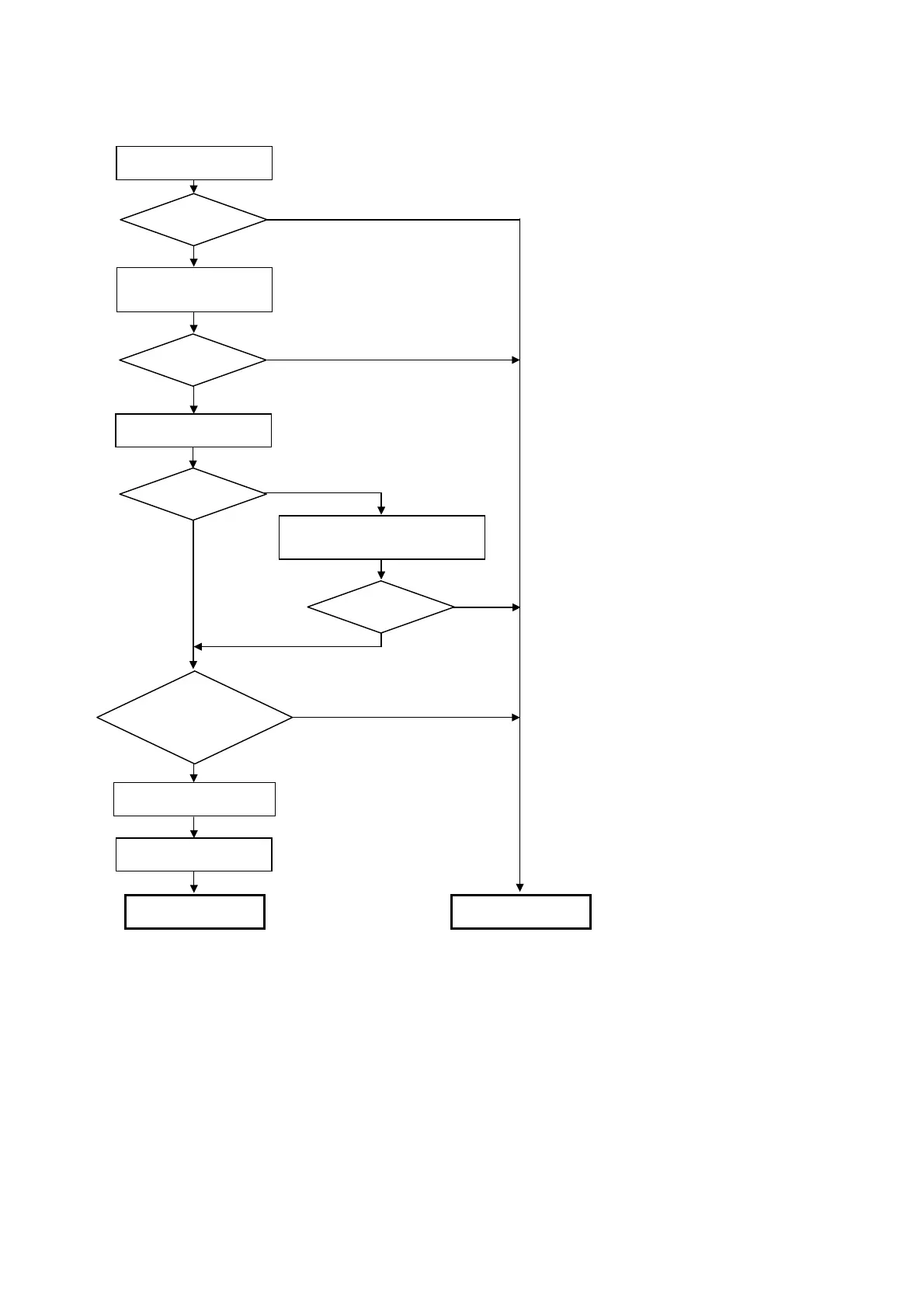
Open front cover,
and install print head
Service mode
Service Call
Error?
Yes
No
Yes
No
No
ee 4-2. Service Mode for
printing method.
<Service test print check items>
(See APPENDIX 1, SERVICE TEST PRINT 1 PRINT
SAMPLE.)
1. Non-ejection of ink: Yes NG
2. Top of form: Off the paper NG
3. Vertical lines: Not connected NG
4. Gray area: White lines / uneven density NG
Replace print head and
erform service test
rint
Main waste ink counter
less than 7%?
Normal Defective
Yes
No
Yes
No
Yes
Service Call
Error?
Visually check the platen waste ink
absorber, and replace it if it is
soiled.
Correct?
Correct?
ee 4-2. Service Mode for
details.
Service test print
EEPROM initialization
Power off









 To Next Page