14
7. SPECIAL NOTES ON SERVICING IN ASIA
7-1. Resetting the Main and Platen Waste Ink Counters
The iP2000 has separate waste ink counters for the main waste ink absorber and the platen waste
ink absorber, respectively. At waste ink absorber replacement, in the service mode, reset the
applicable waste ink counter according to the replaced waste ink absorber. (When both the main and
platen waste ink absorbers are replaced, reset both the main and platen waste ink counters.)
For the main waste ink absorber, a new design has been adopted so that a half portion of the main
waste ink absorber can be replaced just by removing the printer housing.
When compared with replacement of the entire main waste ink absorber, replacement of the half
portion is extremely simple and easy, as it does not require removal of other components such as
the chassis and ASF.
The printable number of pages after replacement of the half portion of the main waste ink absorber
is 2,000 pages.
According to the above, 2 methods are available for replacement of the main waste ink absorber,
and the main waste ink counter should be reset according to the replacement method.
- Replacement of the half of the main waste ink absorber:
Easy, and the printable number of pages after the replacement is approx. 2,000.
- Replacement of the entire main waste ink absorber:
Difficult, and the printable number of pages after the replacement is approx. 4,000.
After replacement, the main or platen waste ink counter should be reset according to the replaced
absorber portion.
<Waste ink counter value to be re-set to after waste ink absorber replacement>
Replaced waste ink absorber Waste ink counter value
Entire main waste ink absorber Reset the main waste ink counter (0%).
Half of the main waste ink absorber* Re-set the main waste ink counter value to 50%.
Entire platen waste ink absorber Reset the platen waste ink counter (0%).
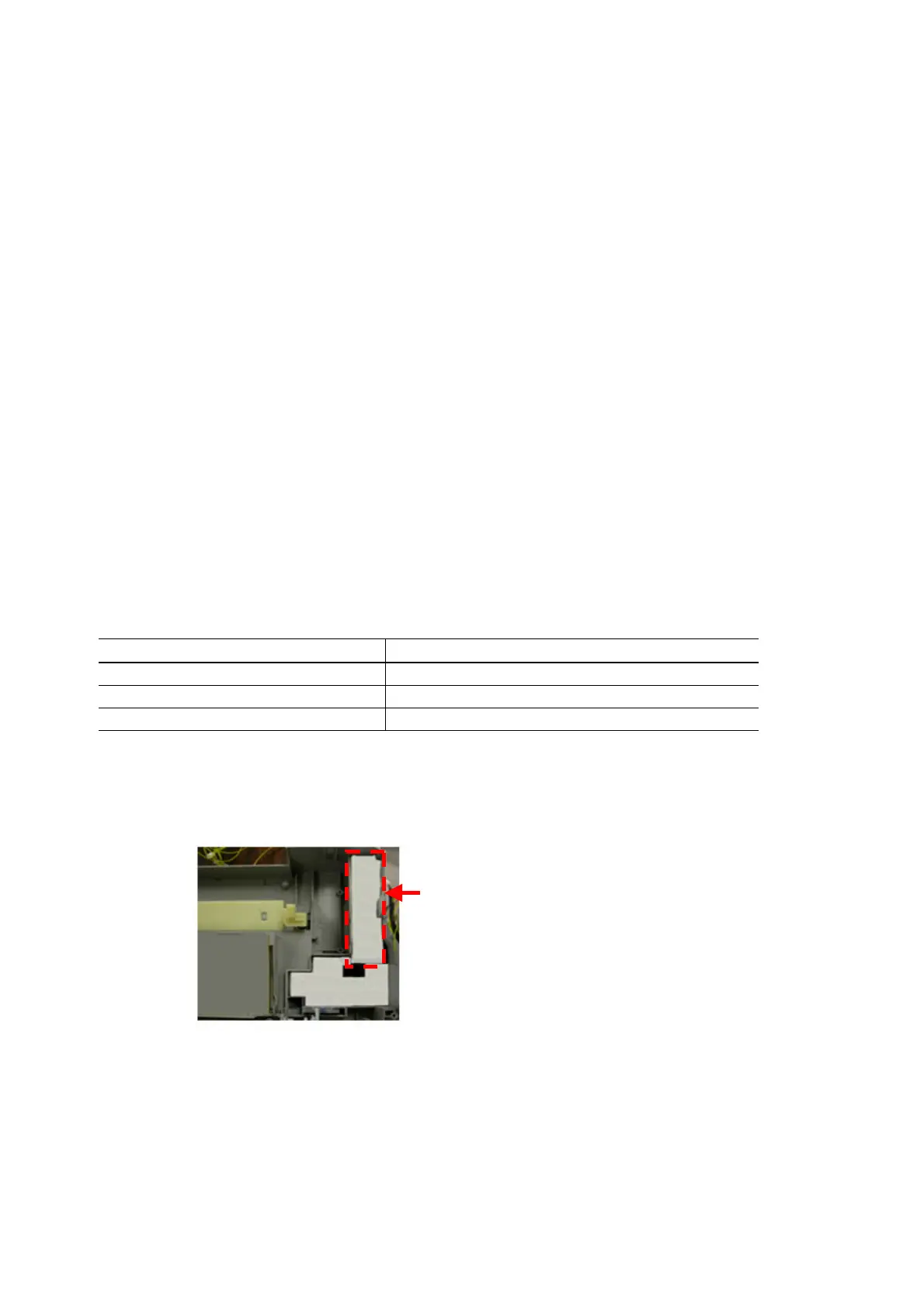
* How to replace half of the main waste ink absorber:
1. Remove the upper cover unit.
2. Replace the 4 ink absorbers (2 types, equivalent to half of the main waste ink absorber),
shown in the figure below.
<Waste ink absorber replacement procedures>
1. Error check
Perform EEPROM information printing, and check the following values:
- D: Main waste ink counter
- PD: Platen waste ink counter
2. Replace the applicable waste ink absorber(s).
3. Reset the waste ink counter.
For waste ink counter resetting procedures, see 4. ADJUSTMENT / SETTINGS, 4-2. Service Mode.
Replaceable half portion (4 ink absorbers)
fter the half portion is replaced, re-set the
waste ink counter to 50%.









 To Next Page