0KCY-0C5
When You Cannot Print Properly
If printing results are not satisfactory, or paper creases or curls, try the following solutions. If the problems persist, contact your local
authorized Canon dealer or the Canon help line.
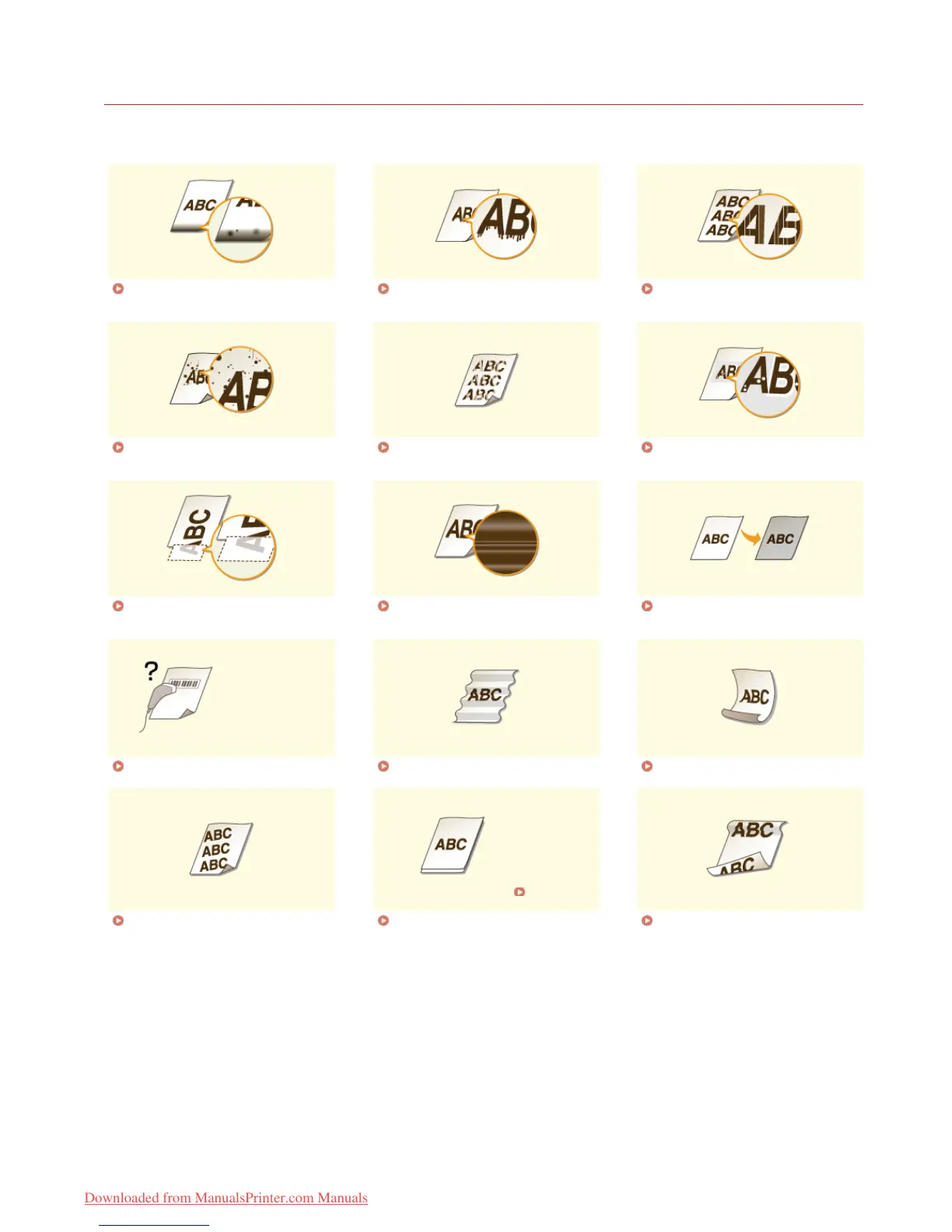
Smudge Marks Appear on the
Edge of Printouts
Streaks Appear on Printouts White Streaks Appear
Toner Smudges and Splatters
Appear
Printouts Are Faded Printed Pages Have White Specks
A Portion of the Page Is Not
Printed
Print Density Is Uneven Printouts Are Grayish
Cannot Scan a Printed Barcode Paper Creases Paper Curls
Printouts Are
Skewed
Printouts Are Skewed Paper Is Not Fed/Two or More
Sheets Are Fed Together
Paper Jams Frequently with 2-
Sided Printing
㻟㻥㻝㻌㻛㻌㻠㻣㻡
Downloaded from ManualsPrinter.com Manuals









 To Next Page