4
4
4-73
4-73
Disassembly/Assembly > Controller System > Removing the Control Panel LCD PCB and Control Panel Key PCB > Procedure
Disassembly/Assembly > Controller System > Removing the Control Panel LCD PCB and Control Panel Key PCB > Procedure
Removing the Control Panel LCD PCB and Control
Panel Key PCB
■
Preparation
1) Remove the the Control Panel Unit. Refer to page 4-70
■
Procedure
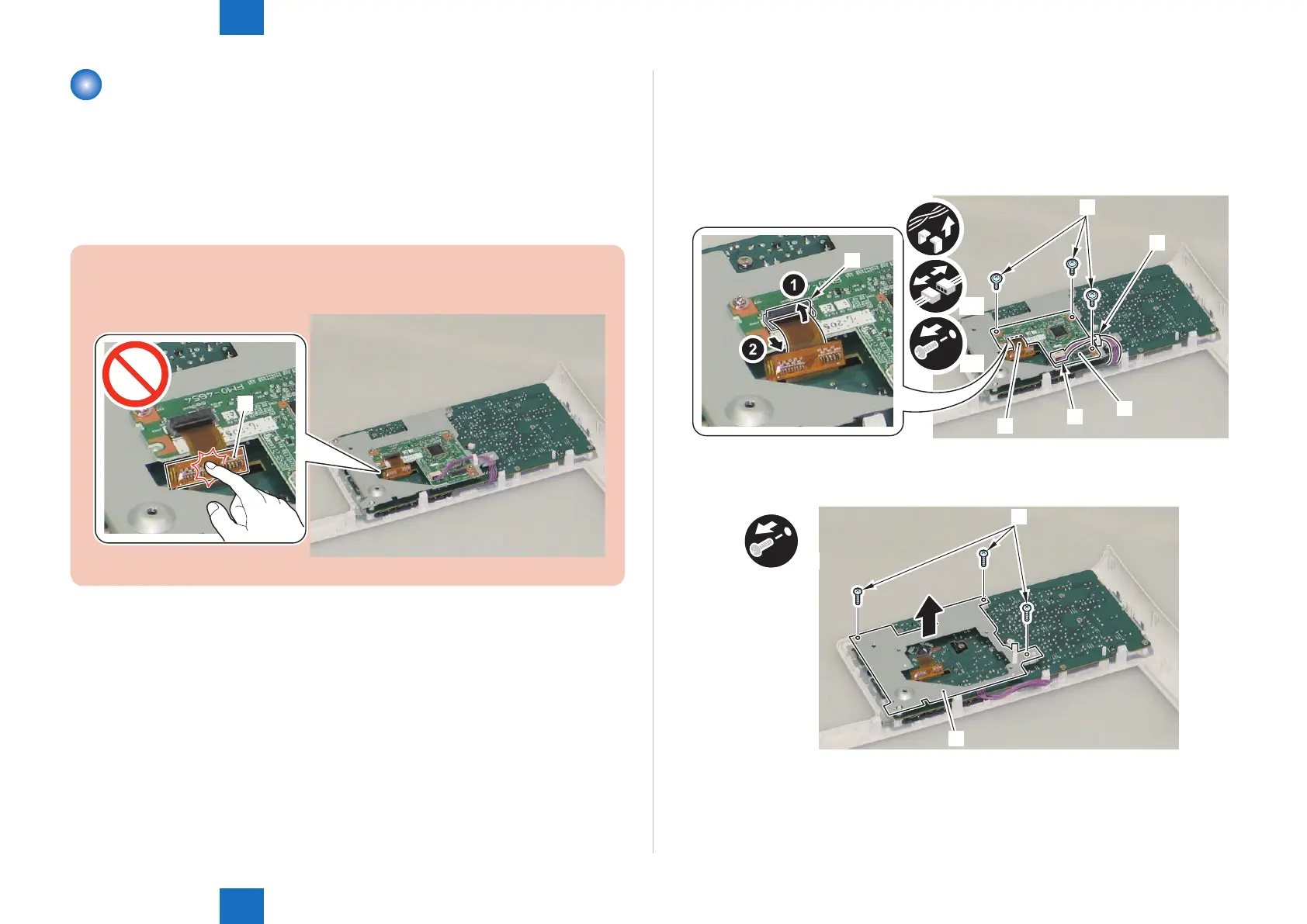
CAUTION:
Do not touch the IC part [A] of the LCD Flat Cable [1].
[1]
F-4-148
1) Remove the Control Panel LCD PCB [1].
• 1 Wire Saddle [2]
• 1 Connector [3]
• 1 Flat Cable Connector Lock [4]
• 1 LCD Flat Cable [5]
• 3 Screws [6]
x3
x2
[6]
[5]
[1]
[2]
[3]
[4]
2) Remove the Control Panel LCD PCB Mounting Plate [1].
• 3 Screws [2] (Binding)
x3
[1]
[1]
F-4-149
F-4-150











 To Next Page