8
8
8-43
8-43
Service Mode > TESTMODE > PRINT
Service Mode > TESTMODE > PRINT
TESTMODE
PRINT
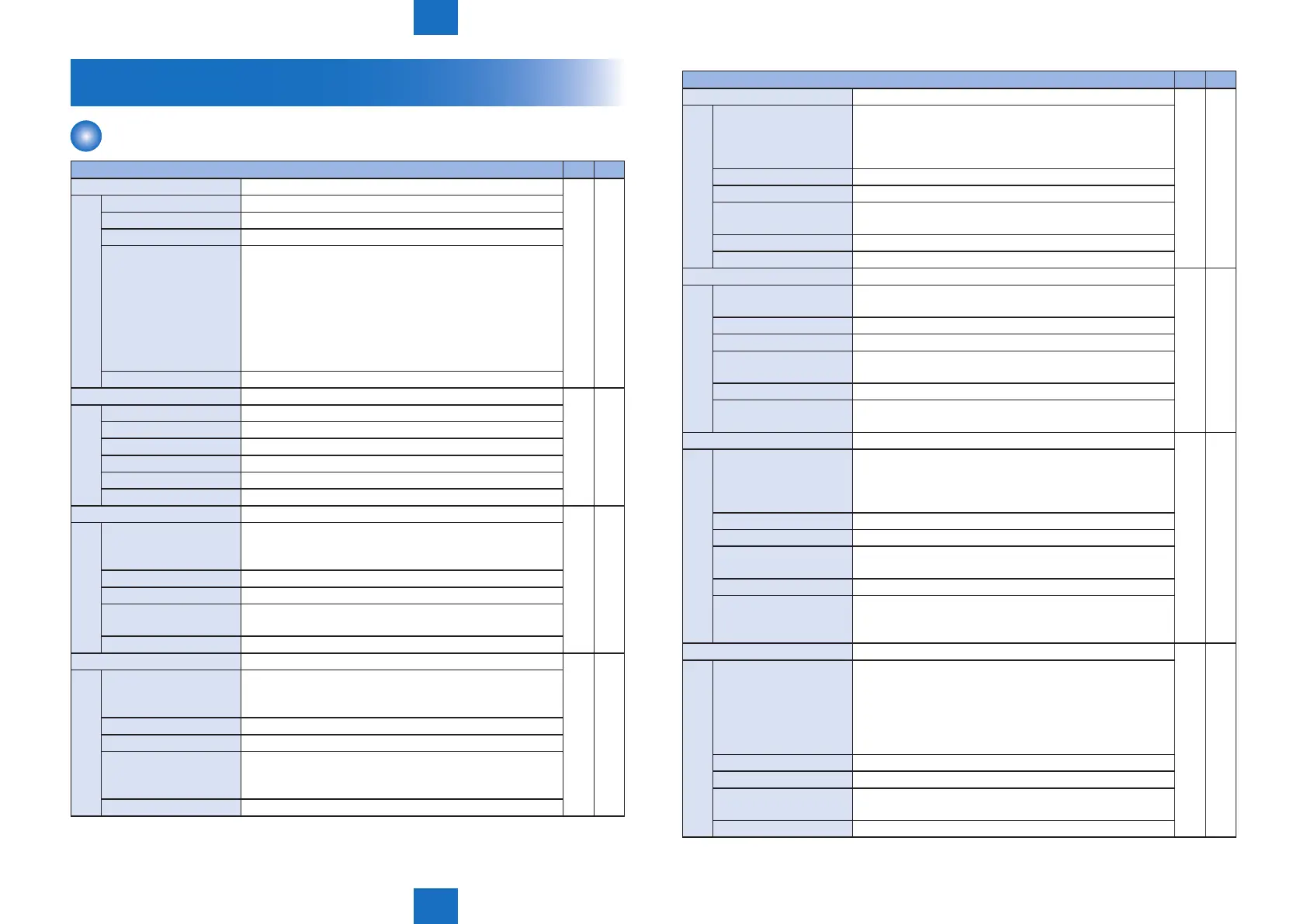
TESTMODE > PRINT M82 M85
PG-TYPE Setting of PG number
○ ○
Details To set the PG number of the test print.
Use case At trouble analysis
Adj/set/operate method Enter the setting value, and then press OK key.
Display/adj/set range 0 to 6
0: Full correction chart 1
1: Full correction chart 2
2: Color chart
3: Color displacement correction chart
4: Rainbow chart (vertical scanning direction)
5: Rainbow chart (horizontal scanning direction)
6: Grid Bk
Default value 0
COUNT Setting of PG output quantity
○ ○
Details To set the number of sheets for PG output.
Use case At trouble analysis
Adj/set/operate method Enter the setting value, and then press OK key.
Display/adj/set range 1 to 99
Unit 1 sheet
Default value 1
PHASE Setting of PG 2-sided mode
○
Details To set 1-sided/2-sided print for PG output.
Even if 2-sided print is set for a machine that only
supports 1-sided print, the setting is disabled.
Use case At trouble analysis
Adj/set/operate method Enter the setting value, and then press OK key.
Display/adj/set range 0 to 1
0: 1-sided, 1: 2-sided
Default value 0
MODE Setting of test print image formation method
○ ○
Details To set the image formation method for the test print.
If PG-TYPE is 0/1, this setting is disabled because a
specic image formation method is applied.
Use case At trouble analysis
Adj/set/operate method Enter the setting value, and then press OK key.
Display/adj/set range 0 to 3
0: T-MIC (T-MIC), 1: High screen ruling (SCA), 2: Low
screen ruling (SCB), 3: TBIC
Default value 0
TESTMODE > PRINT M82 M85
THRU Setting of image correction table at test print
○ ○
Details It is possible to check the density characteristics due to
the density correction process when normal gamma LUT
is used, and the density characteristics of the engine
when the linear gamma LUT is used.
Use case At trouble analysis
Adj/set/operate method Enter the setting value, and then press OK key.
Display/adj/set range 0 to 1
0: Normal gamma LUT, 1: Through (linear) gamma LUT
Default value 0
Supplement/memo Gamma LUT: Density gradation characteristic table
NRKE ON/OFF of laser scanning transfer process of test print
○ ○
Details To perform line transfer process for skew correction of
test print engine's laser scanning.
Use case At trouble analysis
Adj/set/operate method Enter the setting value, and then press OK key.
Display/adj/set range 0 to 1
0: OFF, 1: ON
Default value 0
Supplement/memo Transfer process: A process to correct skew of laser
scanning in vertical scanning direction
BLND ON/OFF of interpolation process at test print
○ ○
Details To set ON/OFF of interpolation process at test print (linked
with NSC).
When 1 is set, interpolation process is performed (no
phase shift).
Use case At trouble analysis
Adj/set/operate method Enter the setting value, and then press OK key.
Display/adj/set range 0 to 1
0: OFF, 1: ON
Default value 0
Supplement/memo Interpolation process: A process to predict, for pixels
holding no color information, color based on the
surrounding pixels, and then set up the color information.
FEED Setting of paper source at test print
○ ○
Details To set the paper sources at the time of test print output.
If this mode is set when there is no Cassette 2 (option
Pickup Cassette), output is from Cassette 1 (standard
Pickup Cassette).
If color paper is loaded in the specied paper source,
there is no output because the setting is disabled.
Use case When outputting a test print
Adj/set/operate method Enter the setting value, and then press OK key.
Display/adj/set range 0 to 2
0: Multi-purpose Tray, 1: Cassette 1, 2: Cassette 2
Default value 1





 To Next Page