33
E
Mastering
the Basics
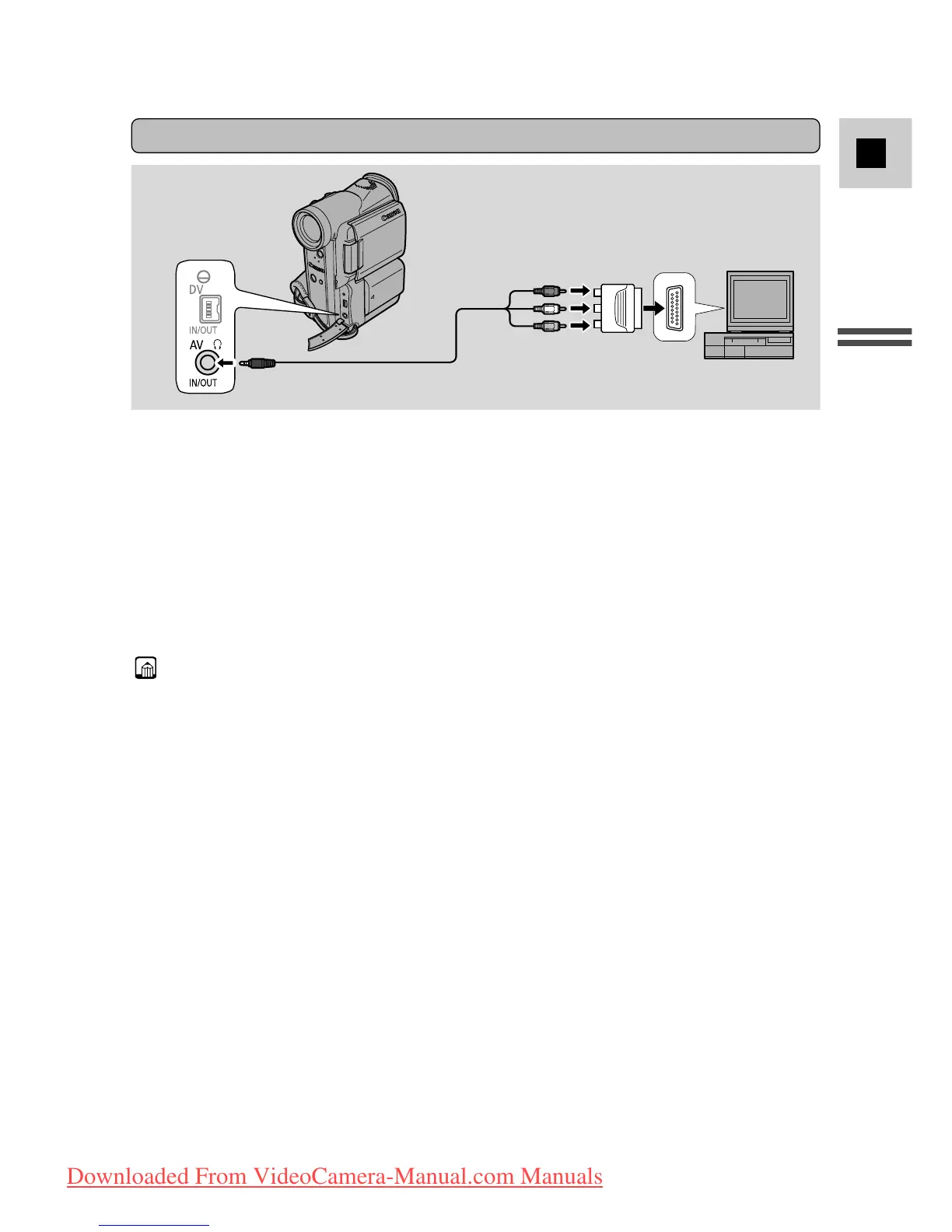
If your TV (or VCR) has a SCART terminal (without S (S1)-video)
AUDIO
(L/ MONO)
AUDIO
(R)
VIDEO
• Connect the PC-A10 SCART adapter to the TV or VCR’s SCART terminal.
• Connect the camcorder to the adapter. Connect the camcorder using the
STV-250N Stereo Video Cable. Connect the white plug to the white audio
terminal L (left). Connect the red plug to the red audio terminal R (right).
Connect the yellow plug to the yellow video terminal VIDEO.
• If you are connecting the camcorder to a TV, set the TV/VIDEO selector on the
television to VIDEO.
• If you are connecting the camcorder to a VCR, set the input selector on the
VCR to LINE.
Note:
• The SCART Adapter PC-A10 is for output only. For analog line-in recording or
analog-digital conversion, please use a SCART adapter with input capability
(commercially available).
PC-A10
SCART Adapter
STV-250N Stereo Video Cable
Downloaded From VideoCamera-Manual.com Manuals



 To Next Page