71
E
Using the Full
Range of Features
Setting the Self-Timer
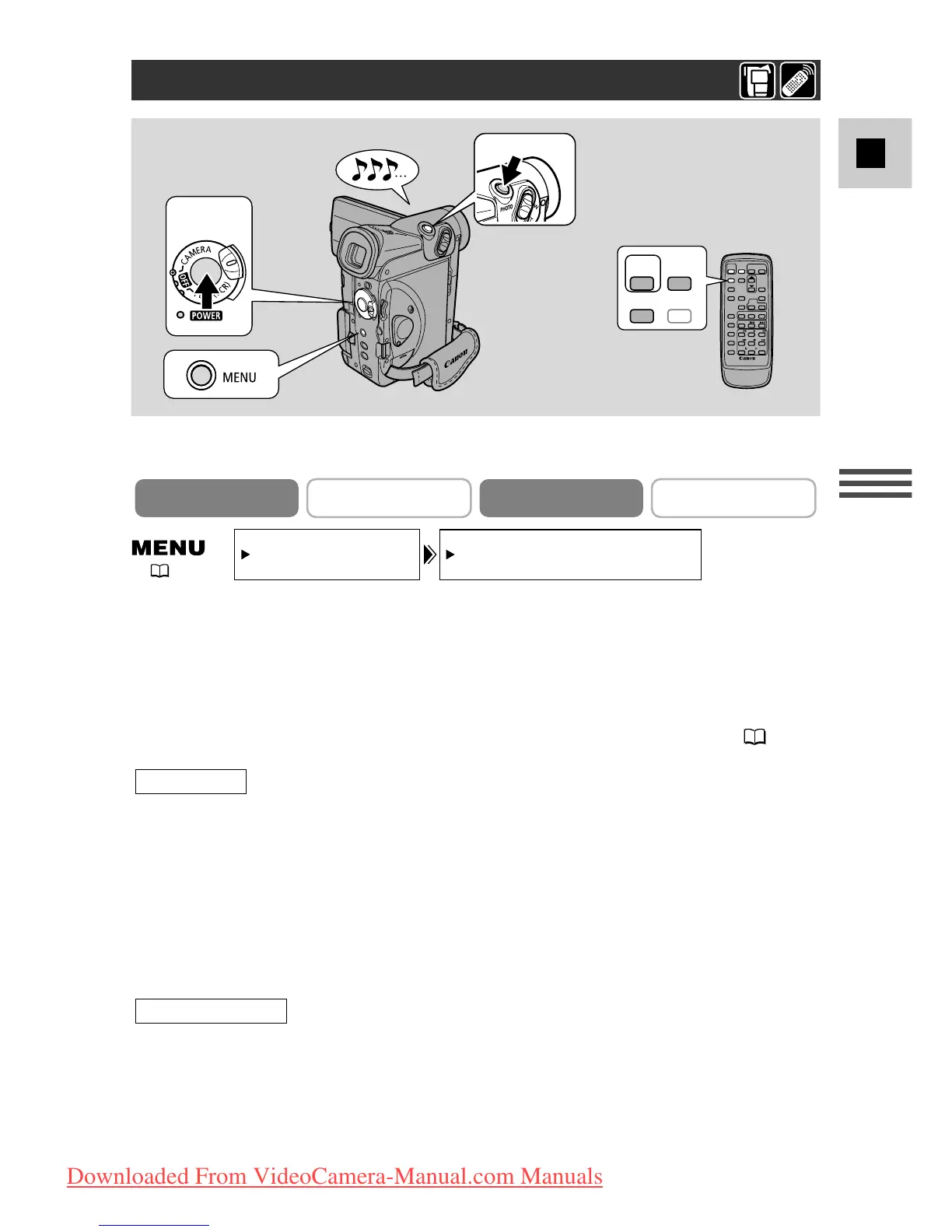
1. Open the menu, select VCR SET UP and set the SELF-TIMER to
ON
or
press the SELF TIMER button on the wireless controller.
• SELF-T appears in the display.
• To have the subject monitor recording, rotate the LCD panel 180° ( 27).
2. Press the start/stop button.
• The camcorder starts to record after a 10-second countdown period (or after
2 seconds when you use the wireless controller). The time remaining counts
down in the display (e.g. “5 SEC”).
• SELF-T disappears from the display when recording begins.
• The tally lamp starts flashing.
3. Press the start/stop button to end recording.
2. Press the PHOTO button on the camcorder body or the wireless
controller.
• The camcorder automatically adjusts the focus 2 seconds before the
countdown is complete. The
F
mark flashes white then turns green after the
focus and exposure are set. If you are using the wireless controller, the
F
mark starts flashing immediately after you press the PHOTO button.
For still images
For movies
2
START
/STOP
PHOTO
MENU
SELF
TIMER
2, 3
1
This is useful when you want to include yourself in the picture when recording
movies or still images to a tape or memory card.
Still images
For movies


 To Next Page