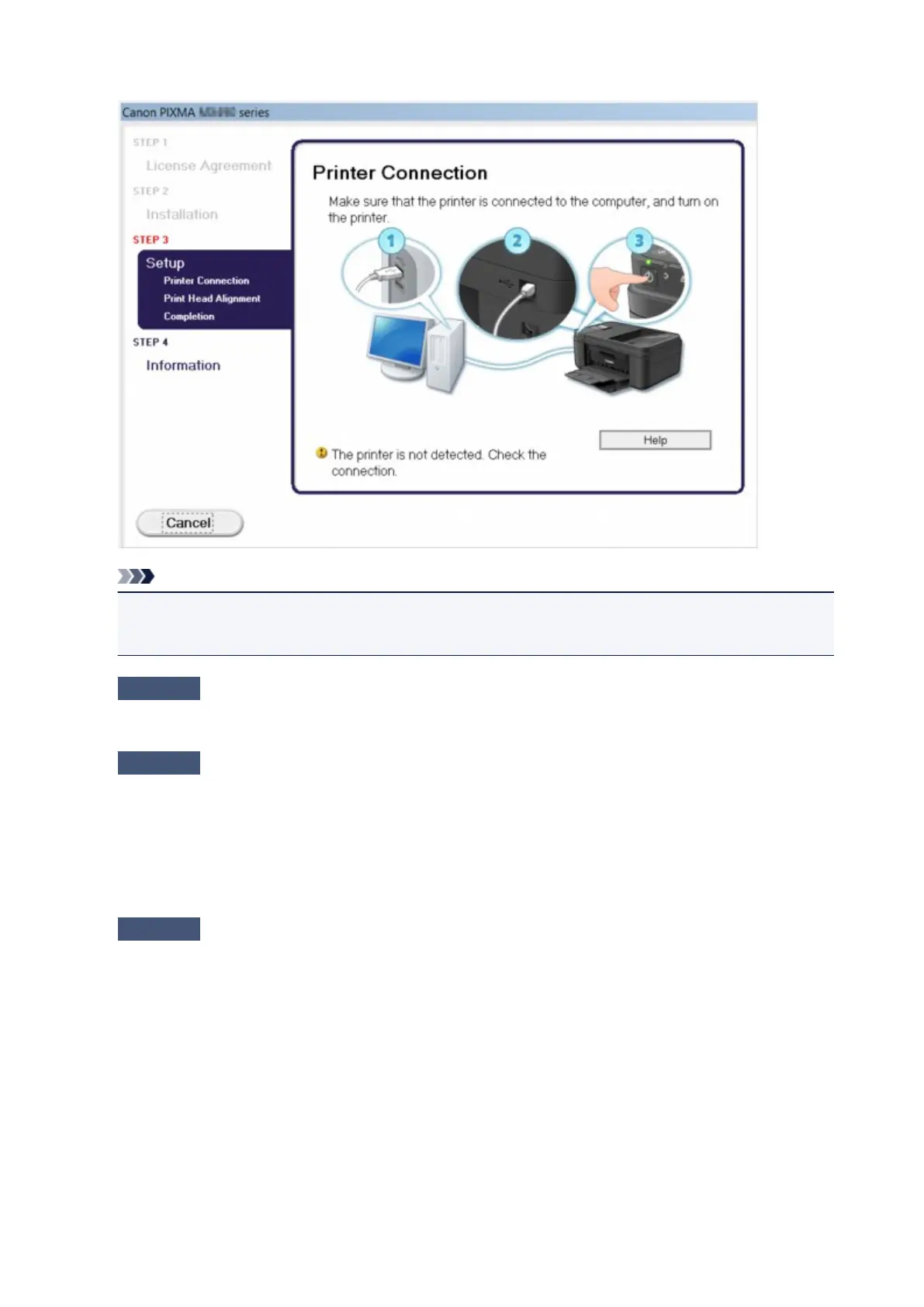
• If you are unable to proceed beyond the Printer Connection screen:
Note
• The printer is not detected. Check the connection. may be displayed depending on the
computer you use.
Check1
Make sure that the USB cable is securely plugged in to the machine and the
computer.
Check2
Follow the procedure below to connect the machine and the computer
again.
1.
Turn the machine off.
2.
Unplug the USB cable from the machine and the computer, then connect it again.
3.
Turn the machine on.
Check3
If you cannot resolve the problem, follow the procedure below to reinstall the
MP Drivers.
1. Click Cancel.
2. Click Start Over on the Installation Failure screen.
3. Click Exit on the "PIXMA XXX" screen (where "XXX" is your machine's name), then remove the CD-
ROM.
4. Turn the machine off.
5. Restart the computer.
6. Make sure that you have no application software running.
7.
Insert the CD-ROM again, then install the MP Drivers.
895


 To Next Page
 Loading...