EasyManua.ls Logo

Canon PC300 - Page 18

Canon PC300
129 pages
Print Icon
To Next Page IconTo Next Page
To Previous Page IconTo Previous Page
Loading...
GENERAL
DESCRIPTION
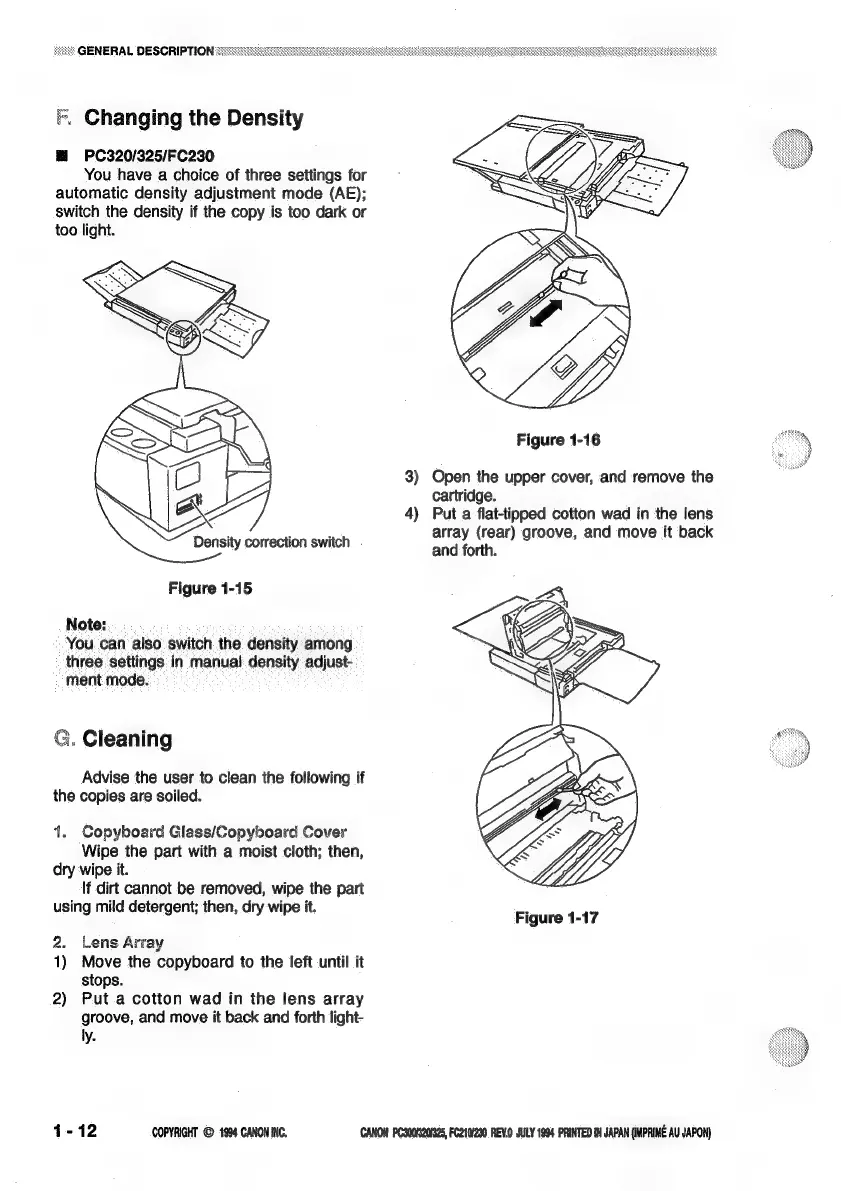
Changing
the
Density
BM
PC320/325/FC230
You
have
a
choice
of
three
settings
for
automatic
density
adjustment
mode
(AE);
switch
the
density
if
the
copy
is
too
dark
or
too
light.
Figure
1-16
3)
Open
the
upper
cover,
and
remove
the
cartridge.
4)
Put
a
flat-tipped
cotton
wad
in
the
lens
: . :
array
(rear)
groove,
and
move
it
back
Density
correction
switch
and
forth.
Figure
1-15
Note:
You
can
also
switch
the
density
among
three
settings
in
manual
density
adjust-
ment
mode.
3.
Cleaning
Advise
the
user
to
clean
the
following
if
the
copies
are
soiled.
1.
Copyboard
Glass/GCopyboard
Cover
Wipe
the
part
with
a
moist
cloth;
then,
dry
wipe
it.
lf
dirt
cannot
be
removed,
wipe
the
part
using
mild
detergent;
then,
dry
wipe
it.
Figure
1-17
2.
Lens
Array
1)
Move
the
copyboard
to
the
left
until
it
stops.
2)
Put
.a
cotton
wad
in
the
lens
array
groove,
and
move
it
back
and
forth
light-
ly.
1-12
COPYRIGHT
©
1994
CANONINC.
CANON
PC300320325,
FC210290.REV.0
JULY 1994
PRINTED
IN
JAPAN
(IMPRIME
AU
JAPON)

Related product manuals