Table of
Contents
Chapter 1
What is
ZoomBrowser EX?
Chapter 2
Downloading and
Printing Images
Chapter 3
What You Can Do with
a Camera Connected
Chapter 4
Viewing Images
Chapter 5
Organizing Images
Chapter 6
Using Supplementary
Features
Appendices Index
ZoomBrowser EX Software User Guide 140
Back Next
Saving Images to CD-R/RW Disks (Windows XP Only)
You can copy or save images onto CD-R disks and CD-RW disks. The
shooting information is saved along with the image.
4.
Confirm that [1. Select Images] is selected, and select
the folder or image in the Browser Area.
5.
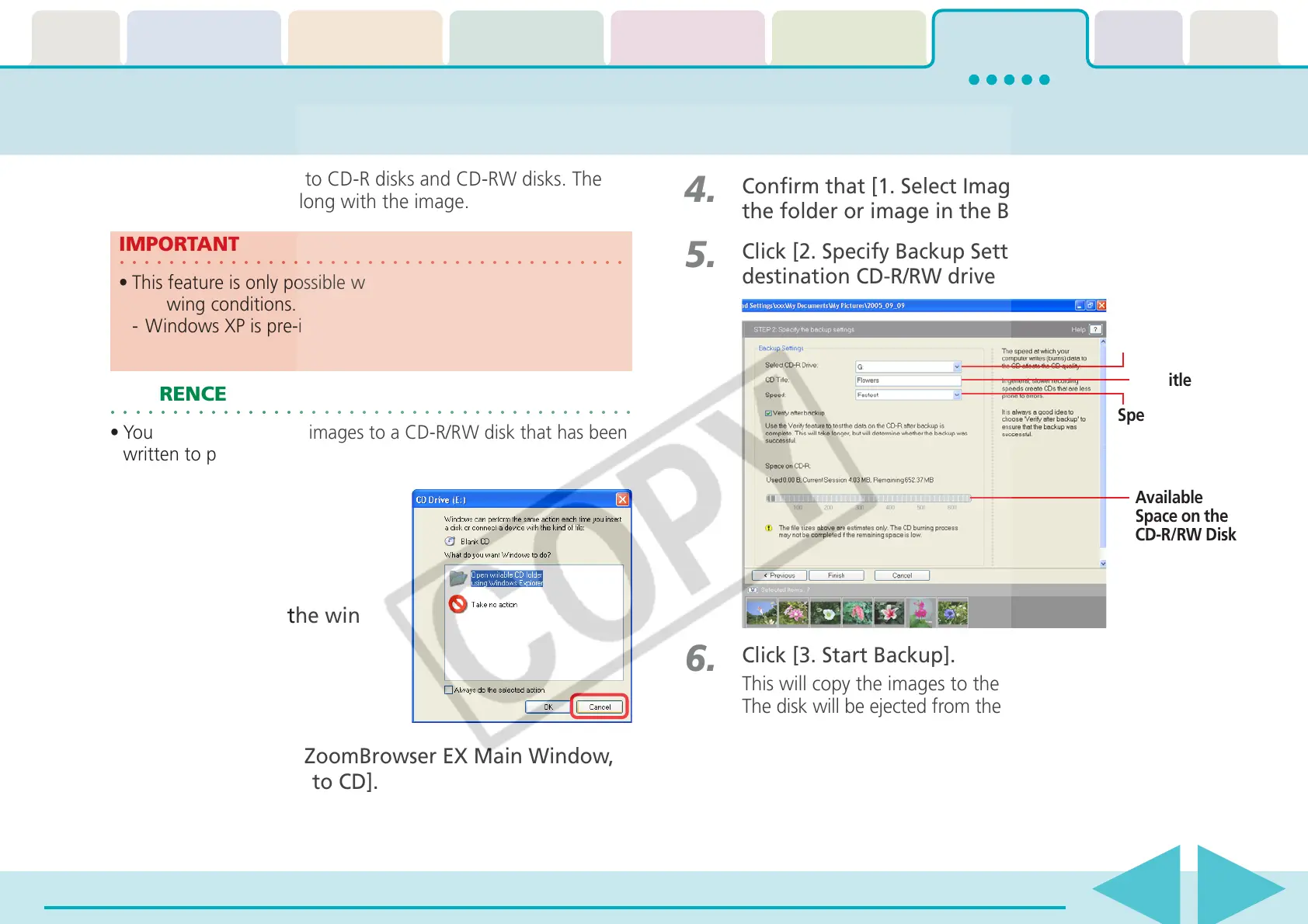
Click [2. Specify Backup Settings], select the
destination CD-R/RW drive and input a CD title.
3.
Click [Export] in the ZoomBrowser EX Main Window,
followed by [Backup to CD].
6.
Click [3. Start Backup].
This will copy the images to the CD-R/RW disk.
The disk will be ejected from the drive when copying is complete.
○○○○○○○○○○○○○○○○○○○○○○○○○○○○○○○○○○○○○○○○○
IMPORTANT
• This feature is only possible with computers satisfying the
following conditions.
-Windows XP is pre-installed
-A CD-R/RW drive is built-in
○○○○○○○○○○○○○○○○○○○○○○○○○○○○○○○○○○○○○○○○○○
REFERENCE
•You can add additional images to a CD-R/RW disk that has been
written to previously.
Destination Drive
CD Title
Available
Space on the
CD-R/RW Disk
Speed
1.
Place a CD-R/RW disk in the
drive.
2.
If a window like the one
shown here appears, click
[Cancel] and close the win-
dow.














 To Next Page