Table of
Contents
Chapter 1
What is
ZoomBrowser EX?
Chapter 2
Downloading and
Printing Images
Chapter 3
What You Can Do with
a Camera Connected
Chapter 4
Viewing Images
Chapter 5
Organizing Images
Chapter 6
Using Supplementary
Features
Appendices Index
ZoomBrowser EX Software User Guide 64
Back Next
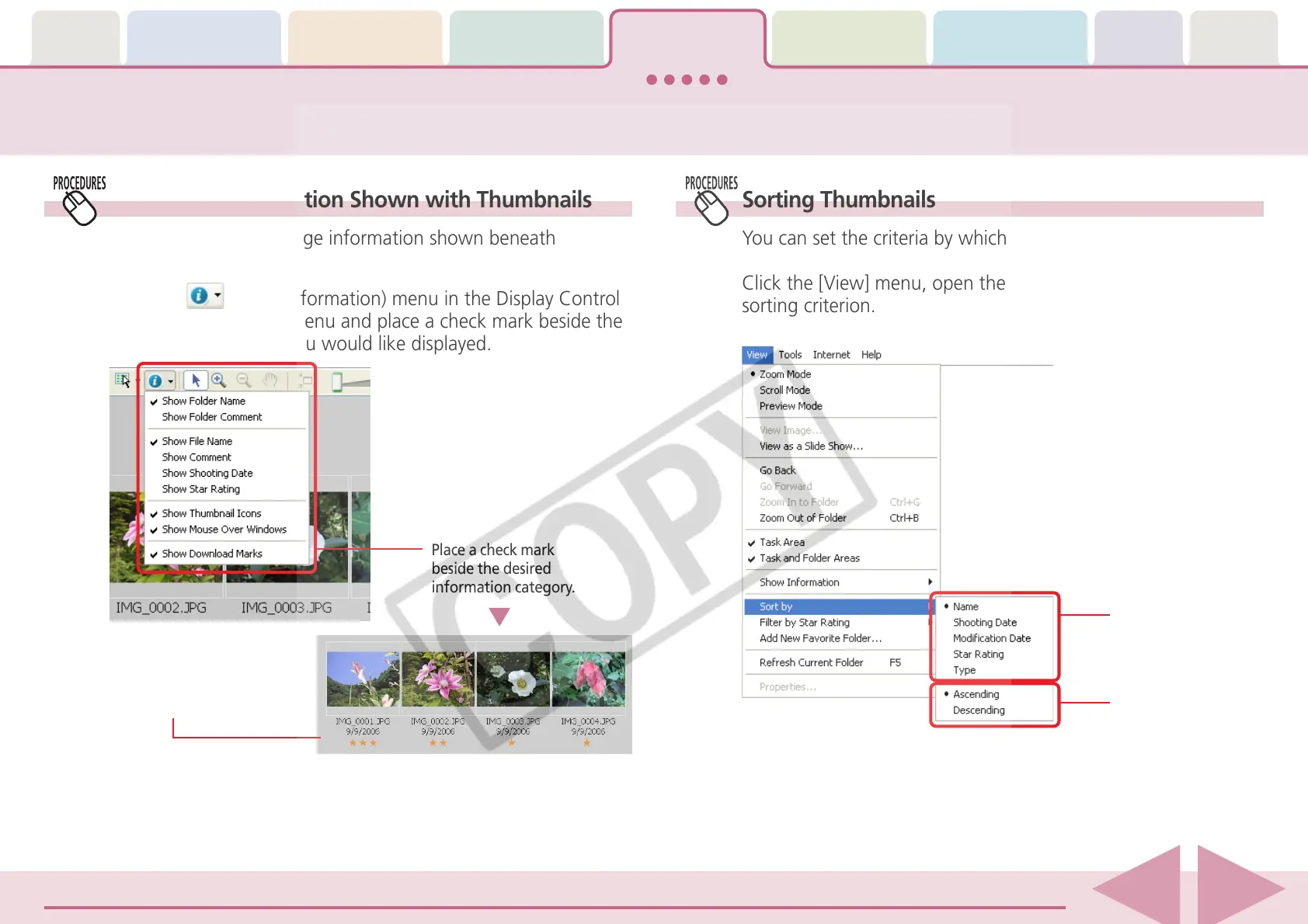
Setting the Information Shown with Thumbnails
You can specify the image information shown beneath
thumbnails.
Click the (Show Information) menu in the Display Control
Panel to open the submenu and place a check mark beside the
information category you would like displayed.
Place a check mark
beside the desired
information category.
Example with a check
mark placed beside the
File Name, Shooting Date
and Star Rating categories.
Changing the Main Window Display Mode (2/5)
Sorting Thumbnails
You can set the criteria by which thumbnails are ordered.
Click the [View] menu, open the [Sort by] submenu and select a
sorting criterion.
Place a check mark
beside the sorting
criterion.
You can also sort by
ascending or
descending order.














 To Next Page