EasyManua.ls Logo

Canon Powershot SD40 - Page 34

Canon Powershot SD40
154 pages
Print Icon
To Next Page IconTo Next Page
To Previous Page IconTo Previous Page
Loading...
Table of
Contents
Chapter 1
What is
ZoomBrowser EX?
Chapter 2
Downloading and
Printing Images
Chapter 3
What You Can Do with
a Camera Connected
Chapter 4
Viewing Images
Chapter 5
Organizing Images
Chapter 6
Using Supplementary
Features
Appendices Index
ZoomBrowser EX Software User Guide 34
Back Next
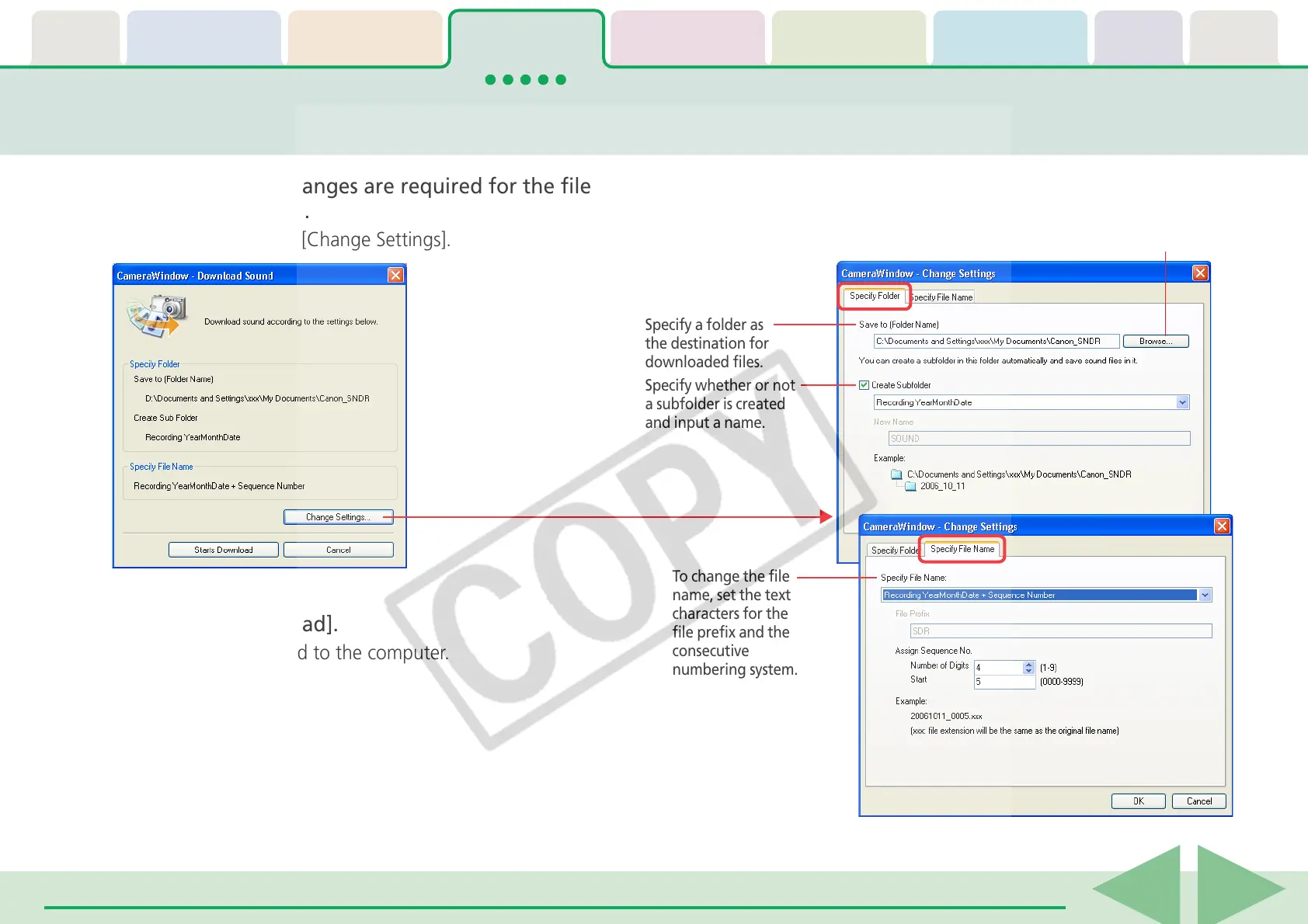
Downloading Sound Files from the Camera (3/3)
5.
Confirm whether changes are required for the file
destination or name.
To make changes, click [Change Settings].
6.
Click [Starts Download].
The file(s) will download to the computer.
To change the file
name, set the text
characters for the
file prefix and the
consecutive
numbering system.
Specify a folder as
the destination for
downloaded files.
Click here to change
the destination folder.
Specify whether or not
a subfolder is created
and input a name.

Table of Contents

Related product manuals