Table of
Contents
Chapter 1
What is
ZoomBrowser EX?
Chapter 2
Downloading and
Printing Images
Chapter 3
What You Can Do with
a Camera Connected
Chapter 4
Viewing Images
Chapter 5
Organizing Images
Chapter 6
Using Supplementary
Features
Appendices Index
ZoomBrowser EX Software User Guide 72
Back Next
Using the Viewer Window (3/5)
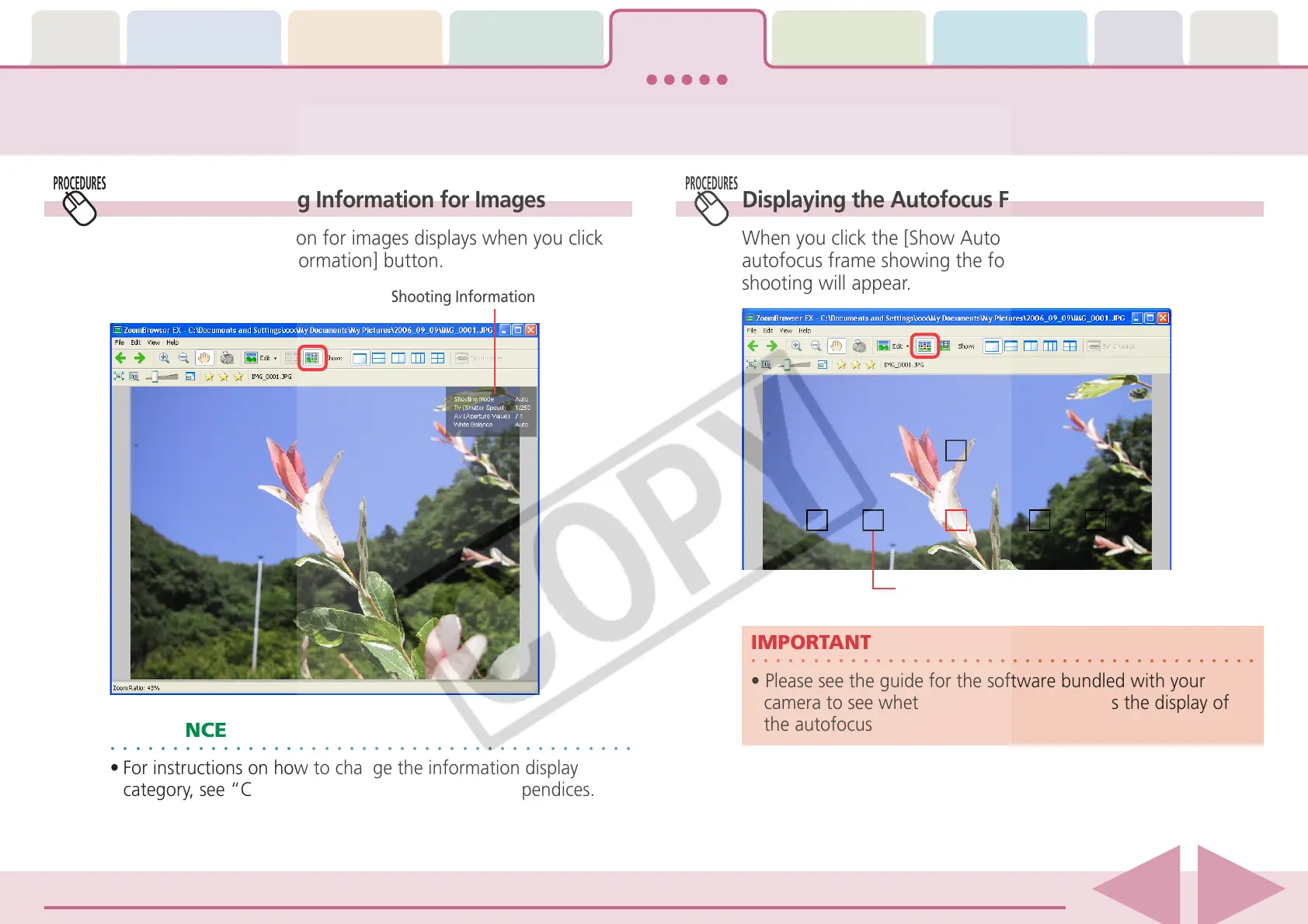
Displaying Shooting Information for Images
The shooting information for images displays when you click
the [Show Shooting Information] button.
Shooting Information
Displaying the Autofocus Frame
When you click the [Show Auto Focus Points] button, an
autofocus frame showing the focus position at the time of
shooting will appear.
○○○○○○○○○○○○○○○○○○○○○○○○○○○○○○○○○○○○○○○○○
IMPORTANT
• Please see the guide for the software bundled with your
camera to see whether your camera supports the display of
the autofocus frame.
Autofocus Frame
○○○○○○○○○○○○○○○○○○○○○○○○○○○○○○○○○○○○○○○○○○
REFERENCE
• For instructions on how to change the information display
category, see “Customizing Preferences” in the Appendices.














 To Next Page