Recording Audio
76
Connecting an External Microphone or External Audio Input Source to the Camcorder
To each of the INPUT terminals you can attach commercially available microphones or analog line-in sources
with an XLR connector. To use the INPUT terminals and microphone holder, the handle unit must be correctly
attached to the camcorder. To the MIC terminal you can attach commercially available condenser microphones
with a ∅ 3.5 mm stereo mini plug.
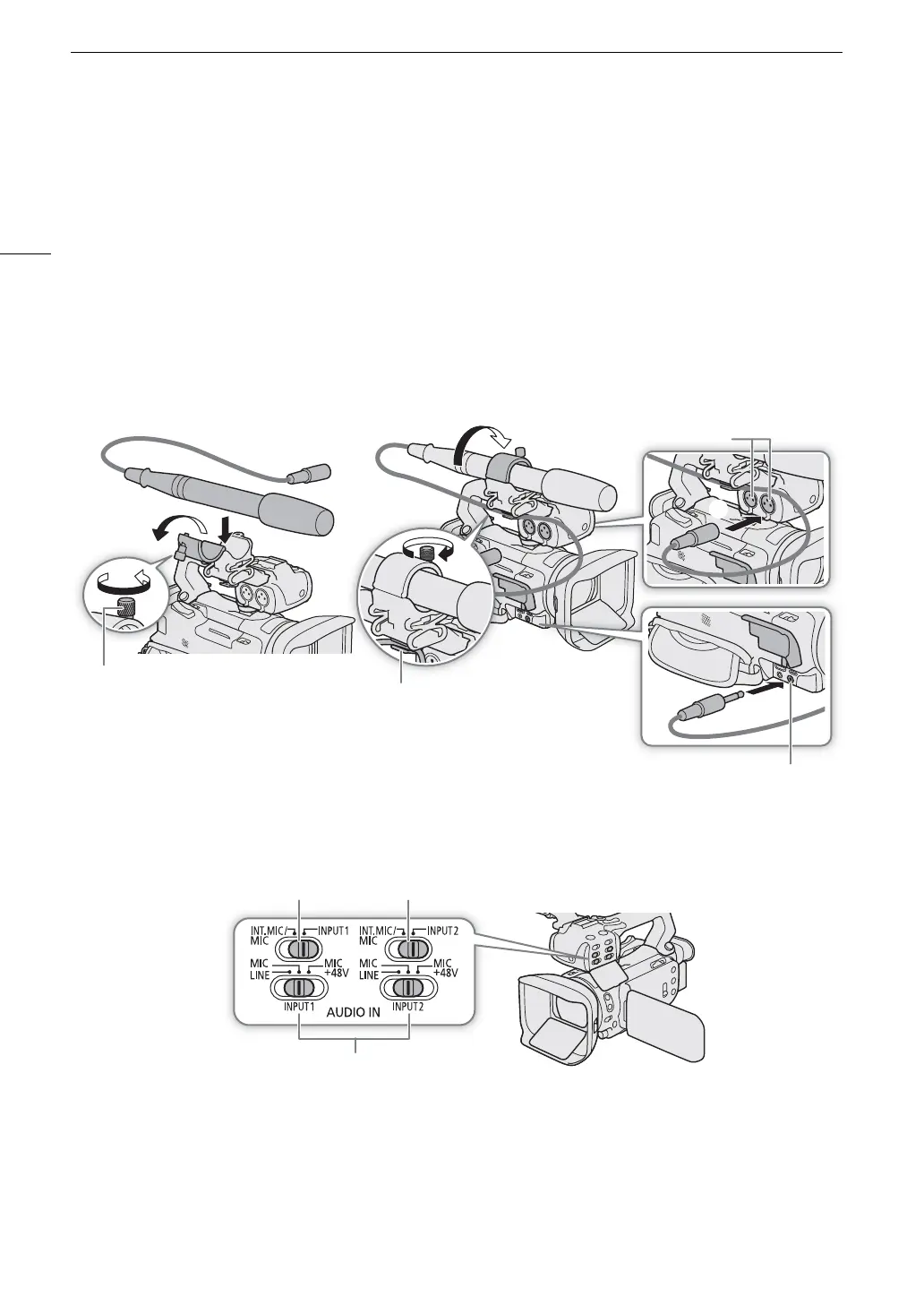
Follow the procedure below to attach a microphone (refer also to the following illustration). To connect an
external device to the camcorder, plug the device’s cable into the desired INPUT terminal (햵).
1Loosen the microphone lock screw (햲), open the microphone holder and insert the microphone (햳).
2 Tighten the lock screw and put the microphone cable through the microphone cable clamp under
the microphone holder (햴).
3 Plug the microphone cable into the desired INPUT terminal (햵) or the MIC terminal (햶).
Recording Audio from the INPUT Terminals to CH1/CH2
1 Set the corresponding AUDIO IN switch to INPUT 1 or INPUT 2.
• You can record the audio input from the INPUT terminals also to CH3/CH4 (A 77).
2To select the audio source, set the corresponding INPUT switch to MIC (microphone) or LINE (audio
device).
• To supply a microphone with phantom power, set the switch to MIC+48V instead. Make sure to connect the
microphone first, before turning the phantom power on. Keep the microphone connected when turning off
the phantom power.
Microphone lock screw
Cable clamp
INPUT 2 / INPUT 1 terminals
MIC terminal
INPUT 1 / INPUT 2 switches
AUDIO IN switches (audio input selection)
for INPUT 1 for INPUT 2



 To Next Page