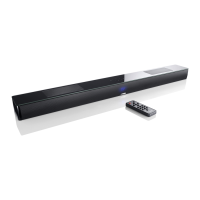
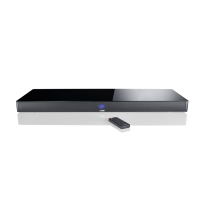
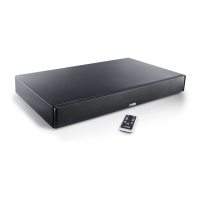
This document describes the Canton Digital Movie 50 soundbar, a device designed to enhance audio experiences for home cinema and music listening. The manual provides comprehensive instructions for unpacking, installation, connection, operation, and troubleshooting, ensuring users can maximize the performance of their loudspeaker.
Function Description
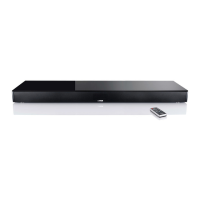
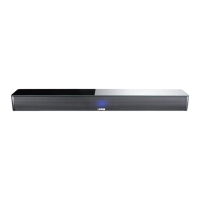
The Canton Digital Movie 50 is a soundbar system that combines high-quality components with advanced development experience and meticulous production methods to deliver pure music and immersive sound. It features three optional inputs, allowing for flexible connectivity with various audio sources. The system is designed for indoor use and should be positioned on a flat surface beneath a screen, supporting up to 40 kg.
The soundbar offers multiple playback modes, including Stereo for music and Surround for virtual surround sound in home cinema settings. It also includes sound adjustments for Bass and Treble, allowing users to fine-tune the audio output to their preferences. The system can be controlled via a supplied remote control, which features dedicated buttons for power, mute, input selection, volume control, play mode, sound adjustments, and Bluetooth pairing.
A key feature of the Digital Movie 50 is its Bluetooth connectivity, enabling wireless playback from mobile devices. The system supports Bluetooth 2.0 and aptX® software, ensuring high-quality audio streaming. The registration process for Bluetooth pairing is straightforward, guiding users through selecting the Bluetooth input, pressing the pairing button, and connecting their mobile device. Once paired, the system automatically connects to the most recently used device when Bluetooth is active.
The soundbar also incorporates an IR learning function, allowing it to learn the infrared codes from a TV remote control. This feature enables users to control both the soundbar and their TV with a single remote, simplifying their entertainment setup. Users can allocate soundbar functions to any key on their TV remote, with instructions provided to avoid conflicts with TV device functions.
Extended sound functions are accessible through a dedicated menu, offering options to correct out-of-sync playback (LIP), activate an external subwoofer output (SUB OUT), and adjust playback settings based on the listening environment (EQ settings). The EQ settings provide three pre-set equalizer configurations: EQ-1 for free-standing placement (factory setting), EQ-2 for placement with a flat-screen TV on top, and EQ-3 for placement in a rack or on a shelf.
Important Technical Specifications
- Inputs:
- TV (optical digital audio)
- DVD (coaxial digital audio)
- AUX (analogue stereo RCA)
- Outputs:
- SUB OUT (analogue for external active subwoofer)
- Power Supply: 100-240V~, 50/60Hz, 150W
- Bluetooth: Version 2.0, aptX® software, maximum range 10m
- Remote Control Battery: CR 2032 (coin/button cell)
- Maximum Supported Weight: 40 kg (when placed beneath a screen)
- Dimensions: Not explicitly stated, but designed to be placed under a TV.
- Sound Adjustments: Bass (+6 to -6 dB), Treble (+6 to -6 dB)
- Playback Delay Adjustment: 10 ms steps (via LIP function)
- Subwoofer Crossover Frequency: 80 Hz (when SUB OUT is activated)
Usage Features
- Easy Setup: The manual provides clear instructions for unpacking and installing the soundbar, including recommended placement under a TV screen.
- Multiple Connectivity Options: Users can connect their TV, Blu-Ray/DVD player, or other audio devices using optical, coaxial, or analogue RCA inputs.
- Wireless Audio Streaming: Bluetooth connectivity allows for convenient playback from smartphones, tablets, and other Bluetooth-enabled devices.
- Intuitive Remote Control: The supplied remote control offers direct access to essential functions like power, volume, input selection, and sound modes.
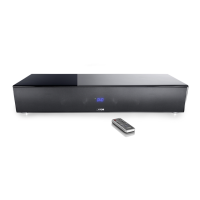
- Multifunctional Display: A blue-lit display provides visual feedback on selected inputs, volume levels, sound modes, and Bluetooth status.
- Customizable Sound: Bass and Treble adjustments, along with pre-set equalizer settings (EQ-1, EQ-2, EQ-3), allow users to tailor the sound to their listening preferences and room acoustics.
- External Subwoofer Support: An analogue SUB OUT allows for the connection of an external active subwoofer, enhancing bass performance. This feature needs to be activated via the extended functions menu.
- IR Learning Function: The soundbar can learn commands from a TV remote, enabling a single remote to control both devices. This feature helps declutter the living space and simplifies operation.
- Breaking-in Period: A recommended breaking-in time of 15-20 operating hours at normal volume is suggested to achieve maximum sound quality.
- Safety Instructions: Comprehensive safety advice is provided, covering positioning, maintenance, electrical safety, and battery handling.
Maintenance Features
- Cleaning: The apparatus should only be cleaned with a clean, dry cloth. Aggressive, alcohol-based, or abrasive cleaning agents should not be used.
- Battery Replacement: Instructions for replacing the remote control battery (CR 2032) are provided, emphasizing correct polarity.
- Troubleshooting Guide: A detailed troubleshooting section helps users diagnose and resolve common issues such as the device not turning on, low sound reproduction, remote control unresponsiveness, no sound output, and humming noises.
- Service and Support: Users are advised to contact their Canton dealer or the Service Hotline for further questions or in case of damage.
- Environmental Responsibility: The manual highlights the importance of environmentally friendly operation, including using the stand-by function to minimize electricity usage and proper disposal of batteries and the device itself at designated collection points.
- Product Longevity: Advice on avoiding direct sunlight, extreme cold, and vibrations, as well as not opening the housing, contributes to the device's lifespan.
- Cable Management: Recommendations include using shorter signal lines and fault-protected cables to prevent issues like humming and ensure optimal signal transmission.
- Firmware/Software: While not explicitly detailed, the mention of aptX® software implies potential for updates or specific software-related maintenance, though user-level interaction with this is not described.


 To Next Page

 General