3
15
English
14
English
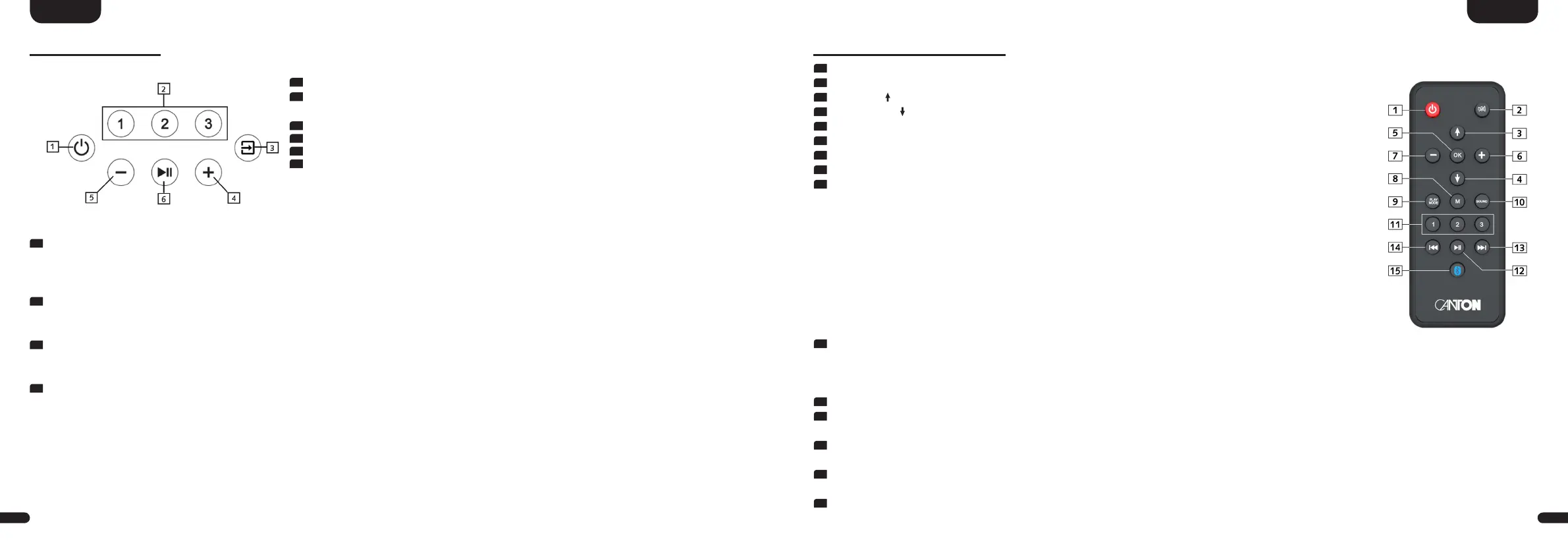
Remote Control
1
Power Toggles Soundbar status (on/standby)
2
Mute
Mutes audio
3
Upwards
[ ]
Sets input or menu item upwards
4
Downwards
[ ]
Sets input or menu item downwards
5
OK Enters next menu level (confirms selection)
6
Plus [+] Increases volume or menu value
7
Minus [-] Decreases volume or menu value
8
Menu Enters settings menu or previous menu level
9
Play Mode Toggles btw� the several play modes:
Stereo For stereo playback
Movie Virtual surround sound for movies
Music Virtual surround sound for concert audio playback etc�
Discrete Surround sound for movies and concert audio playback etc�
(Play mode only available with connected surround speakers)
Party Plays the front channels (FL+FR) additionally on the surround speakers�
(Play mode only available with connected surround speakers)
Night (Virtual) surround sound with reduced dynamic and higher speech intelligibility at low
volume levels for "night usage"
Pure Direct Surround sound without usage of a virtualizer or upmixer
10
Sound Toggles btw� bass, midrange and treble tone control settings:
Bass Bass adjustment from -10dB to +10dB
Midrange Midrange adjustment from -10dB to +10dB
Treble Treble adjustment from -10dB to +10dB
11
Preset Preset keys for direct access of previously stored (sound)settings and Spotify playlists
12
Play/Pause Play/Pause function for Chromecast built-in, Spotify Connect, AirPlay and Bluetooth
®
wireless technology
13
Skip FW Skip forward function for Chromecast built-in, Spotify Connect, AirPlay and Bluetooth
®
wireless technology
14
Skip BW Skip backward function for Chromecast built-in, Spotify Connect, AirPlay and Bluetooth
®
wireless technology
15
Bluetooth Pairing Initializes the pairing process with a (mobile) device
Touch Keys
1
Power: Toggles power status between On and Standby
2
Preset 1–3: Preset keys for direct access of previously stored sound settings and
Spotify playlists
3
Input: Toggles through the inputs
4
Plus: Increase main volume
5
Minus: Decrease main volume
6
Play/Pause: Play/Pause function for Chromecast built-in,
Spotify Connect, AirPlay and Bluetooth
®
wireless technology
Menu control:
1
Input
• Get to the menu (press and hold for 3 seconds)
• One level back in the menu
• Exit the menu (press and hold for 3 seconds)
2
Plus
• Menu selection upwards
• Increase menu value
3
Minus
• Menu selection downwards
• Decrease menu value
4
Play/Pause
• Continue to the next menu level
• Confirm selection


 To Next Page
 Loading...

