17
Instruction manual C2105/C2106
Please keep this instruction manual for future reference
TIMER BUTTON
SETTING THE TIME
Press for 3sec to set current time. Adjust time by pressing + / - .and press SELECT to
conrm setting.
SETTING TIMER
Press to bring up DURATION. The display will ash ”0:00”. Adjust time by pressing + / - and
then press SELECT to set the duration. Once the time is up, an alarm will sound and the oven will
switch off. Press any button to cancel the alarm. If you wish to cancel the alarm before it sounds,
set time back to “0:00” to cancel.
SAFETY LOCK
Pressing SELECT for 5 seconds to enter or cancel the safety lock function.
TEMPERATURE SETTING.
Once the function is selected, press ºC to set the temperature. Adjust temperature by pressing
+ / - and press SELECT to conrm. Press the button to then start cooking.
BOOST FUNCTION
If temperature is set to more than 100ºC, you can press this key to heat up oven faster. Once
activated the display will show
The Boost function will stop when the oven gets to the required temperature.
LIGHT FUNCTION .
Press the light button to turn the internal oven light on/off. The light will automatically turn off if
no operation in 3 minutes.
SETTING THE ALARM/MINUTE MINDER.
By pressing the button twice, this takes you to the minute minder function and the will
appear. Press the + / - button to select the time and press SELECT to conrm. Once the time runs
out an alarm will sound, press any button to turn the alarm off. The oven will continue to run.
4. Timer button.
Setting the time - Press for 3sec to set current time. Adjust time by pressing / . And press
to confirm setting.
Setting timer/alarm. Press to bring up . The display will flash ”0:00”. Adjust time by
pressing / and then press to set the duration. Once the time is up, an alarm will sound and the oven
will switch off. Press any button to cancel the alarm. If you wish to cancel the alarm before it sounds, set time
back to “0:00” to cancel.
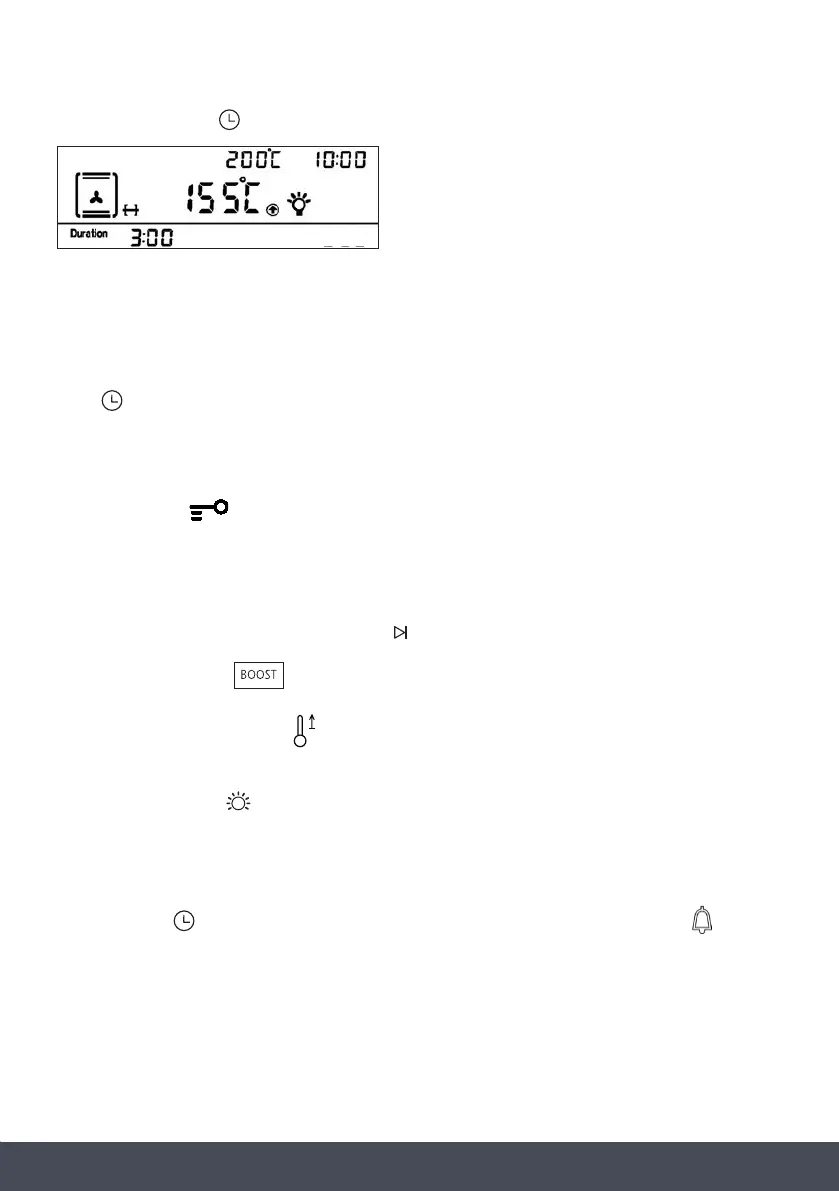
Automatic cooking - Once the time has been set, press the until the time starts to flash.
Adjust the end time by pressing / and press to confirm.
Oven start time = End time – Duration time.
5. Safety Lock . Pressing
for 5sec to enter or cancel the safety lock function.
6. Temperature Setting. Once the function is selected, press to set the temperature. Adjust temperature
by pressing / and press to confirm. Press the button to then start cooking.
7. Boost function . If temperature is set to more than 100°C, you can press this key to heat up
oven faster. Once activated the display will show . The Boost function will stop when the oven gets to
the required temperature.
8. Light function . Press the light button to turn the internal oven light on/off. The light will automatically
turn off if no operation in 3 minutes.
4. Timer button.
Setting the time - Press for 3sec to set current time. Adjust time by pressing / . And press
to confirm setting.
Setting timer/alarm. Press to bring up . The display will flash ”0:00”. Adjust time by
pressing / and then press to set the duration. Once the time is up, an alarm will sound and the oven
will switch off. Press any button to cancel the alarm. If you wish to cancel the alarm before it sounds, set time
back to “0:00” to cancel.
Automatic cooking - Once the time has been set, press the until the time starts to flash.
Adjust the end time by pressing / and press to confirm.
Oven start time = End time – Duration time.
5. Safety Lock . Pressing
for 5sec to enter or cancel the safety lock function.
6. Temperature Setting. Once the function is selected, press to set the temperature. Adjust temperature
by pressing / and press to confirm. Press the button to then start cooking.
7. Boost function . If temperature is set to more than 100°C, you can press this key to heat up
oven faster. Once activated the display will show . The Boost function will stop when the oven gets to
the required temperature.
8. Light function . Press the light button to turn the internal oven light on/off. The light will automatically
turn off if no operation in 3 minutes.
4. Timer button.
Setting the time - Press for 3sec to set current time. Adjust time by pressing / . And press
to confirm setting.
Setting timer/alarm. Press to bring up . The display will flash ”0:00”. Adjust time by
pressing / and then press to set the duration. Once the time is up, an alarm will sound and the oven
will switch off. Press any button to cancel the alarm. If you wish to cancel the alarm before it sounds, set time
back to “0:00” to cancel.
Automatic cooking - Once the time has been set, press the until the time starts to flash.
Adjust the end time by pressing / and press to confirm.
Oven start time = End time – Duration time.
5. Safety Lock . Pressing
for 5sec to enter or cancel the safety lock function.
6. Temperature Setting. Once the function is selected, press to set the temperature. Adjust temperature
by pressing / and press to confirm. Press the button to then start cooking.
7. Boost function . If temperature is set to more than 100°C, you can press this key to heat up
oven faster. Once activated the display will show . The Boost function will stop when the oven gets to
the required temperature.
8. Light function . Press the light button to turn the internal oven light on/off. The light will automatically
turn off if no operation in 3 minutes.
4. Timer button.
Setting the time - Press for 3sec to set current time. Adjust time by pressing / . And press
to confirm setting.
Setting timer/alarm. Press to bring up . The display will flash ”0:00”. Adjust time by
pressing / and then press to set the duration. Once the time is up, an alarm will sound and the oven
will switch off. Press any button to cancel the alarm. If you wish to cancel the alarm before it sounds, set time
back to “0:00” to cancel.
Automatic cooking - Once the time has been set, press the until the time starts to flash.
Adjust the end time by pressing / and press to confirm.
Oven start time = End time – Duration time.
5. Safety Lock . Pressing
for 5sec to enter or cancel the safety lock function.
6. Temperature Setting. Once the function is selected, press to set the temperature. Adjust temperature
by pressing / and press to confirm. Press the button to then start cooking.
7. Boost function . If temperature is set to more than 100°C, you can press this key to heat up
oven faster. Once activated the display will show . The Boost function will stop when the oven gets to
the required temperature.
8. Light function . Press the light button to turn the internal oven light on/off. The light will automatically
turn off if no operation in 3 minutes.
4. Timer button.
Setting the time - Press for 3sec to set current time. Adjust time by pressing / . And press
to confirm setting.
Setting timer/alarm. Press to bring up . The display will flash ”0:00”. Adjust time by
pressing / and then press to set the duration. Once the time is up, an alarm will sound and the oven
will switch off. Press any button to cancel the alarm. If you wish to cancel the alarm before it sounds, set time
back to “0:00” to cancel.
Automatic cooking - Once the time has been set, press the until the time starts to flash.
Adjust the end time by pressing / and press to confirm.
Oven start time = End time – Duration time.
5. Safety Lock . Pressing
for 5sec to enter or cancel the safety lock function.
6. Temperature Setting. Once the function is selected, press to set the temperature. Adjust temperature
by pressing / and press to confirm. Press the button to then start cooking.
7. Boost function . If temperature is set to more than 100°C, you can press this key to heat up
oven faster. Once activated the display will show . The Boost function will stop when the oven gets to
the required temperature.
8. Light function . Press the light button to turn the internal oven light on/off. The light will automatically
turn off if no operation in 3 minutes.
2
1. Power button . To turn on/off the display panel. When turned on, the time of day will be shown.
2. Programme button . Press to shift between functions. When you shift to a new function, the
current function will stop and the cooking time must be reset. The Function list is as per the below order:
3. Start/Pause button . Once the required function has been selected, press to start cooking.
Once cooking has started the display will show the current oven temperature. For example;
when the oven is paused, the display will show the current time. For example;
4. Timer button.
Setting the time - Press for 3sec to set current time. Adjust time by pressing / . And press
to confirm setting.
Setting timer/alarm. Press to bring up . The display will flash ”0:00”. Adjust time by
pressing / and then press to set the duration. Once the time is up, an alarm will sound and the oven
will switch off. Press any button to cancel the alarm. If you wish to cancel the alarm before it sounds, set time
back to “0:00” to cancel.
Automatic cooking - Once the time has been set, press the until the time starts to flash.
Adjust the end time by pressing / and press to confirm.
Oven start time = End time – Duration time.
5. Safety Lock . Pressing
for 5sec to enter or cancel the safety lock function.
6. Temperature Setting. Once the function is selected, press to set the temperature. Adjust temperature
by pressing / and press to confirm. Press the button to then start cooking.
7. Boost function . If temperature is set to more than 100°C, you can press this key to heat up
oven faster. Once activated the display will show . The Boost function will stop when the oven gets to
the required temperature.
8. Light function . Press the light button to turn the internal oven light on/off. The light will automatically
turn off if no operation in 3 minutes.
button twice, this takes you to the
minute minder function and the
will appear. Press the +
+ // -- buttons to select the time
Setting the alarm/minute minder
By pressing the
4. Timer button.
Setting the time - Press for 3sec to set current time. Adjust time by pressing / . And press
to confirm setting.
Setting timer/alarm. Press to bring up . The display will flash ”0:00”. Adjust time by
pressing / and then press to set the duration. Once the time is up, an alarm will sound and the oven
will switch off. Press any button to cancel the alarm. If you wish to cancel the alarm before it sounds, set time
back to “0:00” to cancel.
Automatic cooking - Once the time has been set, press the until the time starts to flash.
Adjust the end time by pressing / and press to confirm.
Oven start time = End time – Duration time.
5. Safety Lock . Pressing
for 5sec to enter or cancel the safety lock function.
6. Temperature Setting. Once the function is selected, press to set the temperature. Adjust temperature
by pressing / and press to confirm. Press the button to then start cooking.
7. Boost function . If temperature is set to more than 100°C, you can press this key to heat up
oven faster. Once activated the display will show . The Boost function will stop when the oven gets to
the required temperature.
8. Light function . Press the light button to turn the internal oven light on/off. The light will automatically
turn off if no operation in 3 minutes.
4. Timer button.
Setting the time - Press for 3sec to set current time. Adjust time by pressing / . And press
to confirm setting.
Setting timer/alarm. Press to bring up . The display will flash ”0:00”. Adjust time by
pressing / and then press to set the duration. Once the time is up, an alarm will sound and the oven
will switch off. Press any button to cancel the alarm. If you wish to cancel the alarm before it sounds, set time
back to “0:00” to cancel.
Automatic cooking - Once the time has been set, press the until the time starts to flash.
Adjust the end time by pressing / and press to confirm.
Oven start time = End time – Duration time.
5. Safety Lock . Pressing
for 5sec to enter or cancel the safety lock function.
6. Temperature Setting. Once the function is selected, press to set the temperature. Adjust temperature
by pressing / and press to confirm. Press the button to then start cooking.
7. Boost function . If temperature is set to more than 100°C, you can press this key to heat up
oven faster. Once activated the display will show . The Boost function will stop when the oven gets to
the required temperature.
8. Light function . Press the light button to turn the internal oven light on/off. The light will automatically
turn off if no operation in 3 minutes.
4. Timer button.
Setting the time - Press for 3sec to set current time. Adjust time by pressing / . And press
to confirm setting.
Setting timer/alarm. Press to bring up . The display will flash ”0:00”. Adjust time by
pressing / and then press to set the duration. Once the time is up, an alarm will sound and the oven
will switch off. Press any button to cancel the alarm. If you wish to cancel the alarm before it sounds, set time
back to “0:00” to cancel.
Automatic cooking - Once the time has been set, press the until the time starts to flash.
Adjust the end time by pressing / and press to confirm.
Oven start time = End time – Duration time.
5. Safety Lock . Pressing
for 5sec to enter or cancel the safety lock function.
6. Temperature Setting. Once the function is selected, press to set the temperature. Adjust temperature
by pressing / and press to confirm. Press the button to then start cooking.
7. Boost function . If temperature is set to more than 100°C, you can press this key to heat up
oven faster. Once activated the display will show . The Boost function will stop when the oven gets to
the required temperature.
8. Light function . Press the light button to turn the internal oven light on/off. The light will automatically
turn off if no operation in 3 minutes.
4. Timer button.
Setting the time - Press for 3sec to set current time. Adjust time by pressing / . And press
to confirm setting.
Setting timer/alarm. Press to bring up . The display will flash ”0:00”. Adjust time by
pressing / and then press to set the duration. Once the time is up, an alarm will sound and the oven
will switch off. Press any button to cancel the alarm. If you wish to cancel the alarm before it sounds, set time
back to “0:00” to cancel.
Automatic cooking - Once the time has been set, press the until the time starts to flash.
Adjust the end time by pressing / and press to confirm.
Oven start time = End time – Duration time.
5. Safety Lock . Pressing
for 5sec to enter or cancel the safety lock function.
6. Temperature Setting. Once the function is selected, press to set the temperature. Adjust temperature
by pressing / and press to confirm. Press the button to then start cooking.
7. Boost function . If temperature is set to more than 100°C, you can press this key to heat up
oven faster. Once activated the display will show . The Boost function will stop when the oven gets to
the required temperature.
8. Light function . Press the light button to turn the internal oven light on/off. The light will automatically
turn off if no operation in 3 minutes.
4. Timer button.
Setting the time - Press for 3sec to set current time. Adjust time by pressing / . And press
to confirm setting.
Setting timer/alarm. Press to bring up . The display will flash ”0:00”. Adjust time by
pressing / and then press to set the duration. Once the time is up, an alarm will sound and the oven
will switch off. Press any button to cancel the alarm. If you wish to cancel the alarm before it sounds, set time
back to “0:00” to cancel.
Automatic cooking - Once the time has been set, press the until the time starts to flash.
Adjust the end time by pressing / and press to confirm.
Oven start time = End time – Duration time.
5. Safety Lock . Pressing
for 5sec to enter or cancel the safety lock function.
6. Temperature Setting. Once the function is selected, press to set the temperature. Adjust temperature
by pressing / and press to confirm. Press the button to then start cooking.
7. Boost function . If temperature is set to more than 100°C, you can press this key to heat up
oven faster. Once activated the display will show . The Boost function will stop when the oven gets to
the required temperature.
8. Light function . Press the light button to turn the internal oven light on/off. The light will automatically
turn off if no operation in 3 minutes.
4. Timer button.
Setting the time - Press for 3sec to set current time. Adjust time by pressing / . And press
to confirm setting.
Setting timer/alarm. Press to bring up . The display will flash ”0:00”. Adjust time by
pressing / and then press to set the duration. Once the time is up, an alarm will sound and the oven
will switch off. Press any button to cancel the alarm. If you wish to cancel the alarm before it sounds, set time
back to “0:00” to cancel.
Automatic cooking - Once the time has been set, press the until the time starts to flash.
Adjust the end time by pressing / and press to confirm.
Oven start time = End time – Duration time.
5. Safety Lock . Pressing
for 5sec to enter or cancel the safety lock function.
6. Temperature Setting. Once the function is selected, press to set the temperature. Adjust temperature
by pressing / and press to confirm. Press the button to then start cooking.
7. Boost function . If temperature is set to more than 100°C, you can press this key to heat up
oven faster. Once activated the display will show . The Boost function will stop when the oven gets to
the required temperature.
8. Light function . Press the light button to turn the internal oven light on/off. The light will automatically
turn off if no operation in 3 minutes.
2
1. Power button .To turn on/off the display panel. When turned on, the time of day will be shown.
2. Programme button . Press to shift between functions. When you shift to a new function, the
current function will stop and the cooking time must be reset. The Function list is as per the below order:
3. Start/Pause button . Once the required function has been selected, press to start cooking.
Once cooking has started the display will show the current oven temperature. For example;
when the oven is paused, the display will show the current time. For example;
and press SSeelleecctt to confirm. Once the time runs out an alarm will sound, press any button
to turn the alarm off. The oven will continue to run.


 To Next Page
 Loading...