14 15Instruction manual C809C Instruction manual C809CPlease keep this instruction manual for future reference Please keep this instruction manual for future reference
USING YOUR CERAMIC HOB
› Read this guide, taking special note of the ‘Safety Warnings’ section.
› Remove any protective film that may still be on your ceramic hob.
CHOOSING THE RIGHT COOKWARE
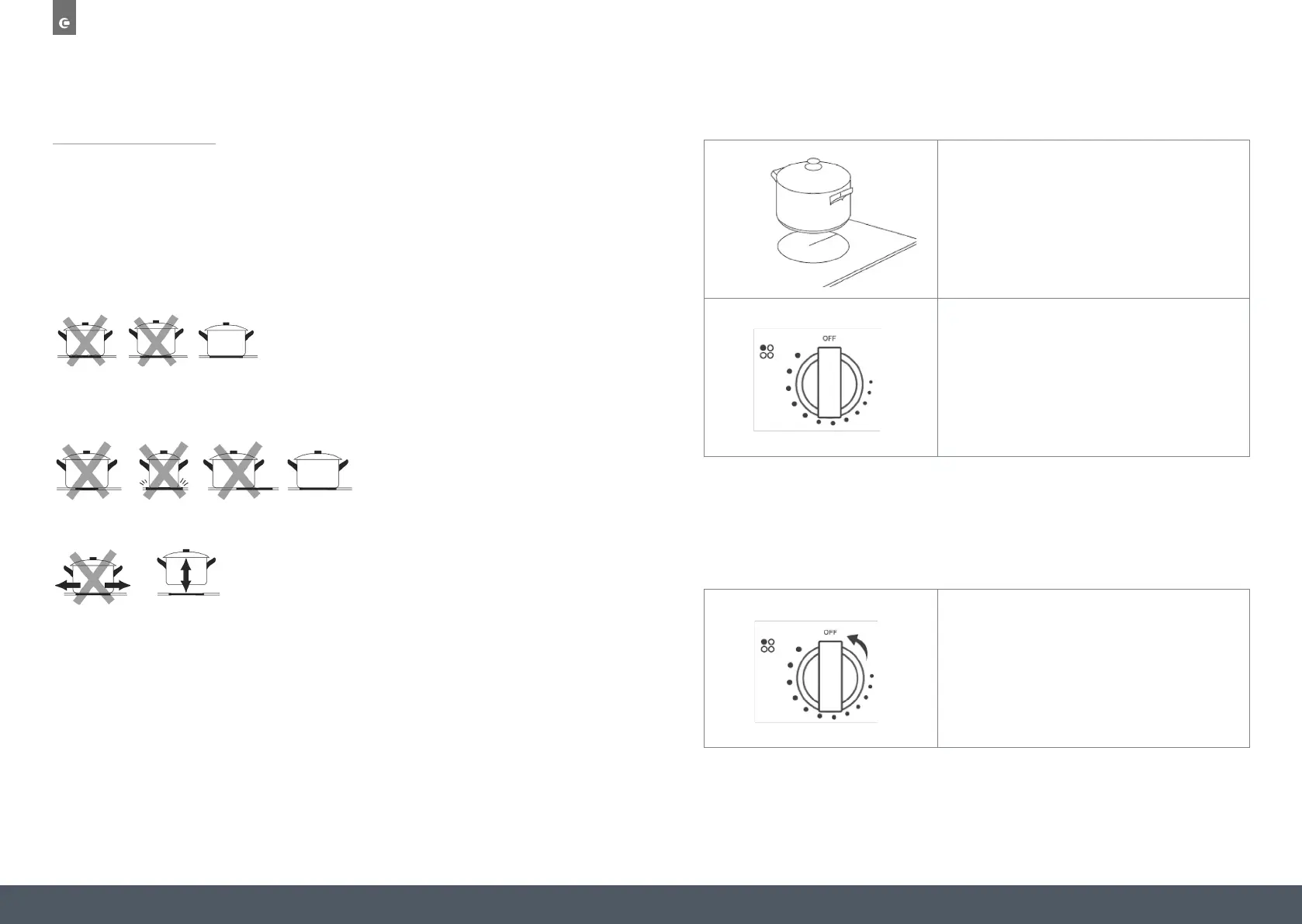
Do not use cookware with jagged edges or a curved base.
Make sure that the base of your pan is smooth, sits flat against the glass, and is the same size
as the cooking zone. Always centre your pan on the cooking zone.
Always lift pans off the ceramic hob – do not slide them or they may scratch the glass.
TO START COOKING
Place a suitable pan on the cooking zone that you wish to use.
Make sure both the bottom of the pan and the surface of the
cooking zone are clean and dry.
Turn on and adjust the power by turning the control knob to the
desired level.
Turn the cooking zone off by turning the control knob to “OFF“.
HOT ZONE WARNING INDICATOR
When the cooking zone is hot, the warning indicator will light. Don’t touch the glass surface
until the indicator goes out. It can also be used as an energy saving function. If you want to
heat further pans, use the zone that is still hot.


 To Next Page