13
Please keep this instruction manual for future reference Instruction manual CM465 / CM465SS / CM465GM
OPERATION
MENU
EXIT
OK
6 8
OK
10 11
PREPARING COFFEE (USING COFFEE BEANS)
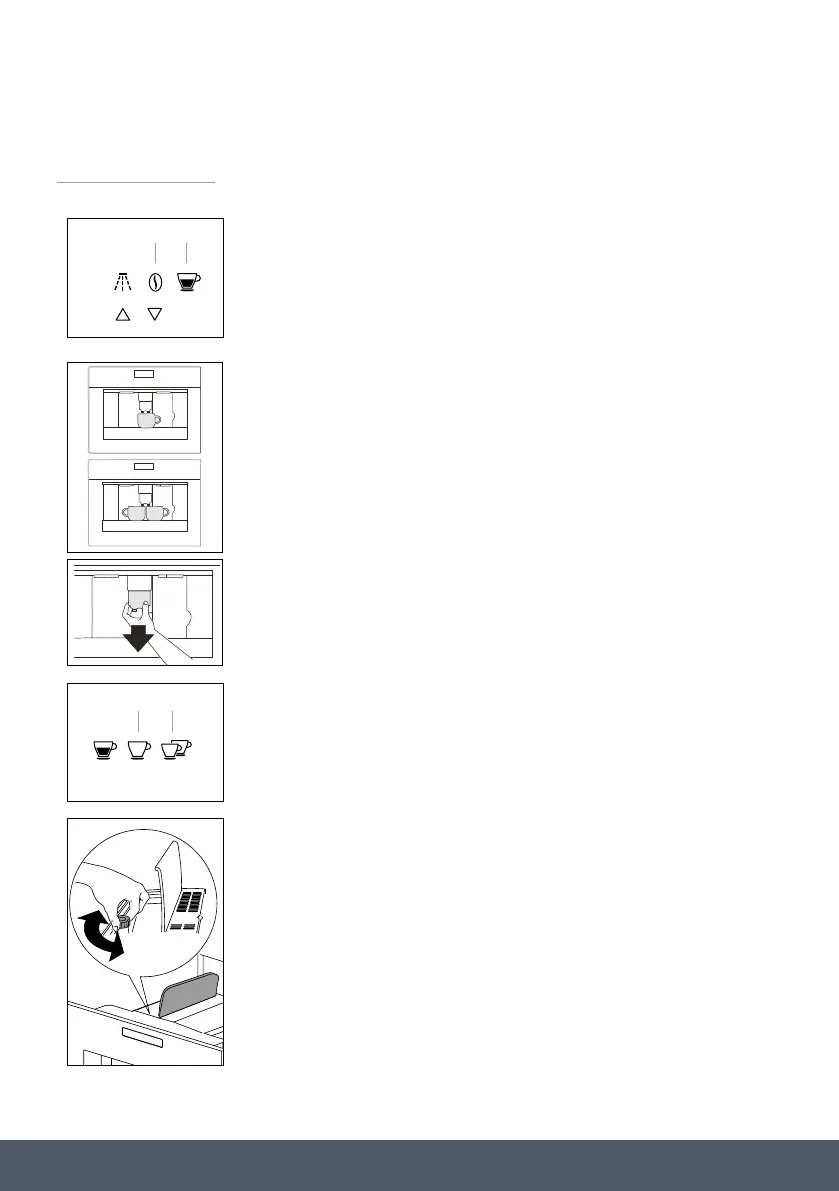
› The appliance is preset to make coffee with a normal taste. You
can also choose coffee with an extra mild, mild, standard, strong
or extra-strong taste. There is also a pre-ground coffee option.
› To choose the required taste, continually press the touch key
‘Coffee strength’ (6) until the required coffee taste is displayed.
1. Place 1 cup under the spouts to make 1 coffee or 2 cups for
2 coffees.
2. Lower the spouts as near as possible to the cup for a
creamier coffee.
3. Press the ‘type of coffee’ touch key (8) to select the type of coffee:
› ESPRESSO CUP
› SMALL CUP
› MEDIUM CUP
› LARGE CUP
› MUG
4. Press the ‘deliver one cup of coffee’ touch key (10) if you want to
make one coffee and the ‘two cup of coffee’ touch key (11) if you
want to make two coffees.
› The appliance now grinds the beans and starts delivering the
coffee into the cup.
› Once the set amount of coffee has been delivered, the machine
stops delivery automatically and expels the exhausted waste
coffee into the waste coffee container.
› After a few seconds, the appliance is ready for use again.
› To turn the appliance off, press the ‘On-off’ button (Aa / see
page 5). Before going off, the appliance performs an automatic
rinse cycle. Take care to avoid scalds.
EN 11
WARNING: To prevent malfunctions, never fill with ground coffee, frozen or caramelised
coffee beans or anything else that could damage the appliance.
• When using the appliance for the first time, you need to make 4-5 cups of coffee and 4-5
cappuccinos before the appliance gives satisfactory results.
• Each time you turn the coffee maker on by the main switch (A), it performs a “SELF-
DIAGNOSIS” cycle and then goes off. To turn it on again, press the On/off button (Aa).
Operation
Preparing coffee (using coffee beans)
• The appliance is preset to make coffee with a normal taste. You can
also choose coffee with an extra mild, mild, standard, strong or
extra-strong taste. There is also a pre-ground coffee option.
• To choose the required taste, continually press the touch key
‘Coffee strength’ (6) until the required coffee taste is displayed.
1. Place 1 cup under the spouts to make 1 coffee or 2 cups for
2 coffees.
2. Lower the spouts as near as possible to the cup for a creamier
coffee.
3. Press the ‘type of coffee’ touch key (8) to select the type of coffee:
• ESPRESSO CUP
• SMALL CUP
• MEDIUM CUP
• LARGE CUP
• MUG
4. Press the ‘one cup of coffee deliver’ touch key (10) if you want to
make one coffee and the ‘two cup of coffee deliver’ touch key (11)
if you want to make two coffees.
• The appliance now grinds the beans and starts delivering the coffee
into the cup.
• Once the set amount of coffee has been delivered, the machine
stops delivery automatically and expels the exhausted waste coffee
into the waste coffee container.
USE
6 8
10 11
TTiippss
RREEPPLLAACCEE
WWIITTHH OOUURR
AARRTTWWOORRKK
EN 12
USE
• After a few seconds, the appliance is ready for use again.
• To turn the appliance off, press the ‘On-off’ button (Aa / see page 5).
Before going off, the appliance performs an automatic rinse cycle.
Take care to avoid scalds.
• If the coffee only comes out in drips or not at all, the knob for setting
the grind level must be turned by one position clockwise (see
“Setting the grind level” ). Turn one click at a time until the coffee is
delivered satisfactorily.
• If the coffee comes out too fast and the cream does not meet your
taste, turn the knob by one position anti-clockwise). Make sure that
you do not turn the knob for setting the grind level too far, as coffee
may come out in drips when dispensing 2 cups.
Tips to make hotter coffee
• After 3 minutes since you last made coffee, you can preheat the
brewing unit by using the menu setting “RINSING (see Rinsing). Run
off the water into the underlying drip tray or alternatively use this
water to fi ll (and then empty) the cup to be used for the coffee.
• Do not use cups that are too thick, as they will absorb too much
heat.
• Y ou can stop the coffee from dispensing by pressing the ‘One cup of
coffee deliver’ touch key (10) or ‘Two cup of coffee deliver’ touch key
(11) again, or by selecting “ESPRESSO CUP” with the ‘Type/quantity
of coffee’ touch key (8).
• After the coffee has finished dispensing (the progress bar reaches
100%), you can increase the amount of coffee by pressing and
holding the ‘One cup of coffee’ touch key until the desired amount of
coffee is reached.
• When the display shows the message “FILL TANK!”, you must fill the
tank, otherwise the appliance cannot make any coffee.
It is normal that there is some water left in the water tank when the
message is displayed.
• Every 14 single coffees (or 7 doubles) the appliance displays
“EMPTY WASTE COFFEE CONTAINER”. This means that the waste
coffee container is full and must be emptied and cleaned.


 To Next Page
 Loading...


