Instruction manual CM465 / CM465SS / CM465GM14 Please keep this instruction manual for future reference
› If the coffee only comes out in drips or not at all, the knob for setting the grind level
must be turned by one position clockwise (see “Setting the grind level” ). Turn one click
at a time until the coffee is delivered satisfactorily.
› If the coffee comes out too fast and the cream does not meet your taste, turn the knob
by one position anti-clockwise). Make sure that you do not turn the knob for setting the
grind level too far, as coffee may come out in drips when dispensing 2 cups.
TIPS TO MAKE HOTTER COFFEE:
› 3 minutes after your last made coffee, you can preheat the brewing unit by using the
menu setting “RINSING (see Rinsing). Run off the water into the underlying drip tray or
alternatively use this water to fill (and then empty) the cup to be used for the coffee.
› Do not use cups that are too thick, as they will absorb too much heat.
› You can stop the coffee from dispensing by pressing the ‘deliver one cup of coffee’ touch key
(10) or ‘Two cup of coffee’ touch key (11) again, or by selecting “ESPRESSO CUP” with the
‘Type/quantity of coffee’ touch key (8).
› After the coffee has finished dispensing (the progress bar reaches 100%), you can increase
the amount of coffee by pressing and holding the ‘One cup of coffee’ touch key until the
desired amount of coffee is reached.
› When the display shows the message “FILL TANK!”, you must fill the tank, otherwise the
appliance cannot make any coffee. It is normal that there is some water left in the water
tank when the message is displayed.
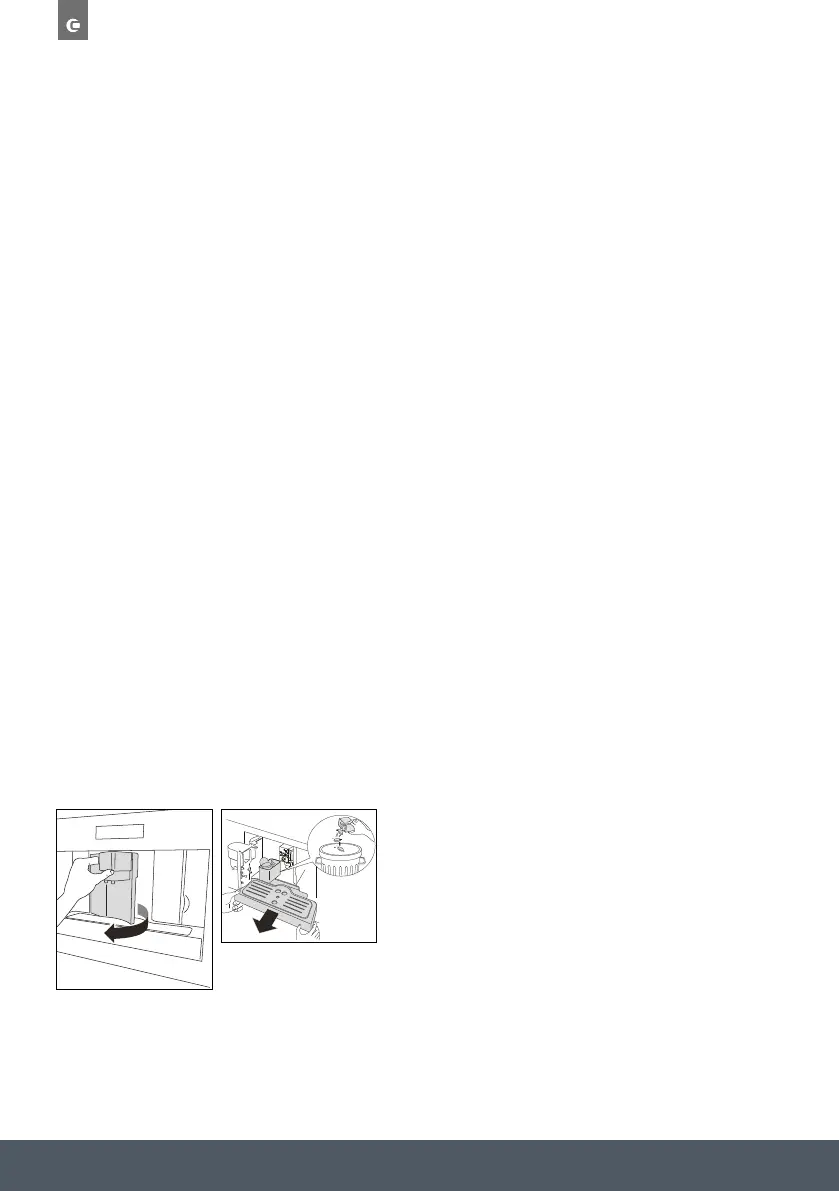
› Every 14 single coffees (or 7 doubles) the appliance displays “EMPTY WASTE COFFEE
CONTAINER”. This means that the waste coffee container is full and must be emptied
and cleaned.
EN 13
USE
• The appliance counts the number of coffees made. As long as the
waste coffee container is not cleaned, this message remains in
place and the coffee machine cannot make any coffee. To clean,
open the service door at the front by pulling the coffee spout,
remove the drip tray, empty it and clean it.
Important!
Always completely extract the drip tray, to avoid that it falls when
removing the grounds container. Empty the grounds container and
clean thoroughly, making sure all residues deposited on the bottom
are removed.
Every time you pull the drip tray out, the waste coffee container
must also be emptied, even if it is not completely full. If this
process is not carried out, the waste coffee container may overfi ll
when coffee is made and the machine may get blocked.
Never remove the water tank when the appliance is dispensing
coffee. Otherwise, the appliance will not be able to make the
coffee. If the appliance malfunctions, do not contact Caple service
straight away, first look at the troubleshooting guide. If this does
not help, contact Caple customer service.
Changing the quantity of coffee
The appliance is factory preset to automatically deliver the following
quantities of coffee:
• ESPRESSO CUP;
• SMALL CUP;
• MEDIUM CUP;
• LARGE CUP;
• MUG.
To change these quantities, proceed as follows:
1. Press the touch key ‘MENU‘ (2) and press the ‘Scroll’ touch keys
(5 and 7) until the menu option “PROGRAM COFFEE” appears.
Confi rm the menu option with the touch key ‘OK’ (9).
EN 13
USE
• The appliance counts the number of coffees made. As long as the
waste coffee container is not cleaned, this message remains in
place and the coffee machine cannot make any coffee. To clean,
open the service door at the front by pulling the coffee spout,
remove the drip tray, empty it and clean it.
Important!
Always completely extract the drip tray, to avoid that it falls when
removing the grounds container. Empty the grounds container and
clean thoroughly, making sure all residues deposited on the bottom
are removed.
Every time you pull the drip tray out, the waste coffee container
must also be emptied, even if it is not completely full. If this
process is not carried out, the waste coffee container may overfi ll
when coffee is made and the machine may get blocked.
Never remove the water tank when the appliance is dispensing
coffee. Otherwise, the appliance will not be able to make the
coffee. If the appliance malfunctions, do not contact Caple service
straight away, first look at the troubleshooting guide. If this does
not help, contact Caple customer service.
Changing the quantity of coffee
The appliance is factory preset to automatically deliver the following
quantities of coffee:
• ESPRESSO CUP;
• SMALL CUP;
• MEDIUM CUP;
• LARGE CUP;
• MUG.
To change these quantities, proceed as follows:
1. Press the touch key ‘MENU‘ (2) and press the ‘Scroll’ touch keys
(5 and 7) until the menu option “PROGRAM COFFEE” appears.
Confi rm the menu option with the touch key ‘OK’ (9).
› The appliance counts the number of coffees
made. As long as the waste coffee container is
not cleaned, this message remains in place and
the coffee machine cannot make any coffee.
To clean, open the service door at the front by
pulling the coffee spout, remove the drip tray,
empty it and clean it.


 To Next Page
 Loading...


