Instruction manual CM465 / CM465SS / CM465GM18 Please keep this instruction manual for future reference
The machine is set by default to automatically delivery 150ml of hot
water. To change these quantities, proceed as follows:
1. Place a container underneath the water spout.
2. Press the touch key ‘MENU’(2) to enter the menu
3. Press the Scroll touch keys (5 and 7) until “PROGRAM HOT WATER”
is displayed.
4. Press the touch key ‘OK’ (9) to confirm.
5. Select the required quantity of water by pressing scroll touch keys (5
and 7). The progress bar shows the quantity of water selected.
6. Press the touch key ‘OK’ (9) to confirm (or the ‘Return’ touch key (3) to
cancel the operation.
7. Press the ‘Return’ touch key (3) to exit the menu.
8. The appliance is now reprogrammed with the new settings and
is ready.
MAKING CAPPUCCINO
The machine is set by default to automatically delivery a standard
cappuccino.
1. Select the taste of the coffee you want to use to make the cappuccino
by pressing the ‘Coffee strength’ touch key (6).
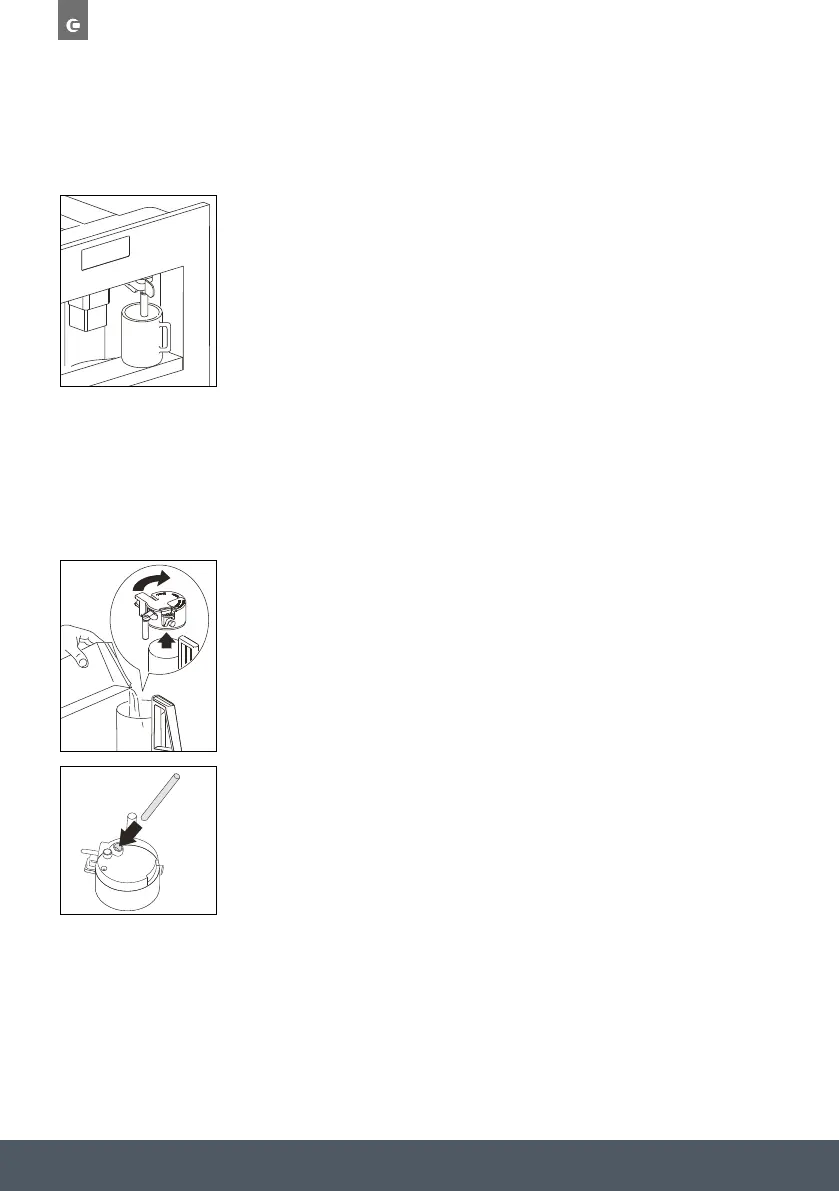
2. Remove the lid of the milk container.
3. Fill the container with about 100ml of milk for each cappuccino to be
prepared. Never exceed the MAX level (corresponding to about 750ml)
marked on the container. You should ideally use skimmed or semi
skimmed milk at refrigerator temperature (about 5°C).
4. Make sure the intake tube is correctly inserted in the rubber washer.
Then replace the milk container lid.
EN 16
USE
Changing the quantity of hot water
The machine is set by default to automatically delivery 150ml of hot
water. To change these quantities, proceed as follows:
1. Place a container underneath the water spout.
2. Press the touch key ‘MENU’(2) to enter the menu
3. Press the Scroll touch keys (5 and 7) until “PROGRAM HOT WATER”
is displayed.
4. Press the touch key ‘OK’ (9) to confi rm.
5. Select the required quantity of water by pressing scroll touch keys (5
and 7). The progress bar shows the quantity of water selected.
6. Press the touch key ‘OK’ (9) to confi rm (or the ‘Return’ touch key (3)
to cancel the operation.
7. Press the ‘Return’ touch key (3) to exit the menu.
8. The appliance is now reprogrammed with the new settings
and is ready.
Making cappuccino
The machine is set by default to automatically delivery a standard
cappuccino.
1. Select the taste of the coffee you want to use to make the
cappuccino by pressing the ‘Coffee strength’ touch key (6).
2. Remove the lid of the milk container.
3. Fill the container with about 100ml of milk for each cappuccino to be
prepared. Never exceed the MAX level (corresponding to about
750ml) marked on the container. You should ideally use skimmed or
semi skimmed milk at refrigerator temperature (about 5°C).
4. Make sure the intake tube is correctly inserted in the rubber washer.
Then replace the milk container lid.
5. Position the frothed milk regulator (N2) between the words
CAPPUCCINO and CAFFELATTE printed on the milk container lid.
6. The quantity of froth can be adjusted by moving the regulator
towards the word CAFFELATTE for a denser froth. Moving it towards
the word CAPPUCCINO obtains a less dense froth.
7. Remove the hot water spout and attach the milk container to the
nozzle.
8. Position the milk spout and then place a sufficiently large cup under
the coffee and milk spouts.
22
1
CHANGING THE QUANTITY OF HOT WATER



 To Next Page