17Instruction manual WMi3001 & WMi3006Please keep this instruction manual for future reference
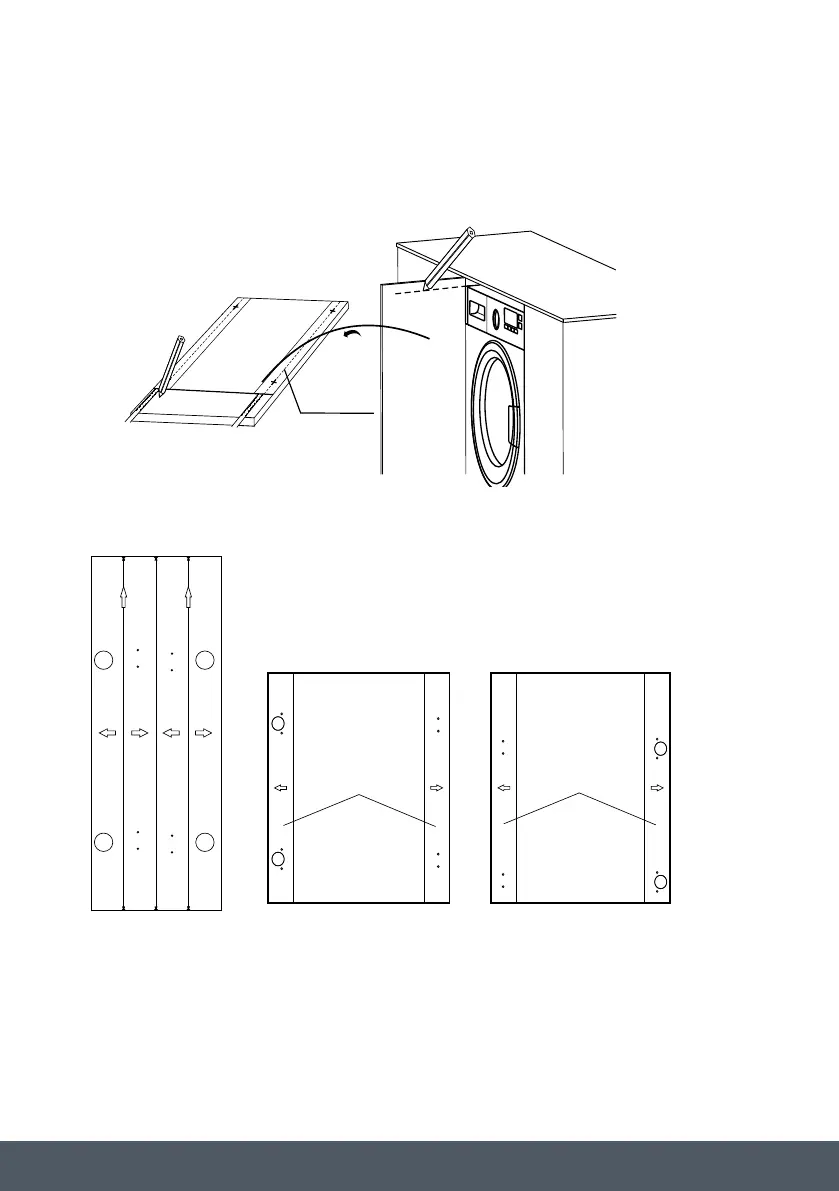
DOOR TEMPLATE PREPARATION
1. Make the mark on the door according to the cupboard and washing machine height.
2. Fix door template onto the door.
Position Paper
Make the mark on the door
1
Position Paper Position Paper
Fixed position paper on the door.
2
16-22mm
12mm
35mm
12mm
2mm
Drill hole on the door
3
10
29
Top Top
Left Open
Right Open
MAINTENANCE
Position Paper
Make the mark on the door
1
Position Paper Position Paper
Fixed position paper on the door.
2
16-22mm
12mm
35mm
12mm
2mm
Drill hole on the door
3
10
29
Top Top
Left Open
Right Open
Cut door template paper Paste on the door
(the door on the right)
Paste on the door
(the door on the left)


 To Next Page