WARNING: The small triangular-shaped peg on the female connector must face OUT. The logic cable has
reverse-voltage protection to prevent damage to the controller and VFD spindle in the event it is incorrectly
plugged in. However, if the cable is plugged in incorrectly, the VFD spindle will not operate.
5.
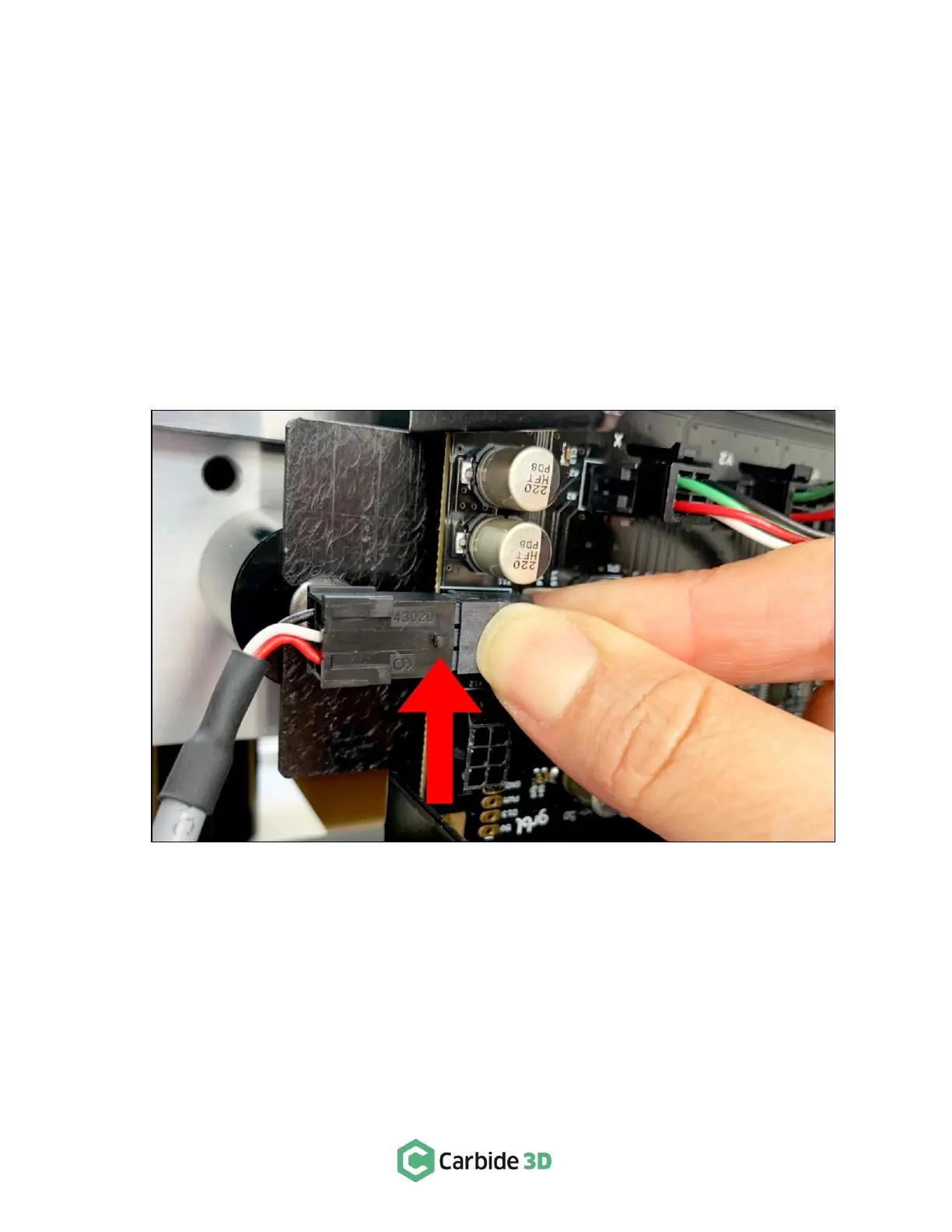
Connect the female end of the logic cable to the 6-pin male accessory connector protruding from the
front-end of the Shapeoko controller. See Fig. 11.
a.
Remove the Shapeoko controller cover.
b.
Use your thumb and index finger to firmly support the accessory connector so it doesn’t pull
away from the Carbide Motion board as you connect the logic cable.
c.
The logic cable’s small triangular peg faces OUT (away from the rail). Make sure the cable is
properly oriented to avoid damaging it, the VFD controller, or the Shapeoko controller.
d.
The connector fits tightly. Press in and down firmly to get it to fully seat.
6.
Set the VFD controller off to the side of the machine or mount it to the wall.
a.
Make sure to set up where it will be safe from chips and dust.
b.
Make sure there is plenty of clear space around the VFD controller to allow for unobstructed
ventilation.
7.
Clean up the cables as needed.
a.
Before securing the spindle power cable to the machine, make sure it won’t get caught on
anything, including the Z-Axis motor, your dust collection system, or other parts of the machine.



 To Next Page