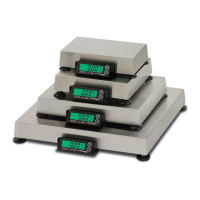
The Cardinal C Series Digital Counting Scale is a sophisticated weighing and counting device designed for various industrial and commercial applications. It offers precise measurements and a range of features to enhance efficiency in counting operations.
Function Description
The Cardinal C Series Digital Counting Scale is primarily used for accurately weighing and counting items. It can display weight, average piece weight, and the total number of pieces. The scale supports both weighing and counting operations, with specific modes for each. It features a built-in rechargeable battery for portability and can operate on AC power. The scale is equipped with a numeric keypad for data entry, including setting quantity presets, weight presets, and PLU (Product Look-Up) numbers. It also includes annunciators to indicate various statuses such as stable weight, low battery, net weight, zero, and accumulator mode. The scale can be connected to a remote scale platform for increased capacity or specialized weighing tasks.
Important Technical Specifications
The C Series offers different models with varying capacities and division values:
- C30: 30 lb x 0.002 lb (15 kg x 1g)
- C65: 65 lb x 0.005 lb (30 kg x 2g)
- C100: 100 lb x 0.01 lb (50 kg x 5g)
Display:
- WEIGHT = 6 Digits
- Avg Piece Weight = 6 Digits
- PIECES = 6 Digits
Scale Size:
- 13.39" W x 13.39" D x 5.00" H (340 mm x 340 mm x 127 mm)
Platform Size:
- 12.60" W x 9.06" D (320 mm x 230 mm)
Power:
- Built-in rechargeable 6v/4Ah battery or 12VDC / 110-240 VAC 50/60Hz AC adapter.
Environmental Conditions:
- Temperature: 32° ~ 104°F (0° ~ 40°C)
- Humidity: 25% ~ 95% RH
Zero:
- Established on power up routine and maintained by auto-zero circuitry.
Tare:
- 100% of full-scale capacity.
Remote Scale:
- Maximum 10,000 divisions.
Usage Features
The Cardinal C Series Digital Counting Scale is designed for user-friendly operation with a comprehensive set of features:
Installation and Setup:
- Unpacking: Ensure the scale is in good condition upon arrival.
- Placement: Place the scale on a stable, vibration-free, level surface away from direct sunlight and air currents.
- Level Adjustment: Use the level indicator to ensure the scale is level.
- AC Power Adapter: Connect the AC adapter to the power input on the left side panel.
- Remote Scale Interface: Connect the remote scale cable to the interface connector socket on the left side panel.
Key Functions:
- Numeric Keypad: Used for entering numbers (0-9) for various settings and operations.
- P1-P8 Keys: Recall average piece weight along with saved tare weight for programmed PLU numbers.
- P# Key: Recalls average piece weight along with saved tare weight for the currently displayed PLU number.
- C / ↵ Key: Used to perform different functions depending on the current mode of operation, including data entry, clearing incorrect entries, re-entering correct data, and toggling the display backlight.
- >0< ZERO Key: Performs a variety of functions depending on the current mode, including displaying weight in pounds or kilograms and turning the ZERO annunciator on/off.
- >T< TARE Key: Displays the current tare weight or enters a new tare weight.
- UNITS Key: Toggles between pounds (lb) and kilograms (kg).
- ENTER Key: Signals completion of data entry.
- PGM Key: Used to add or edit product look up (PLU) numbers.
- REMOTE Key: Used for sampling, counting, or weighing operations with a remote scale.
- M+ Key: Adds the current piece count value to the accumulator.
- MC Key: Clears the accumulator.
Operation Modes:
- Power Switch: Located on the bottom left side panel.
- Metric Conversion: Use the UNITS key to toggle between pounds and kilograms.
- Weight Display: Displays weight, average piece weight, and pieces. The ZERO key can be used to zero the weight display.
- Tare Weight Entry: Push button tare, pre-set tare with known weight of container, pre-set tare with container on scale, and tare weight of empty container on remote scale.
- Quantity Preset Hi Limit: Set a high limit for the quantity of pieces. The scale will beep if the quantity exceeds this limit.
- Weight Preset Hi Limit: Set a high limit for the weight. The scale will beep if the weight exceeds this limit.
- Counting Operation:
- Counting When Weight of Sample is Unknown: Place the sample on the scale, enter the number of pieces, and the scale will calculate the average piece weight and total pieces.
- Counting When Weight of Sample is Known: Enter the average piece weight, place the sample on the scale, and the scale will calculate the total pieces.
- Counting with a Remote Scale: Similar to the above, but using a remote scale platform.
- Counting with an Insufficient Sample: The scale will indicate if the sample is too small for accurate counting.
- Accumulator: Add current count to accumulator (M+ key) and clear accumulator (MC key).
- PLU Operation: Add or edit PLU numbers using the numeric keypad or preset keys (P1-P8).
Scale Setup:
- Access the setup menu by pressing and holding the UNITS key.
- Backlight Mode (bŁL): Auto, OFF, On. Auto backlight turns ON when weight is over 10 divisions or any key is pressed, then turns OFF after 10 minutes.
- Automatic Power-Off (AOFF): Set to 120S (2 minutes), 180S (3 minutes), 240S (4 minutes), 300S (5 minutes), 600S (10 minutes), or OFF.
- Sleep Mode (SLEEP): Set to 30S, 60S, or OFF.
- Weighing Units (UnItS): kg or Lb.
- Beeper (bUrr): On (enable beeper) or OFF (disable beeper).
- Return Add (rtAdd): On (weight will return to 0.0) or OFF (M+ even if weight did not return to 0.0).
- Save User Setup (SrUE): On (changes are saved) or OFF (changes are not saved).
Calibration Procedure:
- Access calibration mode by pressing and holding the UNITS key until "SEtUP" is displayed, then "SCAL2, nO".
- Calibration Units (CAL): Select kg or Lb.
- Local Scale Capacity (CAP 1): Set scale capacity (30lb, 65lb, 100lb).
- Local Scale Resolution (rES 1): Set scale resolution (3000d, 6000d, 15000d, 30000d).
- Remote Scale Capacity (CAP2): Set remote scale capacity.
- Remote Scale Resolution (rES2): Set remote scale resolution (1d, 2d, 5d).
- Normal Transmission SV Mode (SU): On (enables SV Normal transmission) or OFF (disables).
- Enable Gravity Compensation (GrAU): On (enables) or OFF (disables).
- Calibrated Gravity (G-CAL): Enter the gravity value of the location.
- Calibrate Local Scale (CAL 1): Preform scale calibration (On) or skip (OFF).
- Local Scale Zero Count (CAL 1-0): Displays the zero count.
- Calibrate Remote Scale (CAL 2): Preform remote scale calibration (On) or skip (OFF).
- Remote Scale Zero Count (CAL 2-0): Displays the remote scale zero count.
- Reset All Setup Parameters to Default Setting (dEFLt): On (resets all setup parameters) or OFF (does not reset).
- Save Calibration (SrUE): On (saves changes) or OFF (does not save).
Maintenance Features
The Cardinal C Series Digital Counting Scale requires minimal but consistent maintenance to ensure optimal performance and longevity.
Precautions:
- Designed for office type environments.
- Ensure free of excessive dust and moisture.
- Maintain a comfortable temperature (32° to 104°F).
- Keep the scale clean and provide adequate air circulation.
- Avoid placing the scale in front of heating or cooling vents.
- Ensure the scale has good, clean AC power and is properly grounded.
- Protect against lightning strikes, electrical surges, and static discharge.
- The membrane keypad should not be operated with pointed objects.
Care and Cleaning:
- DO NOT submerge the scale in water.
- DO NOT use acetone, thinner, or other volatile solvents for cleaning.
- DO clean the indicator with a damp soft cloth and mild non-abrasive detergent.
- DO remove power before cleaning with a damp cloth.
- DO clean and store the scale in a plastic bag (in a dry environment) if the scale is not going to be used for some time. A desiccant packet may be included to prevent moisture build up.
- DO recharge the internal battery every three months while in storage.
Rechargeable Lead-Acid Battery:
- The battery charges when the scale is connected to the external power supply.
- It takes approximately 12 hours to charge the battery to full capacity.
- The battery has been discharged if a prolonged charging time is required.
- Red light indicates the battery is charging; green light indicates the battery is fully charged.
- Low Battery: When the battery voltage falls below 5.7V, the low battery annunciator will turn on. The display will show "Lo bAt". The scale will automatically shut off if the voltage drops too low.
- Notice: The battery should be recharged at least every 5 months regardless of use. It is desired to cycle (charge/discharge) the battery 3 times to let it restore to full capacity.
- The battery connector can be removed by loosening a single captive screw.
- The battery cover prevents it from falling out.
- The capacity of the batteries will reduce over the years and therefore also the total operation time of the scale.
Error and Status Messages:
- Err: Over capacity.
- Lo bAt: Low battery.
- ooooo: Zero value is too low when starting.
- ooooo: Zero value is too high when starting.
- ErrH: Zero value is too high.
- ErrL: Zero value is too low.
- ErrE: EEprom Error.
- ErrS: Keypad Error.
This comprehensive description covers the essential aspects of the Cardinal C Series Digital Counting Scale, providing users with a thorough understanding of its capabilities, operation, and maintenance requirements.

 Need help?

 To Next Page
 General